

Router Default Passwords is a portable freeware for Windows devices that can be used to find the internal IP address of the router as well as display the default passwords.
Most Windows computers are connected to routers or modems to connect to the Internet. Many times, users of these devices leave them as they are with the factory settings, which means that they can access the settings page with the pre-installed passwords via the internal IP.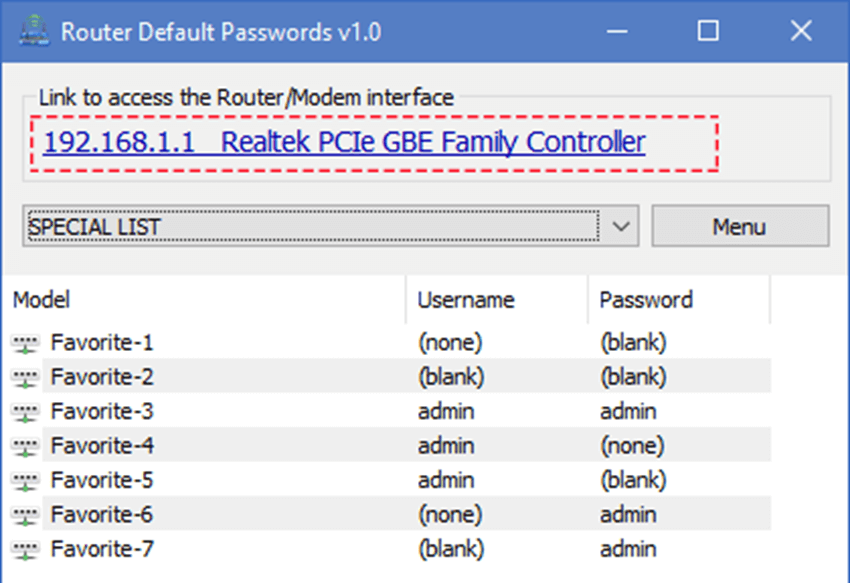
This access can sometimes be necessary to set up new services, manage the network configuration, but also change the wireless network password, port forwarding settings, or configure the built-in firewall that the router has.
Usually, experienced users know the internal IP address or use the ipconfig command to find and use it.
The password, however, is another story. If it has never been changed, it is the default password that comes with the device. If you're lucky, it's on a sticker on the back of the device or in the manual that came with it.
Router Default Passwords
If not, you will need to find the default passwords for each manufacturer. The app will do it for you automatically.
It is a portable application (no installation required) and you can run it right after downloading. The program is compatible with all supported versions of Windows (Windows 7, Windows 8.1 and Windows 10).
The program tries to detect the IP address of the router during startup and converts it into a link. With one click you can open the address in your browser.
The program does not recognize the router itself, but it lists the network adapter and a list of predefined passwords.
To look up the default password for your router, simply click on the drop-down menu and select its manufacturer.
Download the app
