

The Windows 10 operating system is currently the most popular on the market with more than 800 million computers worldwide. However, Windows is not free and requires payment to activate. But what happens if you don't activate it? How long will it be available? Will you have problems with its functions? See in this article an analysis of non-activated Windows 10.
Free Upgrade
Most of the users worldwide have upgraded to Windows 10 using the free upgrade offer for Windows 7, 8 and 8.1 that Microsoft had started along with the release of Windows 10. In fact, even today, PC users with genuine copies of Windows 7, 8 and 8.1 are allowed to upgrade to Windows 10 for free, even though Microsoft officially stopped the free upgrade program about a year ago. Anyone, if they want, can use a genuine Windows 7 or 8 product key to activate Windows 10.
How to install Windows 10 without activating it.
Microsoft offers Windows 10 to download and try for free, without any limitations on features. So format the disk you want to install it on, and go here to download the official Windows directly from Microsoft. They are the safest since they are from the parent company. Although the way to download them is very simple and you only need to follow Microsoft's instructions, if you have problems with the process, see this article for a guide on how to do it.
Then, during the installation of your new operating system, you will be asked to enter your activation key. All you have to do is click the "I don't have a product key" option at the bottom of the box and the installation will continue normally.
Once it is complete, you will see that you have a trial version of Windows 10 in your hands for 30 days. Once the 30-day period has passed, your Windows will continue to run normally, you will be able to use your computer without any problems, with some minor limitations in Personalization, which we mention below.
How long can you use Windows 10 without activation?
We can never be sure about this issue. We don't know how long someone will be able to use Windows 10 without activation, but Windows 10 has been working flawlessly without activation since it was first released (in 2015).
Since an unactivated Windows 10 installation doesn't stop working or stop booting after X number of days, it's hard to know how long you can use Windows 10 without activation. We don't see any reason for Microsoft to change its current policy. However, if you want to run Windows 10 without annoying messages and if you want to have access to all its settings, you should activate Windows 10 from day one.
What happens when you run Windows 10 without activation?
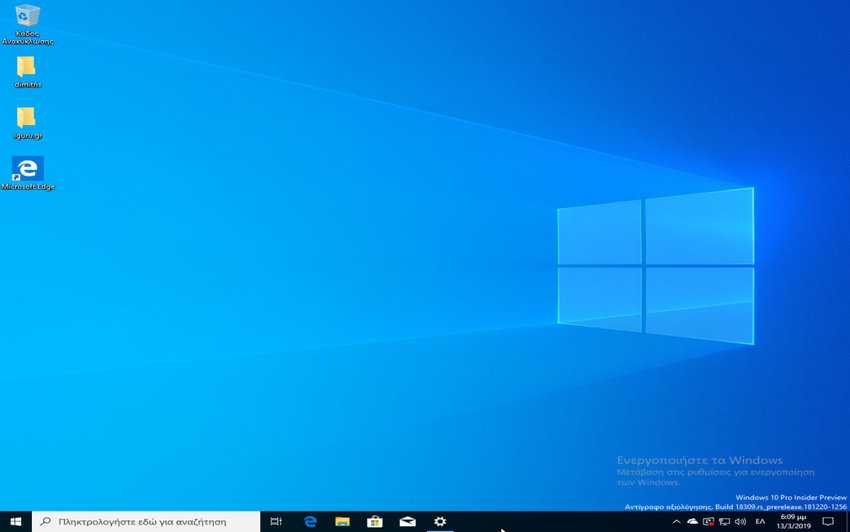
Windows 10 displays a watermark on the right side of the desktop with the message “Activate Windows. Go to settings to activate Windows.”
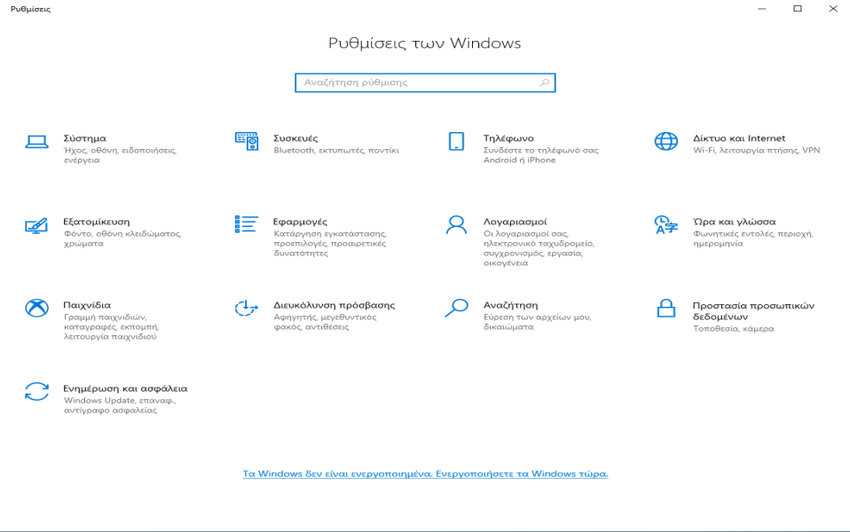
When you are running an unactivated copy of Windows 10, you will receive the following message on the Settings app home page: “Windows is not activated. Activate Windows now.”.
You will also receive the message “You need to activate Windows before you can personalize your PC” on all pages under the Personalization category.
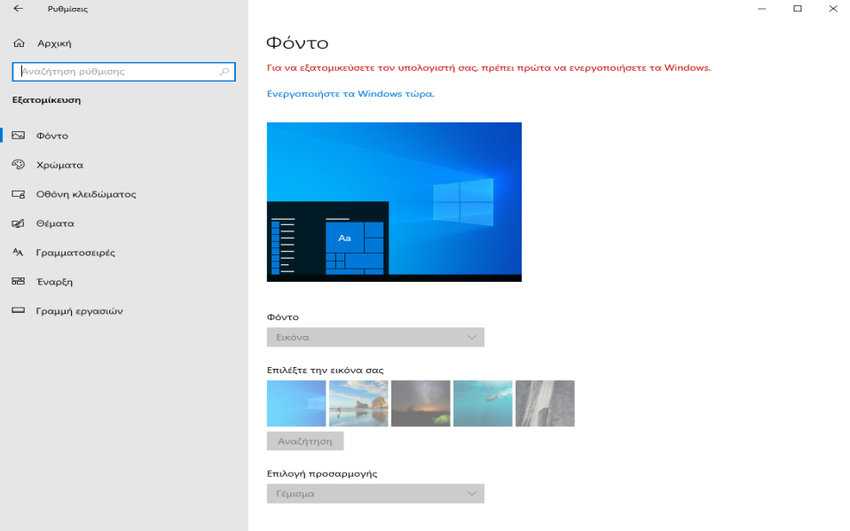
As for functionality, you won't be able to customize the desktop background, Windows title bar, taskbar and startup color, change the theme, customize the Start and lock screen.
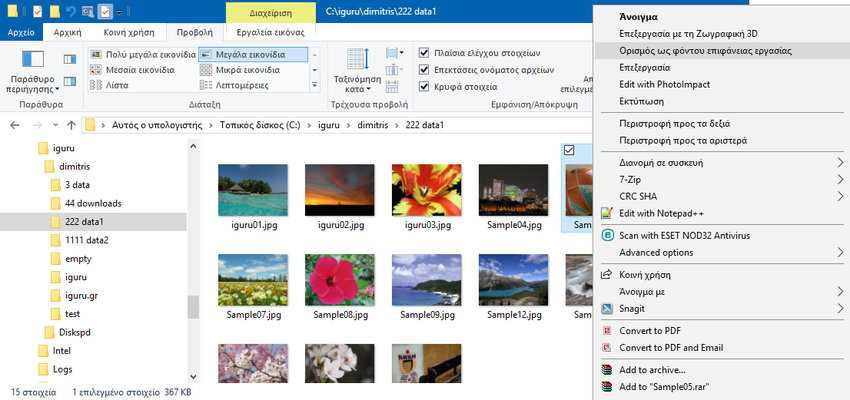
However, you can set a new desktop background from within File Explorer without activating Windows 10. All you have to do is:
- Go to File Explorer and find the background you like
- Right-click on it and in the drop-down menu click on “Set as desktop background”.
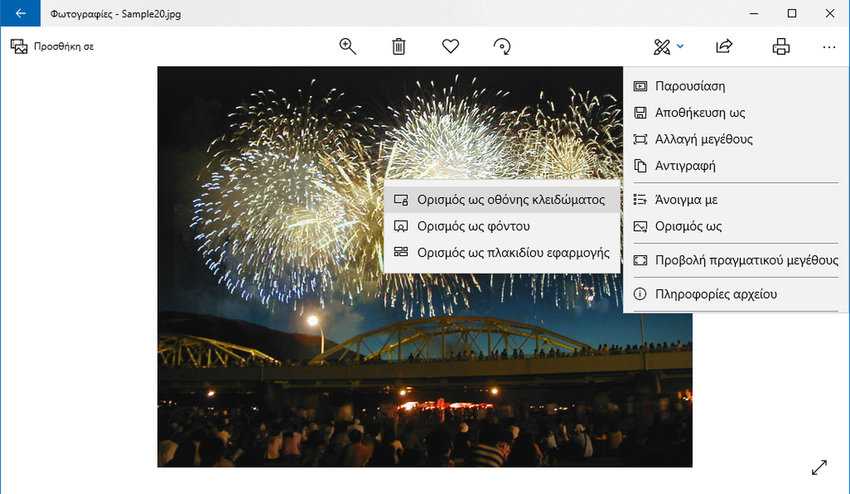
Similarly, you can set the lock screen through the pre-installed “Photos” program. Do the following:
- Open the Photos app
- Select the image you want as your lock screen background (left click on it)
- Click on the 3 horizontal dots located at the top right
- From the drop-down menu select Set as > Set as lock screen
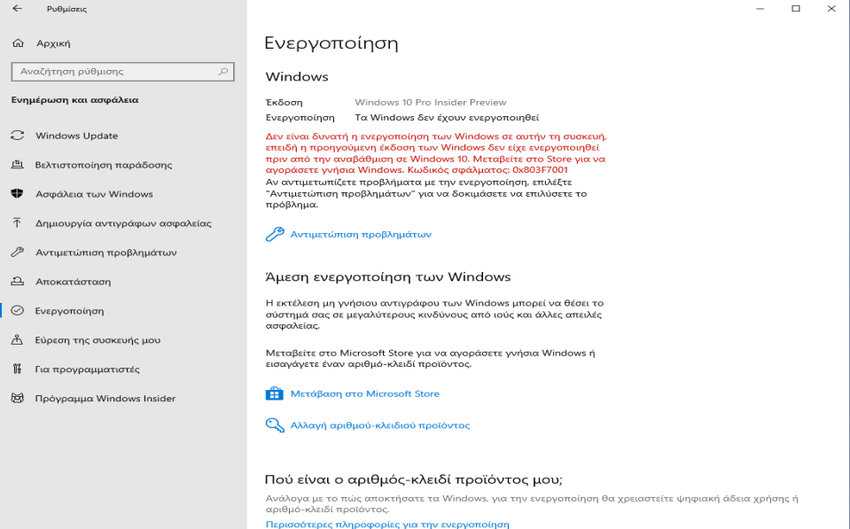
The Settings > Update & Security > Activation page also displays the message “Windows is not activated” if Windows 10 is not activated.
Additionally, you may periodically receive messages asking you to activate your copy of Windows 10. This can be annoying as the message may appear in the middle of your work.
The biggest but relatively minor problem with an unactivated copy of Windows 10 is that you can't personalize Windows 10. All other features work exactly like on a copy with a regular license.
Of course, we recommend that you immediately activate your copy of Windows 10 by purchasing a legal/genuine copy of Windows 10 either from the Microsoft Store online or from a retail store.
How to check if your Windows 10 is activated?
Checking your Windows 10 activation status is easy. Go to Settings > Update & Security > Activation to find out the current activation status of your Windows 10 installation. If it is activated, don't forget to link your Windows 10 license to your Microsoft account to avoid future activation issues if and when you change your PC's hardware.
You can also use the “Troubleshoot” on the Windows 10 activation page to fix activation issues.
If you already have them enabled, you can view your key at any time. Just follow our instructions in this article.
How to activate Windows 10?
Step 1: Go to Settings > Update & Security > Activation.
Step 2: In the “Activate Windows Now” section, click the “Change product key” link, enter your product key, and then click Next to activate your copy of Windows 10. Note that your computer must be connected to the internet to activate Windows 10.
In conclusion,
those users who still have “broken” Windows on their computer, or those who are looking for stolen keys, it would be better for security reasons to install Windows 10 without activating it. Alternatively, those who have a powerful PC that can comfortably run a virtual operating system, you can easily install a free Linux operating system and run Windows on it without activation via Oracle's VirtualBox, or another virtual program.
