

Many of us have multiple Google accounts for various reasons. You may use Gmail and Google Calendar a lot for work, but you prefer to store files in your personal Google Drive account.
Google has added features that make it easier for you to log into multiple company accounts at the same time, so you don't have to log out of one Gmail account to check someone else's emails.
You can simply use accounts.google.com/AddSession to sign in to your personal Google account from the same browser while you are already signed in to your work account.
Signing in is easy, but switching accounts is difficult
When you're already signed in, click your profile picture in the top right and select any Google account from the drop-down menu to switch to that account.
The default account is the one that appears at the top of this list, and it's the one you're signed in to first. So, if you type mail.google.com into your browser's address bar, you'll automatically be taken to that account. To set another Google account as your default, you'll need to sign out of all your existing accounts and sign in to that account first.
This is obviously too much work for users who would have to constantly log in and out between multiple accounts.
Below we will see a simple trick with URLs that will help you quickly switch Google accounts.
Open the Gmail account you're interested in and press Ctrl+D (or Cmd+D on Mac) to add a bookmark.
Once you have added the new bookmark, right-click on it and select Edit to modify the bookmark. 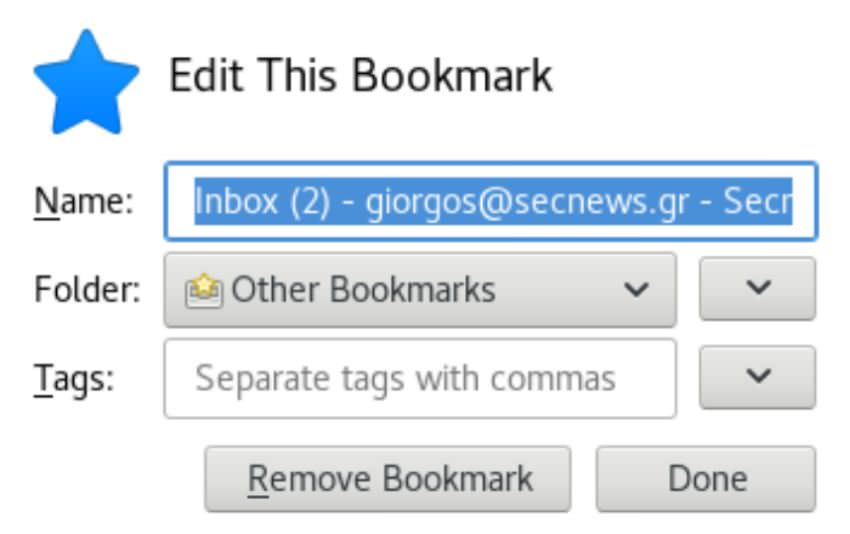
You should add the element “autuser=email@gmail.com” after the last symbol (/) and change the name of the shortcut to the name of the email you are using as shown below and save.
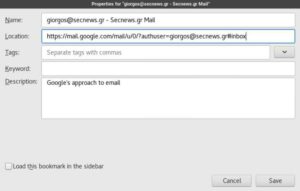
Repeat the steps for all your other Gmail accounts.
So with just one click you can quickly start the Gmail account you are interested in, even if that account may not be your default Google account.
The trick works with all Google Apps services, such as Google Drive, Contacts, and Calendar.
https://calendar.google.com/?authuser=giorgos@secnews.gr
https://drive.google.com/?authuser=giorgos@secnews.gr
https://contacts.google.com/?authuser=giorgos@secnews.gr
