

 The software company Ashampoo is one of the companies we collaborate with, providing free, raffled prizes to iGuRu.gr users with reliable software solutions. After communicating with us, they suggested that we review and present the new version of Ashampoo WinOptimizer 11 before it is even released on the market. The new software will be officially released on April 14, 2014.
Stay tuned, with the launch of the new application we offer free licenses.
What does Ashampoo WinOptimizer:
The Ashampoo WinOptimizer system application is the specialist for configuring your computer that frees space, corrects errors, guarantees stable performance, protects your privacy and customizes Windows to your needs.
Description:
Your computer needs regular maintenance, but this consumes a lot of time and requires specialized knowledge. WinOptimizer will do the work for you and give you maximum performance and security and save you valuable time so you can do real work instead of this. The Ashampoo WinOptimizer system application frees space, fixes errors, guarantees stable performance, protects your privacy and customizes Windows to your needs – easily, quickly and efficiently.

Top features:
- – Frees up disk space
- – Fixes common Windows errors
- – Keeps computers fast and stable
- – Removes all traces on the Internet and protects your privacy
- – Creates backups or permanently deletes sensitive data.
What’s new in Ashampoo WinOptimizer 11:
- Higher performance, lower resource consumption for all modules, thanks to the enhanced algorithm core and the program’s optimized code
- Improved cleaning algorithms for better results
- Ideal gaming conditions with the press of a button, more memory, greater performance, supports custom profiles
- Easy system policy configuration via User Rights Management, toggle Windows capabilities, restrict device access, etc.
- Full system details instantly, information about printers, users, routing tables, shared network resources, audio and video codecs.
What we observed:
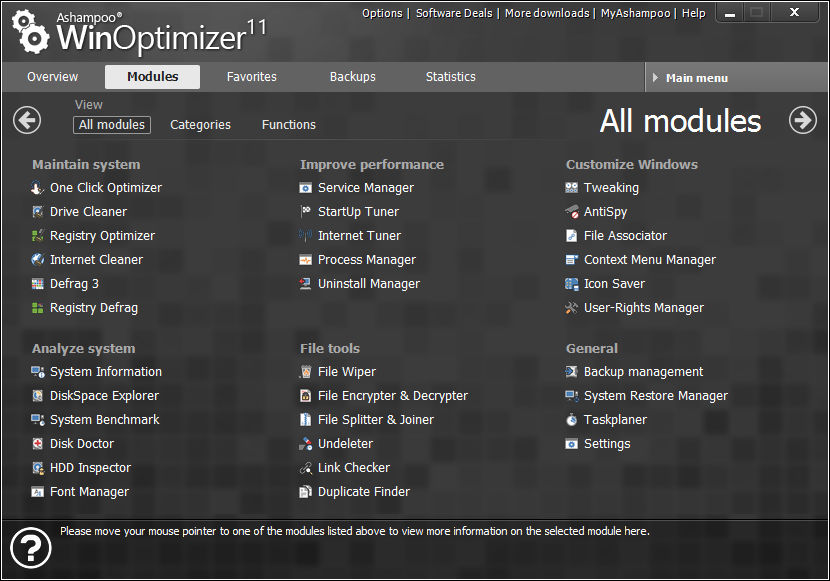
The installation was no problem, it was very easy, even for the most novice user. Besides, Ashampoo is known for its reliable applications that are easy for anyone to manage.
The interface of the program is quite sleek and the application is a reliable tool both for beginners as well as for more experienced and “demanding” users.
Consumes minimal system resources, has the ability to perform scheduled system optimization, and in our opinion is “must” for proper and easy computer maintenance.
Functional requirements:
Operating system: Windows® XP, Windows Vista®, Windows® 7 and Windows® 8.
Computer: Any computer running one of the above operating systems.
Hard drive: 90 MB for the program and some additional space for backup files.
Other: Full administrator rights required.
