


If we are looking for a remote control for our dSLR camera, then an Android device can help in this case.
What we need are:
- The dSLR camera.
- An Android device with infrared functionality.
- The app for dSLR remote control.
First, we need to check if our Android device has infrared (IR). Most new devices have this feature, such as the Galaxy S4, Galaxy S5, LG G3. After checking for this feature, we download the free dSLR Remote app from the Play Store.
After installation, we launch the application and select the brand of our camera. The application is compatible with almost all cameras, although some high-end cameras do not have infrared.
The next step is to set the remote control options, from the settings menu. On Canon models, the setting can be found in the timer menu. From there, select the 2sec/remote control delay. Where this setting is located varies depending on the brand, so if you can't find it easily, it's a good idea to consult the instruction manual.
It is also important at this stage to disable the power saving mode so that the camera does not turn off.
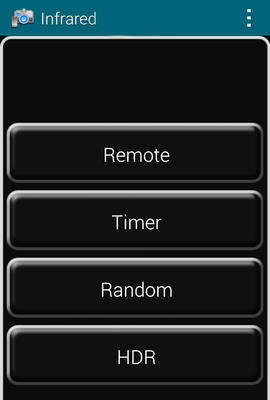
After we finish with the camera settings, we go to the application we downloaded, where we see four options: Remote, Timer, Random and HDR. We select Remote and depending on the model of our camera, the image with an S or 2s will appear on the screen of our device. By pressing there, we activate the shutter and take our photo!
Advanced options
In the application we can also find advanced settings. For example, from the Remote option and then Audio trigger we can adjust the volume level so that the camera automatically takes photos when the sound level reaches a point. We can set this point from the beginning as well as how many photos we want to take with this setting.
We can also set the time step of the photos from the application, let's say every minute. From the home screen, we select Timer and set the minutes we want in the corresponding menu. The camera will take a photo every minute until we stop it.
The application has many features that are worth exploring in order to have complete remote control of our camera from our Android device. A more detailed guide can be found here.
