

WhatsApp is on the verge of introducing time-limited group chats – Expiring Groups! With this new feature, chats will expire after a certain amount of time.

See also: WhatsApp for iOS: Gets PiP feature for video calls
If you take a look at your WhatsApp right now, your inbox is probably full of old group chats that you don't use anymore. You've probably forgotten most of them – these outdated chats are just filling up your phone's memory capacity along with messages and photos that don't matter at the moment.
According to a recent report, WhatsApp is planning to add an awesome new feature called “Expiring Groups” that will help you clean up your inbox. If this addition is confirmed, users should be able to access the ‘clean up’ setting within their group info page and specify how long they want to stay in the group before being asked to leave – from a day or a week to a custom date!
As the leaked screenshot shows, each user will have to set their own expiration date for a group. WhatsApp won't automatically delete it, but instead will remind you that it may be time to either leave or delete the group - however, the choice remains yours.
See also: WhatsApp and Meta recently made groundbreaking changes
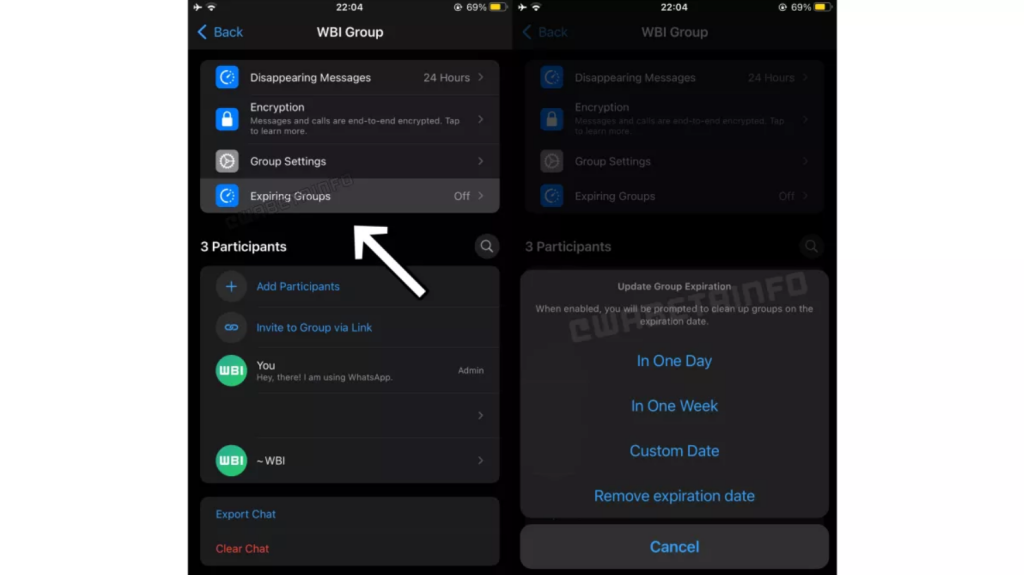
WaBetaInfo recently stated that the Expiring Groups feature is still in development and therefore may not be ready for full release anytime soon. As such, there's a chance we may never see the feature launch – the developers could decide to remove it – or by the time Expiring Groups does launch, it may work differently.
See also: WhatsApp: New feature to combat spam calls
You don't have to wait for the Expiring Groups feature to roll out if you want to "clean up" your outdated WhatsApp groups. In your inbox, long-press on the chat of your choice and tap the menu button (represented by three dots) that appears in one corner. Then, select Exit Group as an option or Archive it so that it's no longer visible in your inbox, but you can access it later when needed.
Information source: techradar.com
