

Your use of mobile data is something you may want to monitor closely. It is very annoying if apps you don't open often use your data in the background. Fortunately, Android allows you to prevent it.

Android makes it very easy to monitor your mobile data usage. You can even set up alerts to prevent smartphone or tablet from going over your data limits. Another handy trick is to completely block specific apps from using mobile data in the background.
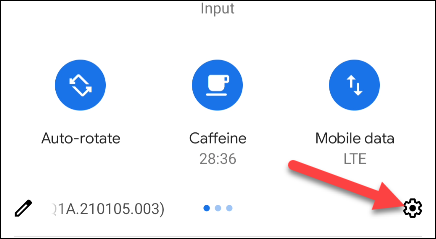
To get started, swipe down from the top of your device 's screen (once or twice, depending on your phone or tablet manufacturer) and tap the gear icon to open the Settings menu
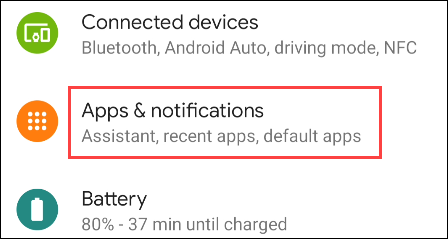
Then, select “Apps & Notifications”.
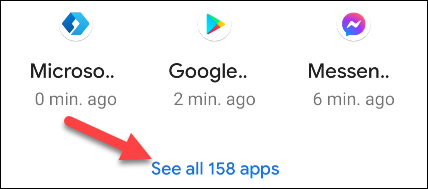
Tap “See All [Number] Apps” for the full list of installed apps.
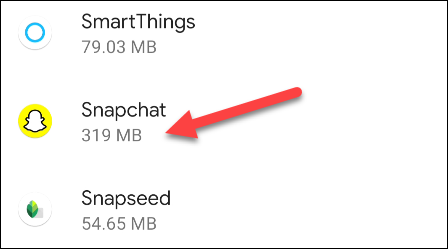
Find the app from the list for which you want to limit the use of background data.
Next, select “Mobile Data & Wi‑Fi”.
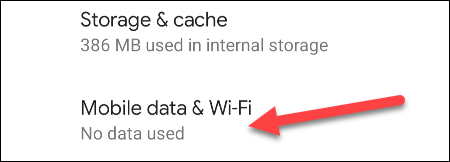
Turn off the switch for “Background Data”.
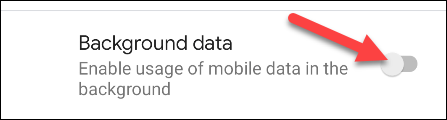
You're done! The app will no longer be able to use mobile data in the background. For apps you don't use very often, this is a good way to ensure they don't eat up your data.
Information source: howtogeek.com
