

Everyone knows how frustrating it is to have to restart Safari on your Mac and end up losing everything you've been working on because all your tabs and windows are closed. Luckily, there's an easy way to make Safari restore everything you had open. Here's how to make the necessary adjustments.

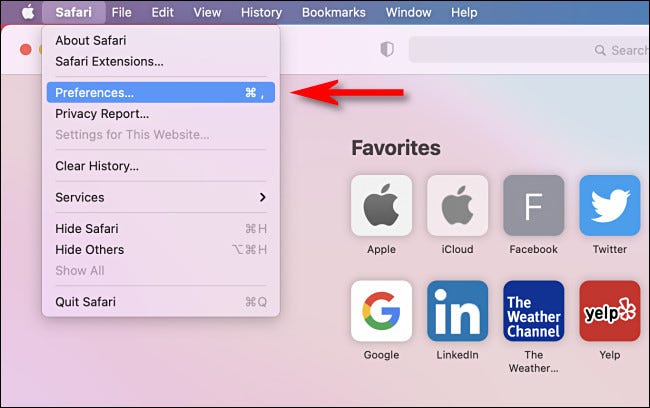
First, launch Safari on your Mac. At the top of screen , click the “Safari” menu and select “Preferences.”
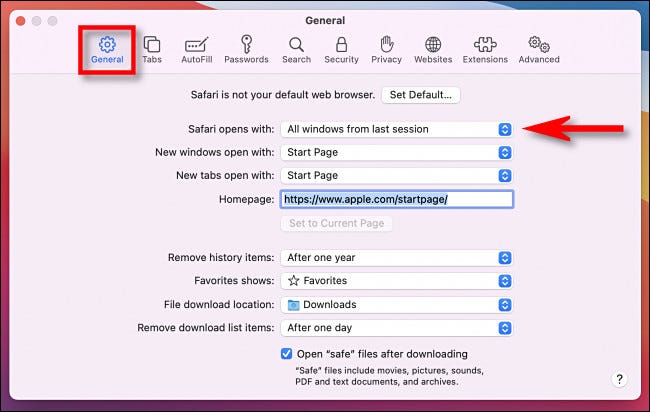
When the “Preferences” window appears, click the “General” tab, then locate the “Safari opens with” option. In the drop-down menu next to it, select “All windows from last session” if you want restored – including private browsing windows .
If you only want your non-private windows restored , select “All non-private windows from last session” in the drop-down menu
After that, close Preferences. The next time you restart Safari, it will remember your browsing session and all the windows and tabs you had open the last time will automatically. Happy browsing!
Information source: howtogeek.com
