

Password security should be a top priority. The fact that each service, function, application requires a different password to keep your system secure makes managing them very difficult. Many users use password managers to stay up to date with all their passwords. If you are not one of them, the best thing you can do is install one. A good option for you is Enpass.

If you already use or plan to get Enpass, then you have some additional audit tools that can help you make your passwords even stronger.
To find them, just go to the Password Audit. With these tools you can identify your passwords that are not strong, or are identical. Of course, they don't automatically change your passwords, but they already do an excellent job of showing you their weaknesses.
Using Enpass control tools is simple.
- Open Enpass.
- Click on the Weak entry under Password Audit. This will list every password you have saved that falls into category . Any time you see a password listed as such, you should change it immediately.
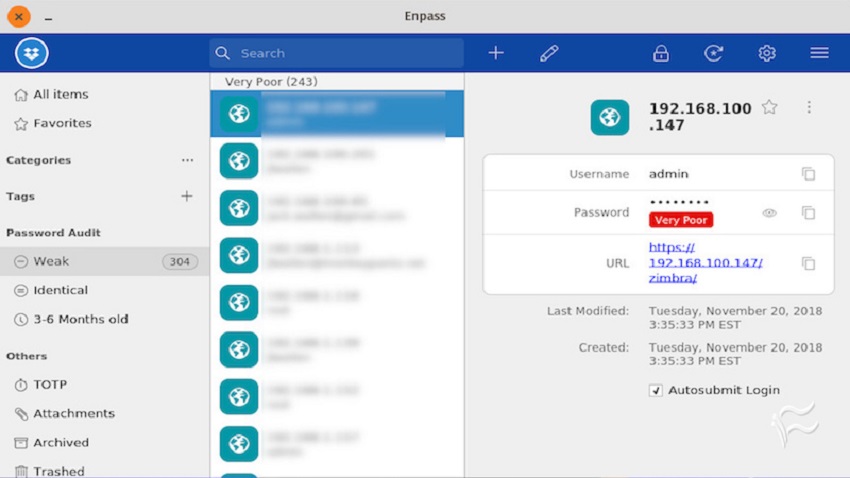
- Remember that you are not only changing your password in Enpass, but also the service or account that the password is used for. Of course, in some cases where there are many saved passwords from old servers and services, they need to be deleted from Enpass.
- Once you have changed all Very Poor passwords, click on the same entry and resolve those issues.
When you do all these checks, you can be sure that your passwords are strong. This is certainly a time-consuming process, but the result will reward you. Don't skip the options provided to you, because they are there to help you.
