

You may have heard the word RAID, as long as you've been working with computers. Although this word certainly reminded you of cockroach killer, it has nothing to do with preventive spraying of the computer against cockroaches. In this article, we will try to explain what RAID is and how it is used in computers.

Everyone, more or less, at some point has lost their data because their precious hard drive decided to give up its ghost.
But apart from the unique photos you lost, there are computers for which the logic that they can lose data is not at all acceptable. Organizations, banks, state archives, and many other data, you understand that they cannot be lost. The solution, of course, is backup. And even triple and quadruple Backup of the same data, each of which will be located in different places, even in other cities or countries.
But beyond the backup, a way of storing the data on the original - main computer had to be found, where if the disk fails, the recovery time would not be huge. That is, the bank would not have to take down its systems for a day until the data was copied from a backup back to the original computer (after someone first changed the failed disk).
Another issue that concerned computer professionals was increasing the speed of writing and reading data on a hard drive. RAID provided the solution to both issues. Let's see.
For the story
The word RAID comes from the initials of the phrase “Redundant Array of Independent Disks”, which means “Redundant Array of Independent Disks”. In Greece, it was established to call it RAID because you simply don’t like the sound of “RAID”. The term “RAID” was coined by David Patterson, Garth A. Gibson and Randy Katz, at the University of California, Berkeley, in 1987. What did these three think? That it is preferable, both for security and speed, to have an array of hard drives, rather than a large single drive. And in fact, these drives can be common, cheap drives, the same ones that are used in personal computers, which with RAID will perform better than an expensive, hi-tech, single drive.
What is RAID?

RAID is a collaborative technique, a way of communicating between two or more hard drives so that a stack of drives acts as a single drive, increasing security and speed. And because this can be done in many ways, RAID also has different levels.
Thus we have levels 0, 1, 2, 3, 4, 5, and 6, which for better understanding among ourselves, we call them RAID 0, RAID 1, RAID 2, and so on. The most common levels that are used almost constantly are 1, 5, and 6.
We will see the differences between them below, but in general these levels move between security and speed, and some are close to security, while others are close to speed. You see, in this life you cannot have both at the same time, at least to their maximum extent.
Forgive us for not presenting the different levels in order, but we do so for educational purposes. We'll skip RAID 0 and go straight to RAID 1, 5, and 6.
What is RAID 1?
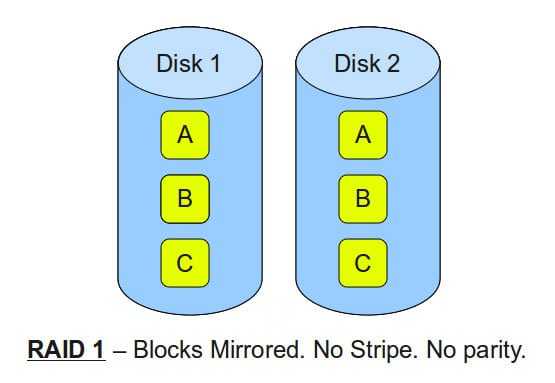
RAID1 is simply the faithful and simultaneous copying of one disk to another. That is, RAID1 is a mirroring and whatever is written to one disk is automatically written to the other. So if one disk fails, the system continues to operate seamlessly with the second disk without any interruption.
Of course, it waits for you to put a new disk in its place so that it can start copying itself, or in other words, “rebuild”.
In short, this is the simplest collaboration between two disks and of course it has its pros and cons. Check them out.
- Write speed = RAID 1 writes at the speed of the slowest disk, since the slow disk delays the common, simultaneous write to both disks.
- Read speed = because it can read from both disks simultaneously and independently, theoretically the read speed can reach the sum of the speeds of the two disks, since it can simultaneously read half the data from one disk and the other half from the other.
- Security = we have a permanent backup and only if both disks fail at the same time will we lose our data. If one of the two fails, the system does not stop, but continues to provide service using the other disk.
- Capacity = While we have two disks, we can write data according to the capacity of the smaller disk. A big disadvantage since we definitely lose 50% of the total capacity and if one disk is smaller than the other, let's say 1TB and 750GB, then RAID 1 will see a single disk of 750GB.
- Expandability = Of course, we can add a third and fourth disk and as many as we want, but they will all be copies of the first and together they will have the capacity and recording speed of the smallest.
In general, however, RAID 1 is a good home solution for a personal computer that will store your data on two different disks at the same time, one of which will be a copy of the other, and will also increase the reading speed. So if you already have two disks and you make a simple backup on the second one, consider the idea of making it RAID1 so that you still have the backup but also increase the reading speed.
RAID1 is not commonly found in professional servers, where the demands are greater.
What is RAID5?
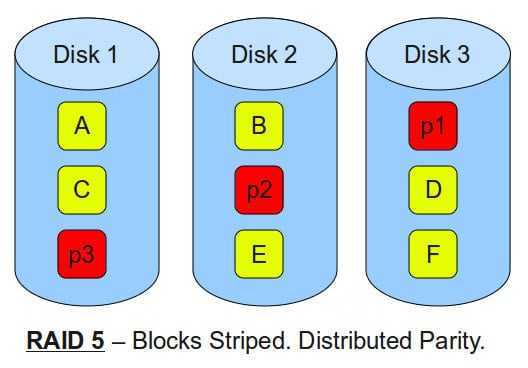
Almost all servers that have RAID use level 5. The reason? RAID 5 is the golden ratio between security, speed and capacity.
RAID 5 requires at least 3 disks to work. I am built in such a way that if I lose one of the three, your data will not be lost.
Striping
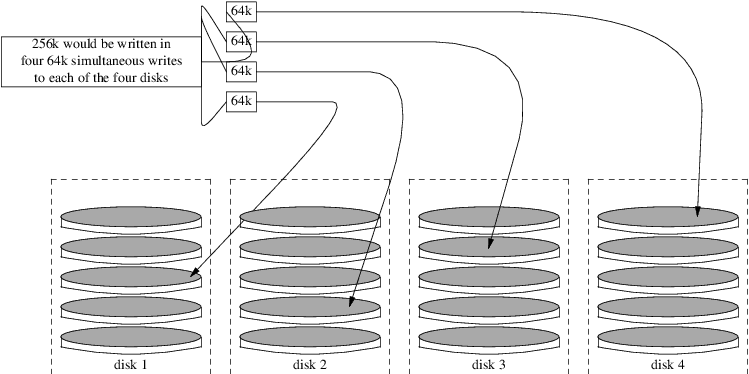
In RAID 5, data is written to disks using the Striping . Striping is the technique of separating logically consecutive data, so that these consecutive parts are stored on different physical storage devices. Are you confused? In short, you break a file into pieces (blocks), usually 64KB, and distribute these pieces to be stored in order, on all disks. The 1st piece will be stored on disk1, the 2nd on disk2, the 3rd on disk3 and so on. This creates rows of horizontal records for aligned disks, like the following diagram.
The key to RAID 5 is that for each row of blocks stored on the disks, a parity block is created, which is stored on one of your disks. And since the parity technique is common from RAID 3 to RAID 6, let's take a long parenthesis and analyze it.
Parity
The Parity bits technique is based on being able to easily find lost data from a failed disk. After the data is divided into equal pieces using the striping method, RAID takes over creating and registering the parity. Here's what it does exactly.
Although usually in RAID5 a file is broken into 64KB pieces, for ease of understanding, let's say that we have a file, which in the binary system consists of only 9 bits 0 and 1 (you will surely know that every data in the computer actually consists of a group of numbers 0 and 1, that is, reduced to the binary system).
So let's say that we have the 9-bit file “010101110” and we break them into three equal pieces, that is, 010, 101, 110 and store them on the 3 disks.
Now comes the parity technique, it sees the 3 pieces and makes the following calculations, using the logical function XOR (eXclusive OR).
For those who don't know, XOR is a logical function that adds 0 and 1 in its own way. From here on out, forget the math you knew, and no, don't call your elementary school teacher to find out because you think she didn't teach you well. It's not a mathematical function but a logical function of computers (semiconductors to be exact).
XOR, as a result, produces 0, if we add two identical things
XOR (0, 0) = 0
XOR (1, 1) = 0
and correspondingly it outputs 1, if we add two dissimilar
XOR (0, 1) = 1
XOR (1, 0) = 1
And so parity reads the data from the first two disks, namely 010 and 101 and calculates the XOR for each corresponding bit. The 1st from the first triplet with the 1st from the second. That is, it performs the operations:
XOR(010, 101) = 111
Then it takes the result and calculates the XOR with the 3rd bit again. That is, it executes:
XOR(111, 110) = 001
So the parity of 010, 101, 110 makes us 001. This is recorded on the next disk of RAID 5. The records on all 4 disks, that is, 010|101|110|001, are also called a row .
Finally, the parenthesis with Striping and parity and we return to RAID5. In RAID 5, the data is not divided by 3 Bits but by 64 KB (64KB= 65536*8= 524288 bits). The process and logic remain the same, as in 3 bits.
In an example with 4 total disks, once one of them fails, then RAID5 undertakes to do the exact opposite of the above and thus rebuild the data that is missing from the failed disk. When you put a new disk in place of the old one, then RAID 5, with the reverse process, discovers the data that was on the failed disk and writes it in place of the new one you just put in, that is, it rebuilds.
If a second disk fails before you can rebuild the first, then unfortunately you will lose all your data.
Note that parity is not written to its own disk, but data and parity are distributed across all disks in a rolling order. While the logic and calculation of the parity block is relatively simple, distributing the parity blocks across all disks is a more complicated matter. There are four different techniques for RAID 5 regarding the parity location, and if we happen to change the controller, because it can fail, we need to know exactly the RAID type and the write order, in order to recover the data from the new controller.
Let's look at the pros and cons of RAID 5
- Write speed = The total write speed is the sum of the speeds of all disks minus one. That is, in a 3+1 disk array we have tripled the write speed. Of course, the quality of the controller that implements RAID 5 also comes into play here, since it has to do with how quickly it calculates and writes parity.
- Read speed = Same as write speed
- Security = Very good security if you consider that you may have an array with 10 disks and you are not afraid of one of them failing. Provided, however, that only one disk fails, until you have time to rebuild your system with a new disk. If you do not have time and a second one fails, then all data from all 10 disks will be lost!!. Rebuilding a disk requires reading all data from all disks, opening up the possibility of a second disk failure and losing all data.
- Capacity = Since the data is distributed equally across all disks, the capacity will be the capacity of the smallest disk times the total number of disks minus one. That is, if we have 1 750 GB disk and 3 1 TB disks, then the total capacity of RAID 5 will be (4-1)*750GB = 2.25TB. In proportion, with 3 identical disks in the array, the third is lost as parity, so we lose 33% of the total. The more disks we add, the less this percentage is.
- Scalability = Of course we can add a third and fourth disk and as many as we want, but if two of them fail at the same time, then we lose our data. Even if we have 50 disks, two should not fail at the same time.
What is RAID 6?
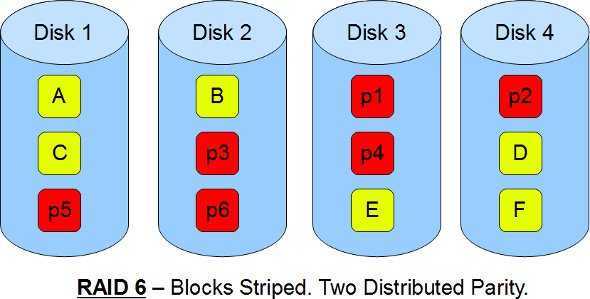
Security above all. RAID6 is the same as the previous RAID5, except that instead of one parity it has two parity blocks. Double parity provides fault tolerance for up to two failed disks. That is, our system will be functional even if we lose 2 disks.
This is more practical for RAID groups with many small drives, especially for high-availability systems, as large capacity drives take longer to rebuild. RAID 6 requires a minimum of four drives. As with RAID 5, a single drive failure results in reduced performance for the entire array until the failed drive is replaced. In our previous tests with software RAID 5, a 1TB drive took about 4-5 hours to rebuild.
With a RAID 6 array, using drives from multiple sources and manufacturers, it is possible to mitigate most of the problems associated with RAID 5. The chance of 3 drives failing together is clearly much lower than 2 failing, which would be a problem with RAID 5.
The second parity is not simply a copy of the first. Instead, it is recalculated using a different method than XOR, called Finite field or Galois field, which involves field theory and quite complex mathematics. However, since the article is aimed at beginners, it is better not to get involved in explaining this method. At least to keep you sober until the end of the article.
Let's look at the pros and cons here:
- Write speed = In writing, due to the additional complexity of calculating parity, it depends largely on the controller. In the best case, it will be equal to the sum of the speeds of all disks minus two.
- Read speed = RAID 6's read speed is the sum of the speeds of all disks minus two.
- Security = Much better security, compared to its main competitor, RAID 5. The possibility of three disks failing and losing our data is minimized. After all, RAID6 is famous for its good operation, in arrays with many disks. Consider that the more disks, the greater the possibility of two of them failing at the same time. So RAID 6 is a one-way street in this matter.
- Capacity = Total capacity is the size of the smallest disk times the numbers of all disks minus two. That is, if we have 1 of 750GB, 2 of 1TB and 1 of 1.5TB, then the total capacity will be 750 * (4-2) = 1.5 TB.
- Scalability = In a RAID 6 array we can add as many disks as we want.
What are RAID 1E, 5E, 5EE, 6E?
These are the familiar RAIDs, except they also have an empty spare disk. That's why they're called E, from "Enhanced".
When a disk fails in these RAIDs, our system is at risk. This disk should be replaced as soon as possible and then the entire system rebuilt. But until all this is done, you're in real danger of a second disk (or even a third for raid 6) being damaged and losing all your data.
That's why they put a spare blank disk in the array, which sits and waits and which they call Hot-Spare. If a disk fails, the spare automatically comes into operation and the rebuild is done immediately, without wasting time until a technician discovers it. Especially during holidays and vacations.
In RAID 1E you have 1 regular disk, a mirrored disk and a third separate disk as a spare. In RAID 5E the hot-spare disk is distributed as part of the disk set, in pieces placed at the end of each disk. To create 5E, at least 4 total disks are required.
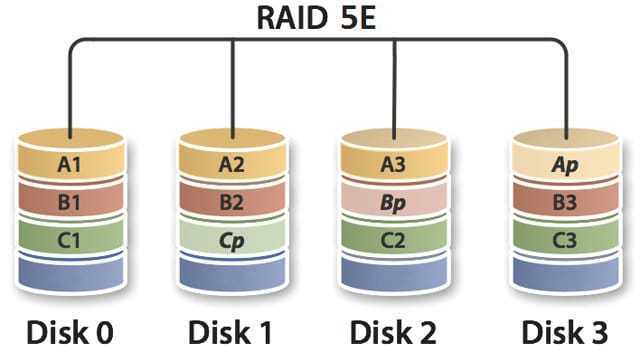
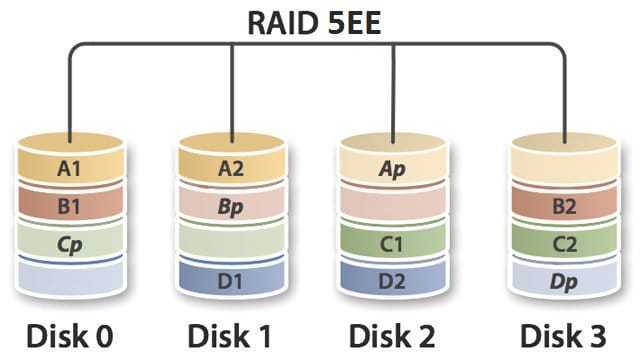
5EE differs from 5E in the position of the spare disk within the array and in the overall operation. In 5E the spare disk is placed in the last position while in 5EE it is placed in between and participates in the RAID operation by increasing the array levels by one more. This reduces the rebuild time.
There are many critics of Hot-Spare and the ability to automatically rebuild. Because, as mentioned above, rebuilding an array requires reading all the data from all the disks, opening up the possibility of a second disk failure and losing all the data, they believe that before starting the rebuild, a technician should first check it.
Being aware of Murphy's Law, no one would risk immediate rebuild after a disk failure, and using a Hot-Spare is exactly what will happen.
What is RAID0?
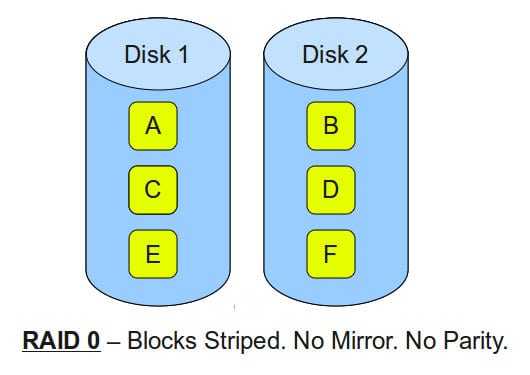
Maximum speed, not security. RAID 0 is pure striping with no parity. It requires at least two disks, and data is divided into blocks, which are written in segments to all disks in the array. If you have four disks, instead of having to wait for the system to write 256k of data to one disk, a RAID0 system can write 64k to each of the four disks in the array simultaneously, providing excellent input/output (I/O) performance.
You understand that if even one disk is lost, then all the data is lost!!!. RAID0 is only recommended for situations where you are interested in speed and not at all in the possibility of losing data, such as for example you can write your operating system to RAID0 and on a separate disk, unrelated to RAID, have only your data.
Pros and cons:
- Writing speed = It is the sum of the writing speeds of all discs.
- Read speed = It is the sum of the read speeds of all disks.
- Security = Zero! If you lose a disk, which you will at some point, then you will lose all the data and have to rebuild everything from scratch.
- Capacity = Total capacity is the size of the smallest disk times the numbers of all disks. That is, if we have 1 of 750GB, 2 of 1TB and 1 of 1.5TB, then the total capacity will be 750 * 4 = 3.0 TB.
- Scalability = In a RAID0 array we can add as many disks as we want.
What to remember
- RAID was created due to the need for speed, data destruction safety, and minimizing disaster recovery time.
- The most common RAIDs are 1, 5, and 6.
- Striping is the division of a file into pieces across multiple disks.
- Parity is the technology that can reconstruct lost data for you.
- XOR is a logical function
- RAID0 only offers speed, without any security.
- RAID1 is simple mirroring. Good for home computers
- RAID5 is striping with one parity. The golden ratio in speed and security and capacity.
- RAID6 is striping with two parity. Focus on security.
- Hot-Spare, or simply the E at the end of the name, is an additional spare disk.
Making RAID combinations
If you have imagination and creativity, then you can combine all of the above, aiming for the best solution for your needs. With the logic that a RAID in the end looks like a single disk, nothing prevents you from combining different RAIDs with each other. You can create RAID 10, 01, 50, 60, 100.
RAID01
Regarding RAID01, we tell you that RAID01 is two RAID0 arrays, one of which is copied to the other with RAID1. That is, we have two mirroring RAID0. It requires at least 4 disks and each RAID0 has twice the write and read speed of a single disk, and because they are in RAID 1 between them, the total theoretical speed is at least four times. Of course, security follows the logic of RAID1
RAID10
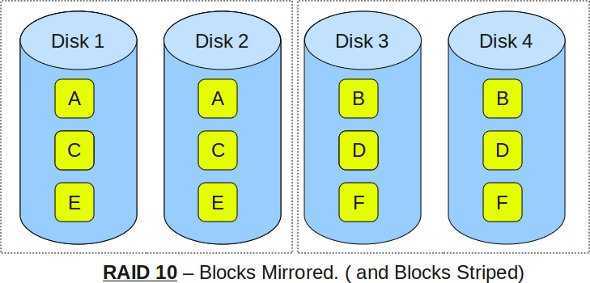
Exactly the opposite of 01, but more popular than the previous one. We have two RAID1 arrays that we put in and strip them like RAID0. This arrangement allows up to two disks to fail, as long as they are in different RAID1. If a third disk fails, wherever it is, then all data is lost. In terms of speed, the same applies to RAID01, that is, the maximum is quadrupled.
RAID50
This is two RAID5 arrays that we make work together like two disks with a RAID0. It requires at least six disks. It can lose at most one disk from each RAID5 array and the speeds are double that of RAID5, i.e. four times in total.
RAID60
Same as above. We have two RAID6 arrays and we make them work together as RAID0. Requires at least eight disks.
RAID100
If you have eight extra disks and you like Legos, then you make four RAID1s, put them in two striped RAID0s and then put the result in striped again with another RAID0. However, your friends will need a long time to understand what you did.
What are RAID2, 3 and 4?
Just as you imagined, there are three other RAIDs, RAID2, RAID3 and RAID4. We don't think you'll find them anywhere since they've been abandoned. The history of RAID says that at first only RAID 1 and RAID2 appeared. Later, and depending on the needs of each developer and company, the rest appeared, and not necessarily all at once. And yes, RAID0 didn't appear first, but later than 1 and 2.
After various “experiments” only 0, 1, 5, and 6 remained and all the rest were abandoned. However, for your information and to be fully informed, we say to you:
RAID 2
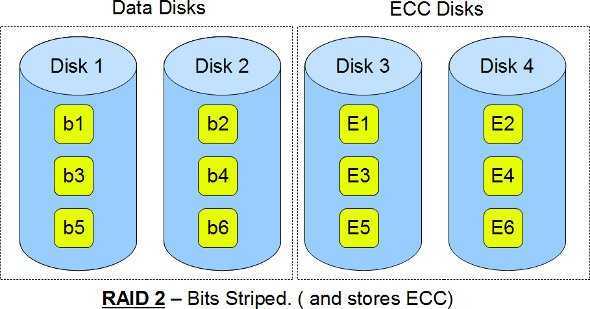
In the case of RAID 2, all data is striped at the bit level and not at the block level like all the others. Each bit is written to a different disk/stripe. Such a solution requires the use of Hamming Error Correction Code (ECC) to correct errors.
Essentially, the first bit was written to the first disk, the second to the second, and so on. The number of disks in RAID 2 used to store information is equal to the logarithm of the number of disks protecting the said data. That is, it uses many more disks for ECC and for example for 10 data disks it wants 4 disks for ECC or another example for 4 data disks it requires 3 disks for ECC.
In RAID2, the controller coordinates the disks to spin at the same speed. RAID2 is no longer used as a solution. It is considered expensive because it requires additional disks and its implementation is complicated as it requires the use of Hamming code, which is now integrated into modern hard drives.
RAID 3
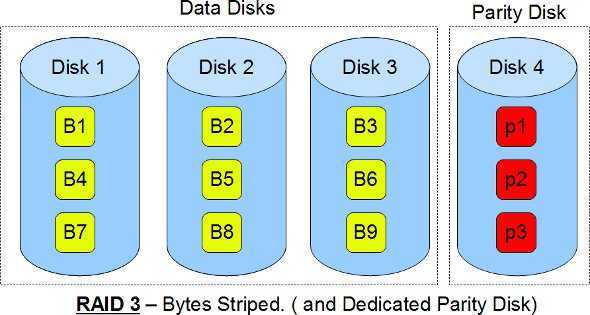
RAID3 went one step further than RAID2 as it strips to 8 bits (i.e. to a byte) and thus does not require multiple disks for ECC, but only one disk, dedicated exclusively for parity. It requires the disks to spin at the same speed.
The problem with RAID3, as with RAID2, is that the required disk synchronization has good performance in sequential read/write, but if you give it many requests at once, the speed will drop dramatically. That is, random read/write has worse performance and is therefore usually not used.
RAID 4
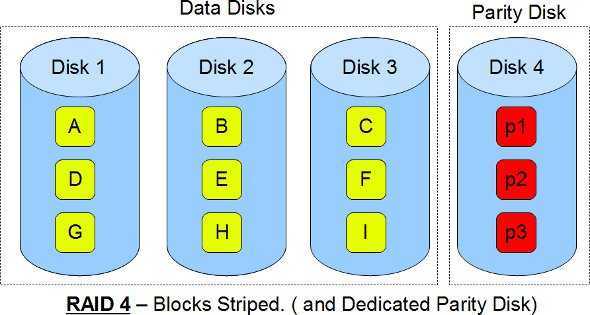
RAID4 does striping not by Byte like RAID3, but at the block level (16, 32, 64 or 128 kB). Like RAID 5. But for parity it uses a dedicated disk just for this job, like RAID 3. The exclusive use of a disk just for Parity reduces the write speed and finally with the appearance of RAID5, RAID3 and 4 were abandoned.
Controllers
Now, as for the controllers that perform RAID, there are hardware and software, each with its own pros and cons. We will analyze them in a separate article, since by now you've probably got a headache.
