

Did you ever wonder if your Twitter account has been hacked, and if so, who did it and when?
Your Twitter has the answer!
After Google and Facebook, Twitter now allows you to see all the devices - laptop, phone, tablet - that are connected to your account.
Twitter added a new security feature for its users, called ” Apps and Sessions”, which allows you to know which apps and devices have access to your Twitter account, together with the location of those devices.

If you want to learn the current and all past connected devices and their locations that have accessed your account in the last two months, follow these steps:
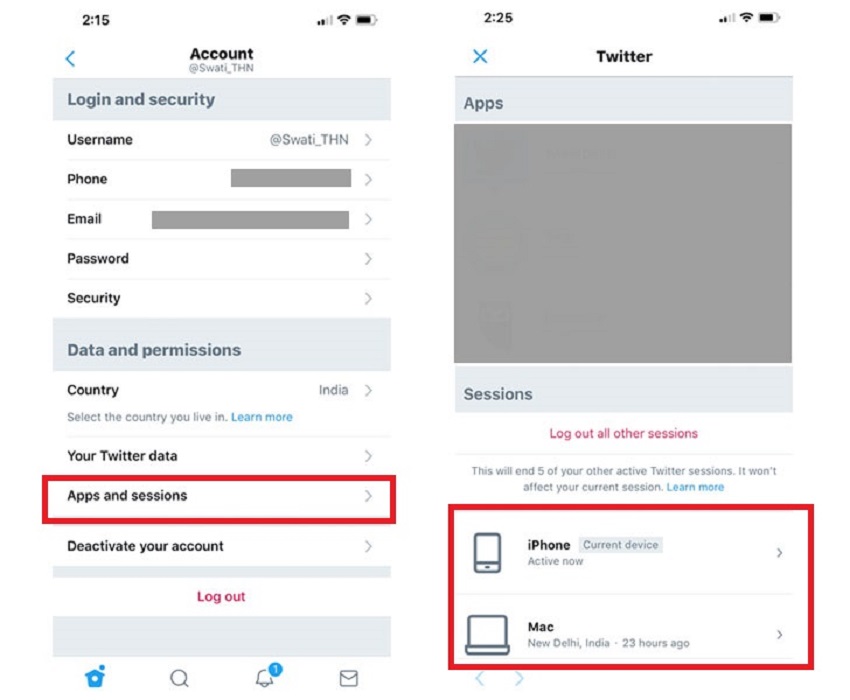
On the smartphone
- Open the Twitter app and log into your profile
- Go to “Settings and Privacy”
- Select the “ Account ” section
- Then select “Apps and sessions”
On your laptop or desktop
- Open Twitter and click the photo icon in the top right corner where all account settings are located.
- Select “Settings and Privacy”
- Within the section, scroll down to the “Apps and Devices”
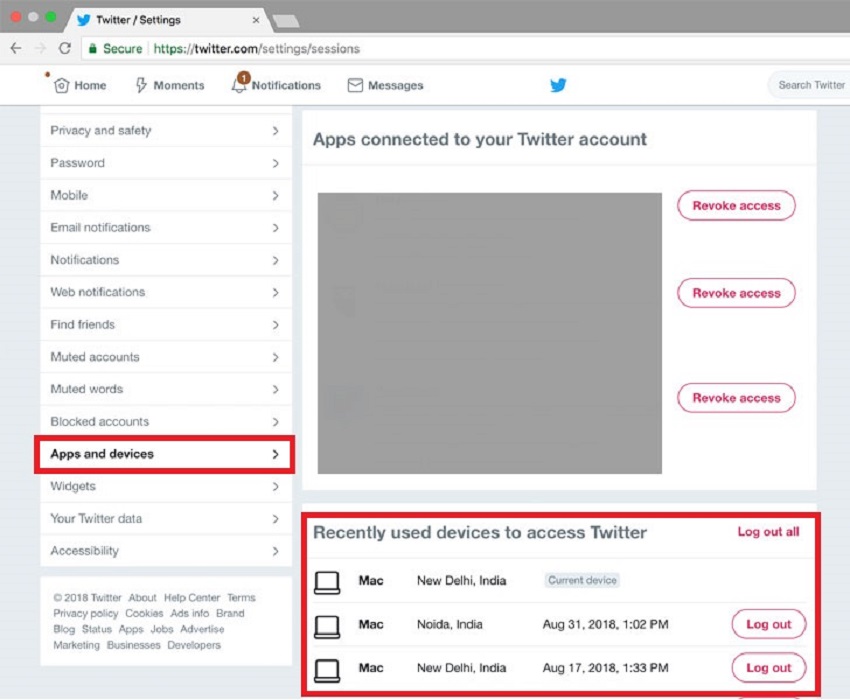
As soon as you select “Applications and login period” on mobile or “Applications and devices” on computer, a list will appear with all the devices that are active in your Twitter account over the past month, as well as the location where they are.
If you click on the device that appears connected to your account, more information is revealed including the device name that is connected, which browser was used as well as the date, time and approximate location where the device was used.
