

The CryptMax application enables you to send and receive encrypted messages on Android mobile phones, ensuring full end-to-end encryption.

Perhaps for most users, encryption sounds like a term used only by government agencies, or is mentioned in movies with a hacker trying to break the security systems of large companies and banks. However, encryption exists and works in all ordinary users and in areas of our online experience, such as on httrs websites or in our documents in Google Drive.
And while encryption is slowly but surely spreading across all sectors and industries of electronic life, the field is still a bit murky for mobile phones. However, there are simple and free methods that can ensure that your Android device can send encrypted messages all the way, from one end to the other.
One such lightweight and free application is CryptMax. The good thing about this application is that it doesn't force you to use its own email application, but essentially uses a notepad where it encrypts whatever you type in it, and then you can simply copy-paste your encrypted message and send it with any email application you want. Yes, this means that you can use your Gmail and send a message where all its contents are encrypted.
Let's see how it works:
Download the CryptMax app from the Play Store , open it, and you'll be presented with a black screen where you can type your message. There's only one option you really need to consider here:
AES-128 vs. AES-192 vs. AES-256.
By default, the encryption strength in CryptMax is “AES-128” and is shown in the top right corner. By clicking on it you can change the encryption method to AES-192 or AES-256, which are technically more secure than 128, but in reality even an AES-128 encrypted message would be nearly impossible to crack. Although government agencies and other large organizations typically work with 192 or 256, there is still no practical way to crack AES-128. In short, if you leave the AES-128 encryption on, you will be fine.
After you have written your message in CryptMax, type an encryption code below the text box. The recipient must know this encryption code in advance and have the CryptMax application installed in order to be able to read the message. You must ensure that no other third party knows the code because otherwise they will be able to decrypt your message (and provided, of course, that they know that you are using CryptMax, which is quite unlikely).
Once you have created a password, tap “Encrypt” at the bottom left, and the app will convert the text into scrambled encrypted characters. Then, tap “Copy,” go to any email app of your choice, tap “paste” in the body of the message, and send the message.
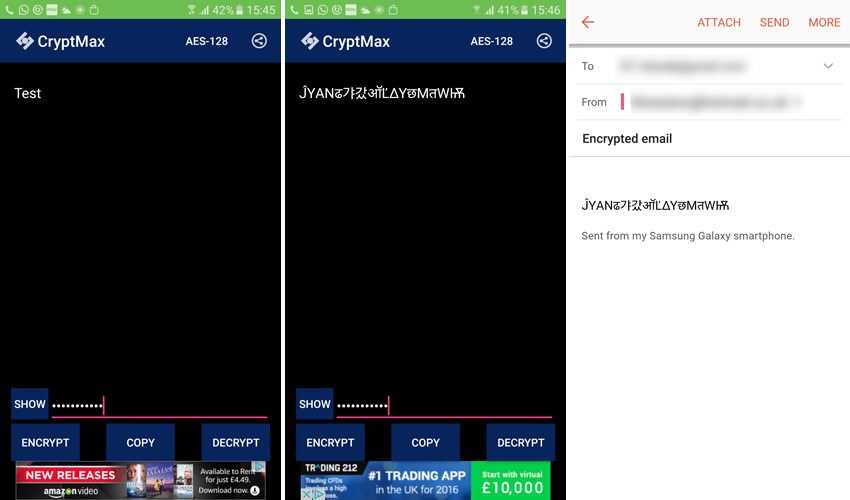
Again, remember that when the recipient receives the email, they will have to copy-paste the altered text into the CryptMax app and use the encryption key to read it. It's an extra task, but that's the price you pay for top-notch security!
AES encryption remains by far the best way to ensure your email stays private. If you don't like the whole copy-paste thing, you can use something like K-9 Mail alongside APG (Android Privacy Guard) to send encrypted emails instantly, but if you want to use an email client of your choice, then CryptMax remains the best option.
