

If you installed the new Windows 10 Anniversary Update version over a previous version of Windows, you would have noticed that your free disk space has decreased significantly.
When upgrading from a previous version of Windows, Windows 10 saves a lot of files from the previous version during the upgrade, and thus your hard drive becomes filled with files that you may not need again, especially if your upgrade was successful. 
The installation saves these files just in case something goes wrong with your operating system upgrade. If something goes wrong, you can safely restore your previous version of Windows.
But if everything is working perfectly, there's no reason to keep junk on your computer.
Below we will see how you can free up space after upgrading your operating system (Winaero):
Press the Win+R keys together to open the Run dialog box.
Type the command and press Enter: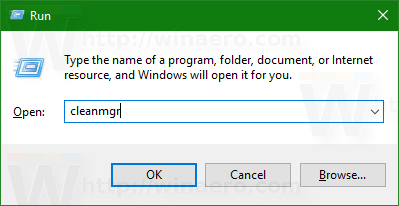
cleanmgr
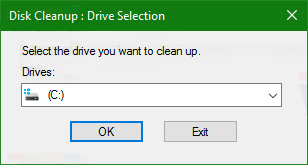
Select the disk where your operating system is installed (usually it is C) and press OK.
Click the Clean up button to activate the Disk Cleanup tool.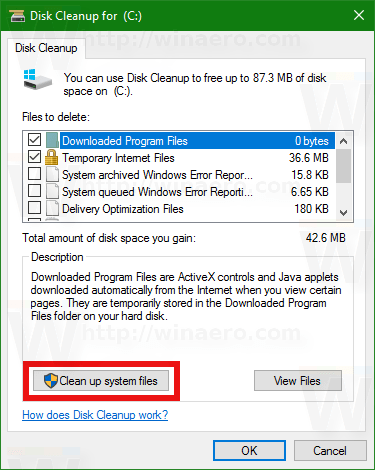
Find and select the files of the previous Windows installation (Previous Windows installation(s).
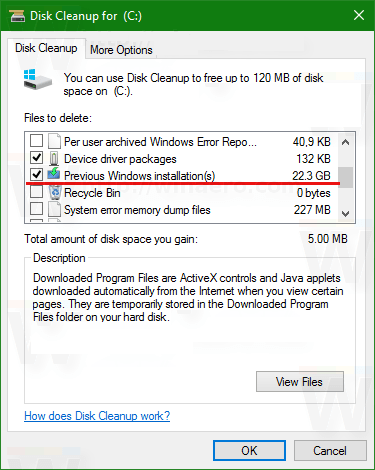
Click OK and you're done.
