

uTorrent app , but it has become quite annoying with so many ads. This post will help you disable them from Advanced Settings.
To disable ads and promotions in the uTorrent you are using, follow the path
Options> Preferences> For advanced users.
In the window a large list of application flags and a search box will appear. Search for the following flags and disable them:
- offers.left_rail_offer_enabled/left_rail_offer
- gui.show_plus_upsell
- offers.sponsored_torrent_offer_enabled/sponsored_torrent_offer_enabled
- bt.enable_pulse
- gui.show_notorrents_node
- offers.content_offer_autoexec
As you can see in the image below, disabling is easy, simply marking “False.”
When you disable all the flags, press “OK” and you are ready.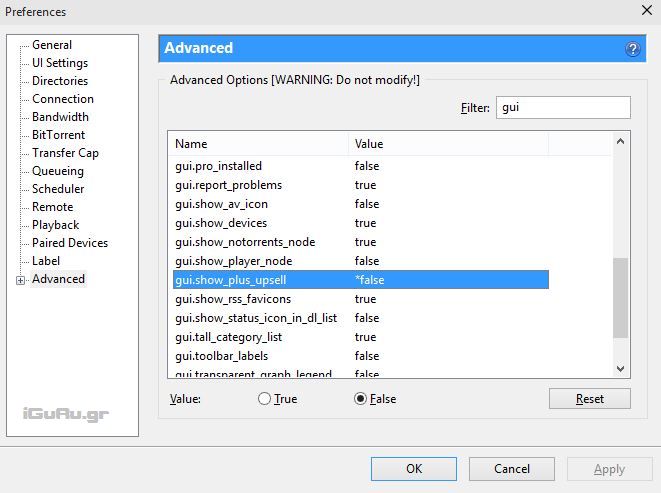
The flags mentioned above may be named slightly differently, depending on which version of the application you are using.
Be careful when editing them if you are not completely sure what their function is.
📧
Subscribe to the SecNews Newsletter
