

Most users prefer Mozilla Firefox due to many factors: such as the variety of available extensions and low RAM consumption during execution, factors that make it far better than Chrome.
So, since it happens to be my personal favorite browser, I decided to share with you some techniques that will help you increase your browsing speed and make your Mozilla Firefox faster than ever!
Are you ready to "set it on fire"?

Method 1: Use pipeline to make Mozilla Firefox faster!
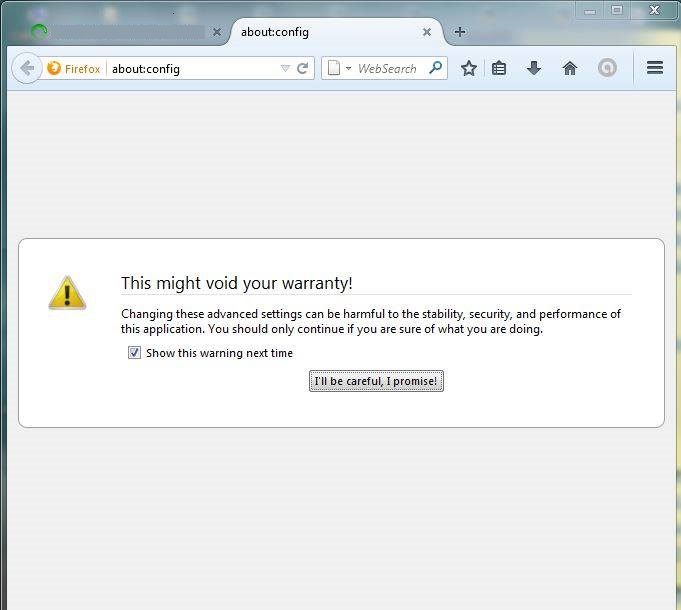
Type “about:config” in the address bar and press Enter.
Now click “I'll be careful, I promise!”
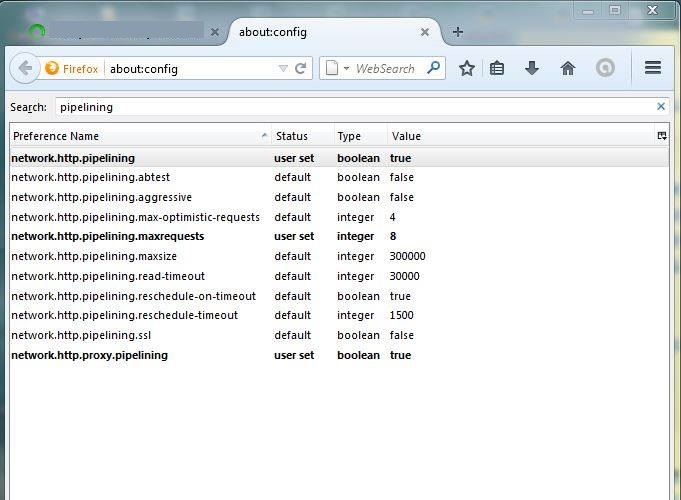
Type “pipelining” in the search box
Search for “network.http.pipelining”.
By default it is false, so you will need to change it to true by double-clicking on the option.
Now you need to set “network.http.proxy.pipelining” to true by double-clicking it.
You should set “network.http.pipelining.maxrequests” to 8 (it is 32 by default) by double-clicking it. This means it will make 8 requests at a time.
Now restart your Browser and you will be able to enjoy faster surfing!
[su_button url=”https://www.secnews.gr/103834/exaitias-autou-tou-video-i-google-agorase-to-youtube/” target=”blank” style=”bubbles” background=”#28c6c3″ color=”#0404047″ wide=”yes” center=”yes” radius=”20″ icon_color=”#ffffff”]Read more: Because of THIS video, Google bought YouTube!! Watch it![/su_button]
Method 2: Use Speedup extension to make Mozilla Firefox faster!
Personally, if you ask me, I don't particularly appreciate extensions installed in the Firefox browser, because they slow down browsing and the overall browser speed drops a lot. So if you haven't used an extension for a while, we advise you to remove it immediately. However, there are some extensions that will make page loading faster in Firefox.
Fasterfox: This is an official extension from Mozilla Firefox to “Make your Sites Faster than a Fox for Firefox!” You can download the extension from here
Speedyfox: Another extension to speed up your browsing. You can download it from here
Betterfox: Another official extension from Mozilla “To make your browsing experience 15% faster!” as it claims! You can download and try it from here
Method 3: Additional things you should consider!
To be honest, the following is not a method in itself, but there are some things you should consider if you want to increase your surfing speed! You can try them:
- Clear your browsing history frequently.
- Remove add-ons that you don't need.
- Remove unwanted/unnecessary toolbars
- Block Flash (Although Mozilla Firefox has already started blocking it by default).
[su_button url=”https://www.secnews.gr/103832/krummena-mustika-google-search-part2/” target=”blank” style=”bubbles” background=”#9328c6″ color=”#0404047″ wide=”yes” center=”yes” radius=”20″ icon_color=”#ffffff”]See more: The 14 Hidden Secrets of Google Search that you must discover! #2[/su_button]
