

 Home Wi-Fi has evolved to be almost as important as water or electricity. If your own wireless network is experiencing reception issues or interference and you're looking for solutions to get a ringing signal in every corner of your home, keep reading…
By following these simple steps from the resourceful lifehacker, you will see how to improve reception and boost your home Wi-Fi signal.
10. Use the latest wireless devices
One of the easiest ways to get fast and reliable Wi-Fi at home is to use the latest technology devices that make the most of the connection you (expensively) pay for. Use a router that will provide wireless N connection type. (Sellers know).
9. Find the ideal spot for your Router
Okay, the Router may not be the ideal decoration for a house, but that doesn't mean you have to hide it behind TVs, under the... dresser or inside cabinets. Expose the Router in a visible external point of the house. Ideally in the center of it, so that you achieve wider coverage that reaches every corner.
8. Find the right wireless channel
Your router’s signal is likely to be affected by neighboring wireless networks, especially if you live in an apartment building or densely populated area. Use an online tool like WiFi Stumbler, which provides an easy way to check which “channels” are the most crowded by your neighbors’ Wi-Fi networks, and choose a channel that is not particularly “crowded.” (Most routers operate on channel 6.)
7. Eliminate interference from other devices
Cordless phones, microwave ovens, and other devices can also create interference with Wi-Fi, so if you're shopping for a new router, make sure it's Dual Band, and use the 5Ghz radio frequency, instead of the 2.4Ghz one where it collects many different types of wireless signals (bluetooth, etc.)
6. Protect your network from “nosy” neighbors
Change your password frequently, and of course avoid using the “old-fashioned” password that the Router device provides by default, because it is easy to hack. The best method is to use WPA-type passwords. A “grocery” method to detect if your Wi-Fi is being stolen is to turn off every device that is using it and observe the Router’s lights. If they are still blinking, change the password immediately.
5. Limit applications and programs that “eat” Bandwidth
Torrents, streaming services, video chat, online video games, etc. are some of the most “hungry” for bandwidth programs and applications. Programs such as Qos (Quality of Service), can put these applications in order, giving priority to the most necessary ones.
4. Increase Wi-Fi range with DIY tricks
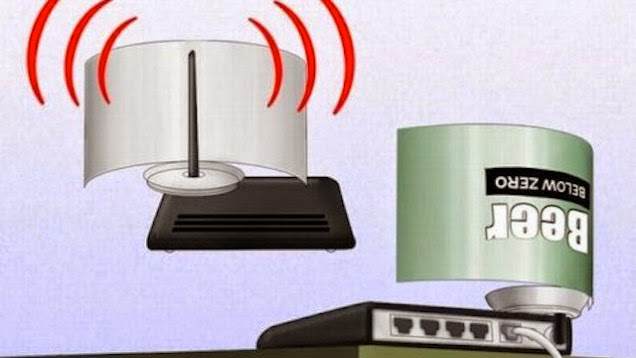
You may not see dramatic changes, but even a DIY construction like the one below, with an opened aluminum soda can, can give a few more meters of range to your old (or even new) Router. An open beer can on the Router's antenna can make a difference
3. “Hack” your Router for a better signal (Proceed at your own risk with the following step)
By replacing your Router’s Firmware with DD-WRT, you can transform a simple Router into a “rocket”, since in addition to increased security features, you can internally amplify the transmission signal of your Router’s antenna (with the rule of thumb – 70 mW is more than enough). This way you will be able to access your home’s Wi-Fi from a much greater distance!
2. Turn an Old Router into a Signal Booster And yet it can be done. Buying and installing a signal booster is a relatively easy process. However, if you don’t want to spend money on buying yet another piece of hardware, the previous step, i.e. replacing the Firmware with DD-WRT, will allow you to turn an old Router into a Frankenstein – a signal booster. It may not increase the speed, but it will definitely extend its range.
1. Schedule the Router to Reboot Regularly
Simple and effective solution that can be done either manually -from the Router's on/off button- at regular intervals or via a simple socket timer, in case you have installed the Router in some... inaccessible area of the house. Many times a simple restart can solve the most complex problems.
Of course, the comments are at your disposal for your own ideas and methods.
Good luck!
Source: press-gr.blogspot.gr
