

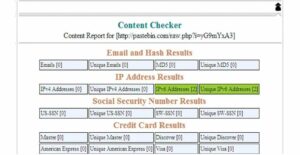
If you enjoy analyzing leaked data online, you'll know that it's not easy to count the number of compromised records and determine how many of them are unique. The solution is provided by the Chrome, Content Checker.
Content Checker, developed by ctrlbox.com, is an easy-to-use plugin that measures the amount of relevant information contained in a data leak.
After installing the plugin, click the icon that appears in the upper right corner of the browser (a black silhouette with a hat) to get the number of total and unique emails, MD5 hashes, IP addresses (IPv4 and IPv6), social security numbers, and credit card numbers.
Additionally, the add-on can accurately identify payment card types, distinguishing between MasterCard, Visa, Discover, or American Express cards.
The tool can also be used to check website caches on Google and Bing.
You can download Content Checker from here.
