

Cybercriminals are now taking advantage of the popularity of AI services to launch new phishing, with ChatGPT being used as a “bait” to steal credentials. The latest campaign is based on a particularly common scenario: a message informing the user that there is a problem with their subscription and that payment details need to be updated immediately.
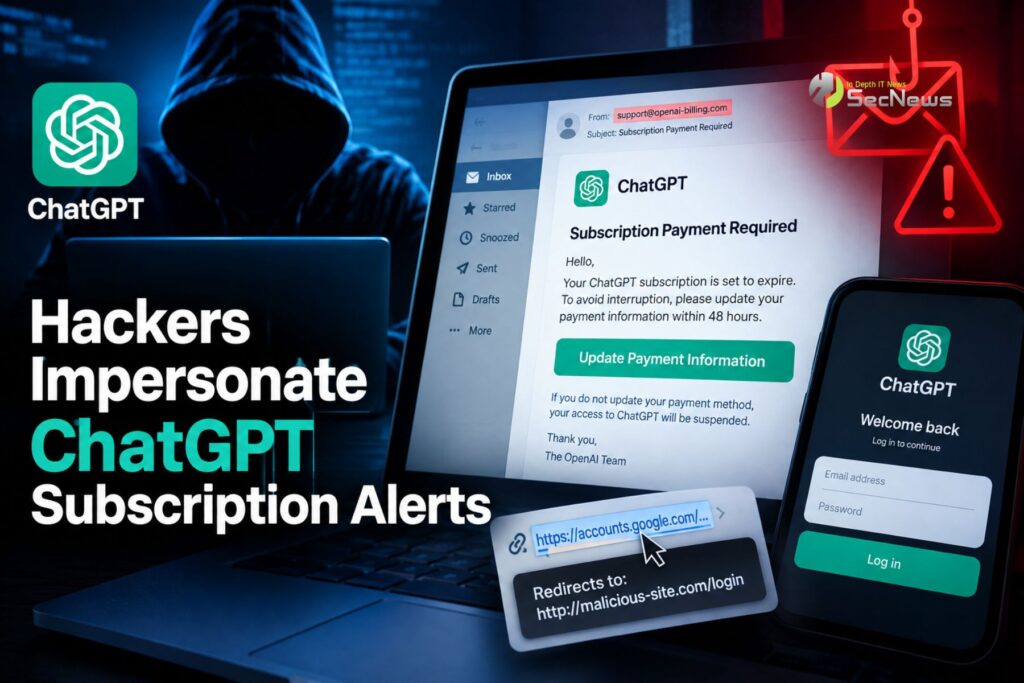
The attackers' goal is not to directly compromise OpenAI's service. Instead, they are attempting to exploit the trust that has been built around ChatGPT and lead the victim to a fake login page. There, the information the user enters can end up in the hands of the attackers.
Cybersecurity firm Cofense spotted the campaign and said the message was designed to look like a genuine subscription notification.
See also: PhantomRaven: npm Stealer was built with AI by a bug bounty hunter
The email looks like a real notification from OpenAI
The success of such attacks relies heavily on detail. The malicious email appears as a billing-related message and uses a logo and terminology that refer to ChatGPT.
The content displays a warning that payment or subscription update is required, while a prominent button invites the recipient to select “Update Payment Information.” At the same time, the message creates the feeling of a time limit, stating that the required action must be taken within 48 hours.
This is a classic social engineering technique. The more the victim feels they have to act quickly, the less likely they are to stop to carefully check the message.
However, behind the neat appearance there are signs that can reveal the fraud. The full address does not correspond to OpenAI, while the button link leads to a different destination than the service's official infrastructure.
The trap is hidden behind the link
Another element that makes the attack more convincing is the use of a redirect chain. According to Cofense's analysis, the link first passes through a wrapper associated with the Google API and then directs the user to infrastructure controlled by the attacker.
This can make it difficult to quickly identify the final malicious destination, especially when the user only sees the text of the email and does not examine the actual address of the link.
After clicking, a page opens that is designed to replicate the look of the ChatGPT login process. Logos, icons, colors, and wording create the impression that this is an authentic page.
In reality, the login details the victim types are sent to the attacker. The page may then display an error message or redirect, so that it is not immediately apparent that the details have been stolen.

Why a ChatGPT account is valuable to attackers
Theft of a ChatGPT account is not necessarily limited to access to the service itself. An account can include saved conversations, personal information, business data , or user-generated content.
The risk becomes even greater when ChatGPT is used at work. Conversations may contain information about projects, documents, business processes, or other data that was not intended for third parties.
Additionally, if the same password is used on other services, the initial breach can act as a launching pad for credential stuffing and new attacks.
That's why unique passwords and a reliable password manager are an important layer of defense.
See also: WeaselBiscuit Stealer is distributed via 13 malicious npm packages
How to recognize fraud
The most important step is to not click on the link in an unexpected email, even if the message seems perfectly professional.
If you receive a notification about a payment or subscription problem, open your browser yourself and go to the service from a known and trusted address or bookmark. Check there if there is indeed a problem with the account.
Also, check the full email address sender's , not just the display name. The same goes for links: before clicking any, hover over them and examine the actual destination.
An unknown or unrelated domain is a significant sign of danger.

What to do if you already entered your password
If a user has already entered their credentials on a suspicious page, they should not wait to see what happens. The safest move is to immediately change their password through a legitimate service.
At the same time, it is useful to check account activity and related security and payment settings. If the same password is used on other services, it should be changed there as well.
Enabling multi-factor authentication (MFA) adds another layer of protection. However, it doesn't mean users can trust suspicious pages. There are phishing attacks that target not only passwords but also active login sessions.
See also: RatHat Android: New malware steals PINs and passwords from mobile phones
Phishing follows the popularity of AI
This campaign shows how criminals are adapting social engineering techniques to services people use every day. Just as emails claiming to be bank alerts or account problems were once common, artificial intelligence services are now a new field for phishing.
The basic message remains simple: an email requesting immediate payment, changing details, or confirming an account should not be treated as trustworthy just because it uses the logo of a well-known company.
The best defense remains verification before you click. Check the sender, examine the link, and visit the service directly, rather than following instructions in a suspicious email. In an era where ChatGPT and other AI tools have become part of everyday life, scammers know that familiarity can become their most powerful weapon.
