

F.Lux is a free display management software for desktop and mobile operating systems that automatically or manually adjusts the color warmth as well as other details related to the appearance and color of your screen.
If you've ever tried getting up late at night to work on a computer, you may have initially felt discomfort from the bright light of the computer screen. It's not a very pleasant experience, and it can take a few minutes for your eyes to adjust to the brightness of the screen. You may also have noticed that it takes time to get used to your screen when you first turn on your computer in the morning or even during the day.
F.lux is a small, free program for Microsoft Windows , Mac OS X , Linux , iOS , and Android that adjusts the brightness of your computer screen based on the time of day. The software automatically adjusts the color temperature of your computer or mobile phone screen. In technical terms, this means that the software will reduce the Kelvin degrees of brightness to make the light more natural and pleasing to the eye.
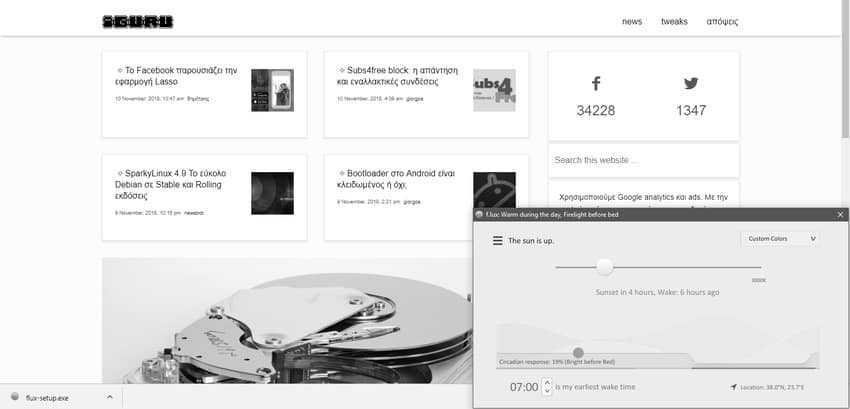
F.Lux comes with preset values that you can use right away or customize to your needs. Note that you will need to enter your nearest city or location the first time you launch it, as the default values are automatically selected by F.Lux based on the current time in your area. The program displays a curve when you open the interface, highlighting the time of day and the warmth of the screen. Users can automatically adjust the warmth of the screen based on the time of day or manually select the setting they prefer to use.
You can run a 24-hour preview within 10 seconds to see how the display changes over that period. Adjustments to the default settings can be made from the program options.
The latest version of the program also adds the ability to display grayscale. Grayscale is a new feature in F.Lux that displays everything in grayscale. It is an attempt to reduce distractions with colorful screen elements, such as icons or the operating system toolbar.
The program is much more powerful and has several settings, compared to the Windows night light. And of course it is not the only one on the market. For anyone who wants to look for it better, there are also the corresponding free programs Lightbulb and Iris , as well as a bunch of applications for Android.
To summarize:
The F.Lux program is designed to reduce distractions, help you avoid eye strain on your computer or mobile screen, and help you sleep easier at night. It certainly does this to some extent, giving you a lot of customization options, although in some cases it may be difficult to work with your computer or make it difficult to read the texts on the screen. In general, the changes in color and brightness of the screen take some time to get used to. Most users will probably use programs of this type sporadically and not continuously.
