

Using Dual Boot you run Linux alongside Windows on your computer. So far so good. But sometimes you want to share data between the two operating systems, and something is stopping you: Windows.
Windows 10 locks the disks it uses, so you can't access their data from Linux. What can you do about it? The solution is very simple.
Windows Hibernation
Windows also has a hibernation mode. It has been used since Windows 8 and is also available in Windows 10. So as we mentioned in an earlier post , turning off Windows in the usual way simply puts the system to sleep and does not turn it off.
This means that everything in memory is saved to the hard drive during hibernation. So when you want to turn on your computer, you are not actually turning it on, but restoring the data from the hard drive to memory.
Windows has a few power management features:
- Shut Down: The option to turn off your computer.
- Sleep: Low power consumption mode that maintains the current connection to the system.
- Hibernate: Saves the current session to the hard drive until the computer is restarted.
- Hybrid: A combination of sleep and hibernate, allowing for quick restart.
So according to the above the solution is based on how we shut down Windows. The easiest solution is to ensure that your computer does not shut down in hibernation mode. Without the hibernation data on your hard drive, you will be able to access any disk that Windows uses from your Linux system without any problems.
Let's see what you can do:
Open the Windows Control Panel by pressing the WIN+R keys together. In the window that opens, type control panel and press enter. Then, select Power Options (the path is shown in the image below).
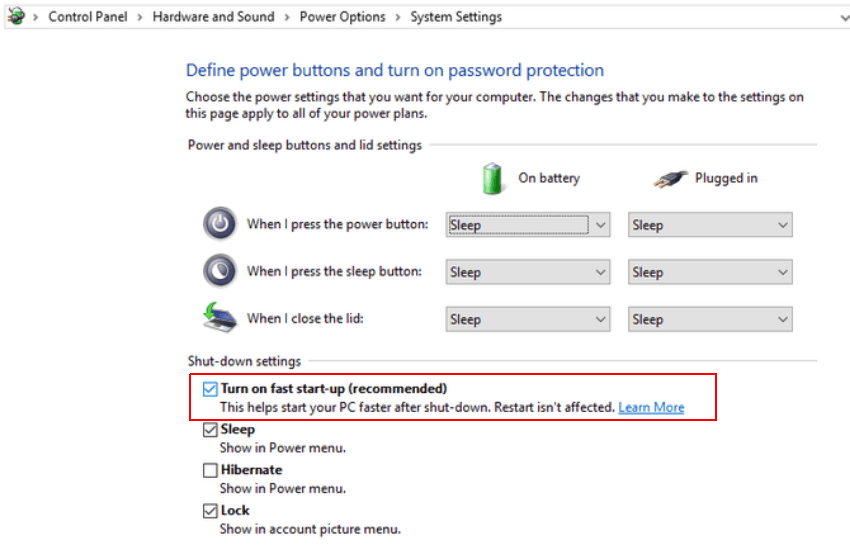
Then, disable Turn on fast start-up (recommended). Untick and save the changes.
That's it, now when you shut down your computer, it will be done correctly, as it was done in older versions of Windows.
________________________________
- Online Piracy: The History of Piracy Before the World Wide Web
- Microsoft: how much does the company listen to your opinion?
- BSOD: 20 years of the blue screen and the most famous WHOA
