

Some users have posted on Mozilla, Google, and Microsoft forums about their problem with Chrome, Firefox , and Internet Explorer browsers , saying that tabs were opening automatically.
These users reported that new tabs keep opening in their browsers automatically or when they click on links. Learn how to fix this with the steps below:
Why does my browser open new tabs by itself?
Clean Adware with AdwCleaner
1. Browsers automatically opening multiple tabs is often caused by malware or adware. Therefore, scanning for adware with Malwarebytes AdwCleaner can resolve the automatic tab opening.
2. Users can download Malwarebytes on Windows by clicking the “Free Download” button on the utility’s page, here.
3.Run the application
4.Click the Scan button to check for adware, browser hijackers , and PUPs.
5. Reset browsers
Google Chrome
1. Resetting browsers can also fix multiple tabs opening automatically, as it will disable (or remove) their extensions, clear browsing data (which may include virus scripts ), and reset them to their default settings . To reset Google Chrome, type 'chrome://settings' in the browser's URL bar and press Return
2.Click the “Advanced” button.
3.Then, scroll down and click Restore settings to original default configuration.
Firefox
1.Open Mozilla Firefox.
2.Click the Refresh Firefox button on the Refresh Firefox page.
Internet Explorer 11
1. Internet Explorer users can reset the browser by clicking the Tools button .
2.Click Internet options to open the window shown directly below.
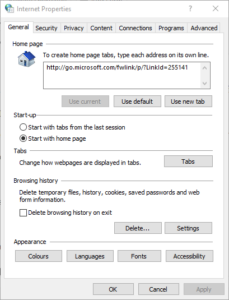
3. Click the Reset button on the Advanced tab.
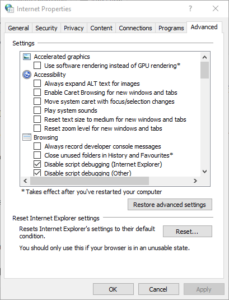
4.Click Reset again to confirm.
Reinstall your browsers
1.Some users may need to reinstall their browsers to fix tabs keep opening error, which will fix corrupted installations. To do this, launch Run by pressing Windows key + R.
2.Then, users can open the uninstaller by typing 'appwiz.cpl' in Run and clicking OK.

3. Select the browser you want to remove.
4.Click Uninstall.
5. Select Yes to provide further confirmation.
6.Then, restart Windows after uninstalling the browser.
7.Download the latest version of the browser from its website. Then reinstall the browser.
Reset Content Type Actions
1.This is a possible solution specifically for Firefox users. Try adjusting your content type settings by clicking the Firefox Open menu button and selecting Options.
2.Then, click the General tab.
3.Go to the Applications section that appears immediately below.
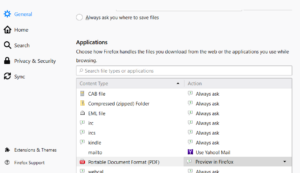
4. Select the content types listed there to choose alternative actions for them in the Actions column. Select the “Always ask” action for content types.
