

OneTab is the best solution for organizing the open tabs you have in browser !
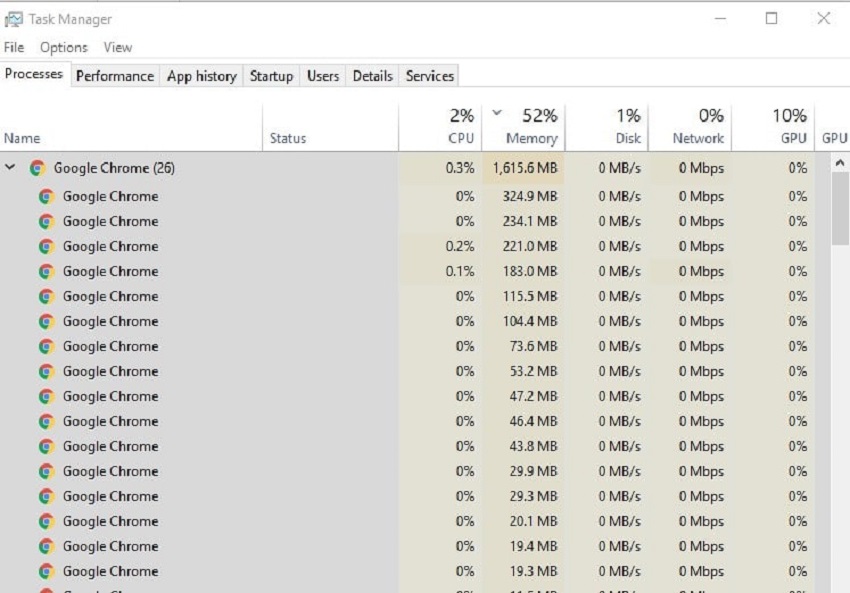
While Chrome holds 64% of the global web browser market and offers the best performance for websites and videos, it can sometimes be a strain on your system resources. This is related to stability issues, as it separates each tab, plugin, and extension into its own process, so that if something happens, all the sites you have open don't close. While this may seem useful to you, the truth is that it's not so good for your computer. This is because you may run out of memory to continue, and then Chrome will start to become unresponsive.
However, there is a way to reclaim these resources and speed up your computer backup with a useful Chrome extension, OneTab!
How does it work and what are the advantages?
This extension is free and is located at the top and right of the Chrome browser and when you click on it, it will collect all your open tabs and place them on a single screen. In addition, OneTab stops all the problems caused by the display of all tabs and helps you to be better organized!
The truth is that most internet users have multiple tabs open at the same time. For example, someone might have applications open and 20 tabs in the browser, while simultaneously checking their personal and corporate email. In this case, Chrome can reach 2GB of memory. The PC might be able to handle the extra resource usage, but it will start to slow down more and more. In this case, OneTab will help and if you use it, it will give you a list of all the tabs that are open and the window they correspond to.
Now, if you accidentally close one of the many tabs you have open, you won't have to open your search history and spend a lot of time searching, as OneTab will save you a lot of time!
