

Controlled folder access: Windows has been hit twice by ransomware infections in recent months. Thousands of computers ended up with files encrypted by the malware after owners failed to properly protect their data, either with updates or, at the very least, with a backup.
Microsoft had released Windows updates that were intended to prevent these infections, and most of the systems that were infected did not have the latest patches installed.
So it was very clear that the company needed to develop a solution that would keep users safe, even if there were no updates available.
Let's talk about Controlled folder access.
This is a new feature that Microsoft is currently testing with the help of Insiders. The new feature is supposed to monitor critical folders and notify users whenever an application tries to perform unauthorized actions.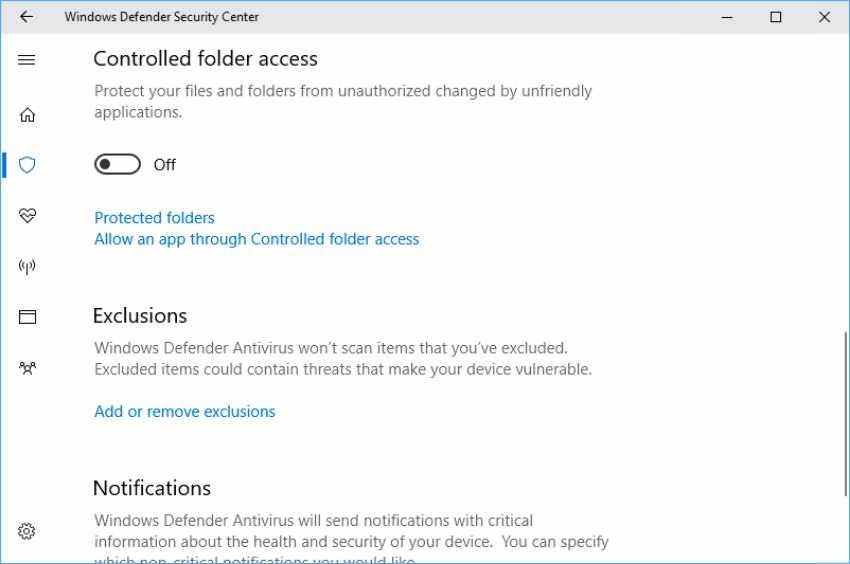
The new Controlled folder access tool is integrated into Windows Defender Security Center in the Windows 10 Fall Creators Update build preview. It is expected to be available to everyone with the official release of the operating system in September.
Is ransomware encryption over?
With Windows folders protected by default, the new feature will be able to monitor any folder on your system, even on shared networks and map drives, ensuring that if ransomware is present, it won't be able to make modifications to your PC.
Windows 10 users will be able to define which folders are protected, while they will be able to set exceptions, which will allow other trusted applications to make changes to protected folders.
Applications that attempt to make changes to protected folders without authorization will automatically be placed on a blacklist that only administrators can access.
In this way, Windows 10 hopes to give its users full control over which applications can modify files.
This will prevent threats like ransomware that attempt to modify the system without users receiving any notification.
What Microsoft didn't mention is what could happen if a zero-day exploit allows the ransomware to gain administrator privileges...
