

You know that Microsoft is offering Windows 10 as a free upgrade to everyone running Windows 7 and 8.1 starting June 1st. 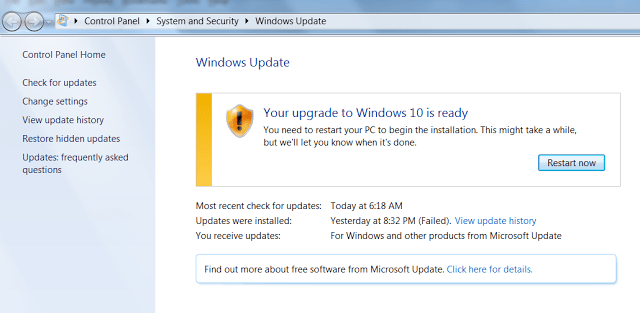
Initially, we all knew that this update was not mandatory and that everyone had the right to choose an operating system.
However, it turns out that Microsoft, with certain corrective changes distributed through Windows Update, no longer allows the user the option to delay or cancel the upgrade of their operating system.
In other words, your computer may automatically upgrade to Windows 10 after a reboot, because, as ZDNet, Windows Update now only offers an option to start installing the new operating system and nothing more.
Additionally, there don't seem to be any other updates available at the moment, so unless you install Windows 10, there's nothing you can do other than Windows Update.
What's really interesting is that some third-party apps that could previously block or delay the upgrade to Windows 10 no longer work. It's likely that a recent update rendered them ineffective.
Josh Mayfield, developer of the GWX Control Panel app, says his app no longer works and he can't say for sure if there's another way to make it work.
If you are seeing either of the above two screens, exactly as they appear here, GWX Control Panel is not yet able to help you, although I am looking into whether it's possible to fix these things through software. I do not have any recommendations at the moment, though, unfortunately.
There are some users who report that System Restore helped them since they were able to restore their system to a previous state before October 14, the date on which Microsoft allegedly made the change.
What else can you do?
Stop the Windows Update service. It will prevent the upgrade for now, but it is not the best solution as it prevents any updates from downloading to your operating system.
Use System Restore as mentioned above. It is one of the best options provided that there are system restore points available.
To run System Restore, press the Windows key together with R, type rstrui.exe and press enter to open System Restore.
