The Mozilla Speculative Connect API is a new feature added many, many versions of Firefox ago, and its mission is to create HTTP connections in advance in the browser, which it is likely that the user will navigate to.
Basically, this API comes into play whenever a user hovers over a link. The browser then interprets this action as an intent to navigate to it and starts issuing HTTP requests to that website, and pre-establishes TCP and SSL handshakes, just in case the user clicks on that link to go to that page.
As you can imagine, this API exists to improve page load times. And it does just that in many cases.
What you don't know is that this type of behavior can be used by malicious actors (usually websites) to track users, even if they don't actually browse their sites.
As Yuri Khan points out on the Mozilla bug tracker, the current version of the Speculative Connect API, which lacks a GUI that allows users to disable this feature, adds a hole in Firefox's Privacy Shield.
An attacker who wants to control a list of email addresses could easily take a list of IPv6 addresses, associate them with an email, create a basic HTML page, and host it at that address.
Sending a message to this email, specially crafted to contain a large link that fills up as much space as possible on the email server, would help the attacker, thanks to the Speculative Connect API, check which email address is still in use.
Because Firefox would simply initiate a connection to the server, the attacker could easily verify if the email is still in use, and also learn the user's IP, without the victim ever visiting their website.
Obviously, you can't perform serious attacks on a user who simply hovers their mouse over a connection, but the Speculative Connect API feature poses more of a privacy issue than a security vulnerability.
Since this feature is enabled by default for all users, until the Firefox team decides to put a checkbox somewhere in the browser settings that allows the user to decide whether to use this feature or not, there is only one way to disable this silent pre-connection. Simply follow the steps below.
Step 1: In a new tab, type “about:config” and click the “I’ll take care” button when Firefox asks you.
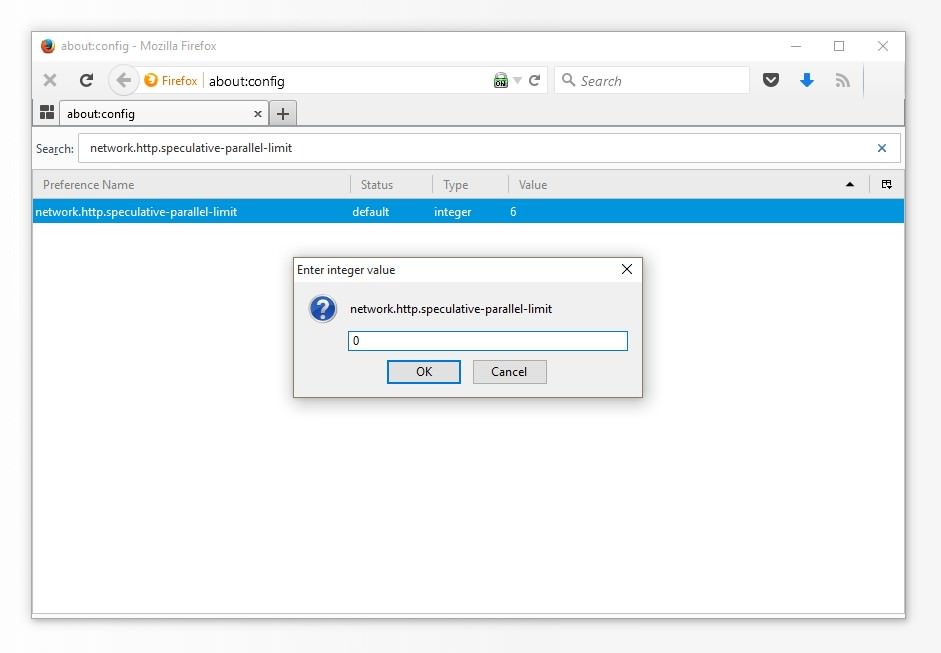
Step 2: Type “network.http.speculative-parallel-limit” in the search box
Step 3: Double-click the setting and type “0” in the pop-up window that appears.
You have just disabled the Speculative Connect API.