

Unlike previous versions of Windows 10 Technical Preview, the latest public build, Windows 10 build 10049, is taking a significantly longer time to install for some users. Many of the Windows Insiders have noticed the slow update time and the fact that the new operating system requires additional space on their hard drives. Below we will see together how you can free up 2.5 GB of disk space after installing Windows 10 build 10049.
The problem starts with the language packs that come with the Windows 10 build 10049. Because the packs are quite a lot (Greek is still not included btw) that's why it takes longer to install. This particular problem only occurs to those who have upgraded their system via Windows Update.
Users who performed a clean install from an ISO of Windows 10 build 10049 were not affected.
It seems that the error is due to Microsoft updates, which made all language packs available during the upgrade from build 10041 to build 10049.
To check if you are affected by this issue, and free up to 2.5 GB from the disk where Windows is installed, follow the instructions:
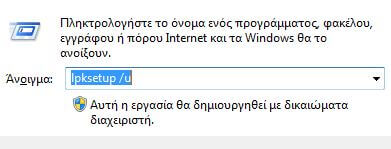
Press the Win + R keys together to display the RUN window and type the command:
lpksetup /u
Wait a few seconds until the window for “Install or uninstall a display language” appears:
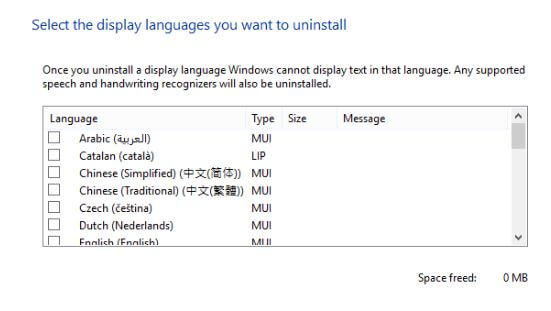
Select the languages you don't use and proceed to remove them. If you leave only English, you will free up around 2.5 GB of disk space.
If your lpksetup window looks like the one shown in the image below, it means you do not have any additional languages on your system. 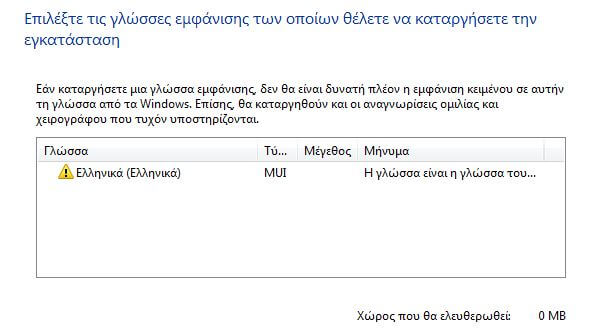
It should be noted that the above instructions can also be used to remove language packs in Windows 8, 8.1, and 7.
