

Firewalls is always someone trying to sell something new and revolutionary. However, Windows has had its own firewall since Windows XP SP2, and it is more than enough.
You also don't need a full security suite (see Internet Security Suite with a different brand name each time). All you really need is an antivirus.
Why you need Firewall
The main function of a firewall is to block unwanted incoming connections. Firewalls can block different types of connections in clever ways, for example, they can allow access to network file shares and other services when your laptop is connected to your home network, but not when it is connected to a public Wi-Fi network.
A firewall blocks connections to potentially vulnerable services and controls access to network services – particularly shared files, and all file shares in general.
With the release of Windows XP SP2, the Windows Firewall was upgraded and turned on by default. Before that, Windows XP systems that were directly connected to the Internet were infected after an average of four minutes. Worms like the Blaster worm thrived because there was no firewall.
Why Windows Firewall is pretty good
Windows Firewall does exactly the same job of blocking incoming connections as a third-party firewall. Third-party firewalls, like the one included with Norton, will often pop up windows to let you know what they're doing. Each connection they block will appear, and sometimes they'll ask you what to do next. It's quite annoying, especially if you don't turn off notifications. Windows Firewall does its dirty work in the background.
It is enabled by default and should remain enabled unless you have disabled it manually or installed a third-party firewall. You can find its interface with Windows Firewall from the Control Panel.
When a program on your computer needs to have incoming connections, you will need to create a rule in the firewall or a dialog box will appear asking for your permission.
When do you need a third-party firewall?
By default, Windows Firewall only does what's really important: block incoming connections. It has some more advanced features, but they're in a hidden, more difficult-to-use interface.
For example, most third-party firewalls allow you to easily control which applications on your computer can connect to the Internet. When an application requests an outbound connection, a window will appear. This allows you to control which applications on your computer can access the Internet, and block those that do not need to communicate over the Internet.
Power users love this feature, but for the average user it's a problem. With each application detection it can block background-updater processes, leaving your software vulnerable if it doesn't update. It's also quite annoying to have to confirm dialogs every time a new application wants to connect.
However, if you need outbound connection management, you need a third-party firewall. They offer an interface where you can easily view statistics, firewall logs, and other information.
Advanced Windows Firewall features
The Windows Firewall actually has more features than you might expect, although its interface is not that user-friendly.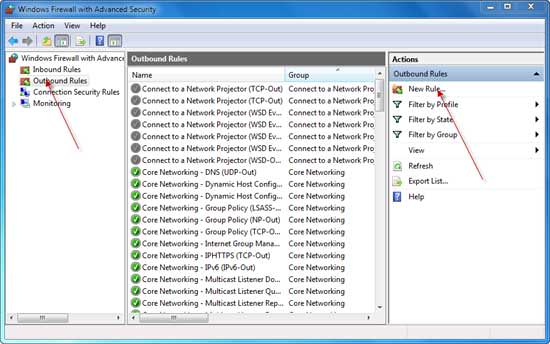
Windows does however have an advanced firewall configuration interface, from where you can create advanced firewall rules. You can create rules that block certain programs from connecting to the Internet, or you can allow a program to communicate with specific addresses.
The Windows firewall is solid and quite reliable. The same cannot be said for Microsoft Security Essentials / Windows Defender, but good things come to mind.
[schema type=”review” url=”https://www.secnews.gr/2014/10/24/windows-and-third-party-firewall/” name=”Why you shouldn’t install a third-party firewall and when to do it” rev_name=”Firewall” rev_body=”Firewalls are one of the most important security programs, and we’ve seen that there’s always someone trying to sell something new and revolutionary.” author=”Giorgos” pubdate=”2014-10-24″ ]
