

Koler, the new Ransomware for Android. Ransomware has become very popular in recent years, and that's because it's quite a profitable business for criminals. A type of the REVETON family, it leaves your data intact, but locks you out of the system. Of course, to let you have access again, it requires a ransom. Another type of ransomware, CryptoLocker, lets your computer work fine, but encrypts your data and demands a ransom for the decryption key.
The ransom demanded by criminals is around $300, and usually the desperate owners of the infected devices pay it.
In recent weeks, a new pay-to-unlock ransomware has appeared on Android devices, and the price to recover an infected system is set at $300.
Introducing “Koler”
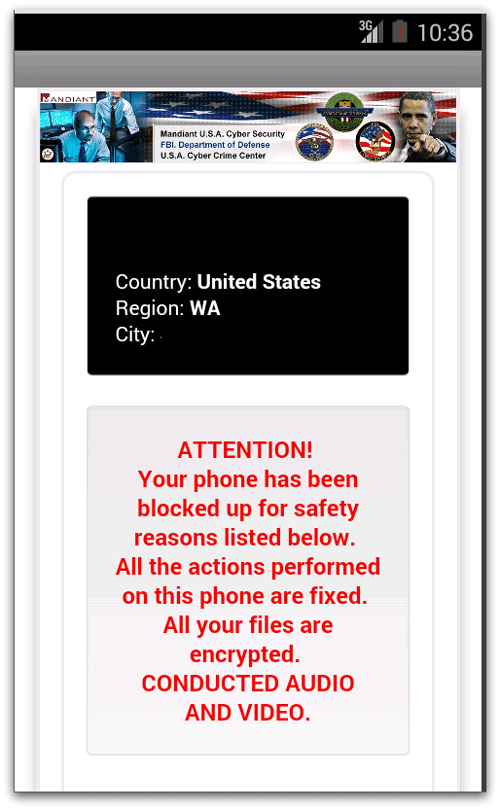
Perhaps the most talked about Android ransomware at the moment is known as “Koler”, a threat that follows a very similar pattern to the REVETON malware mentioned above.
In reality, it seems that the gang behind REVETON are the scammers who developed Koler, with a platform conversion to work from Windows to Android.
The malware is known as “policeware” and displays a warning on your Android screen claiming that you are being monitored by federal agents for some alleged criminal activity.
Once the malware is installed, it downloads and displays a warning screen saying that the police are charging you with viewing illegal pornography.
The malware demands a ransom of $300, which must be paid via the MoneyPak service, to unlock your phone.
To install it, according to reports, scammers suggest you install a special “video player.” Those who have allowed their devices to download applications outside of the Google Play Store are at risk of being infected. So disable “Allow installation of apps from unknown sources.”
When a device is infected, it displays the message:
ATTENTION! Your phone has been blocked up for safety reasons listed below. All the actions performed on this phone are fixed. All your files are encrypted. CONDUCTED AUDIO AND VIDEO.
Sophos products detect this malware, like Andr/Koler-A.
How can you get rid of Koler
The good news is that Koler doesn't "touch" your data as it claims. It simply locks your phone with a browser pop-over window.
The bad news is that because this window keeps reappearing it makes it almost impossible to access Settings to remove the malware.
Even rebooting won't help, as the malware loads during the reboot process.
A factory reset will get rid of this, but you will lose all your other installed apps and saved data.
Using Android in “Safe Mode” you can get rid of this without losing your data.
Put Android in “Safe Mode”
Press and hold the power button, just as you would to turn off or restart your device.
A menu will appear.
Press and hold the “Power off” or “Power off” option.
If nothing happens, try the same with “Reboot”.
A dialog box will appear and offer you to restart in safe mode.
If this method does not work on your device, type your device name into Google along with “Safe Mode” and you will see several results.
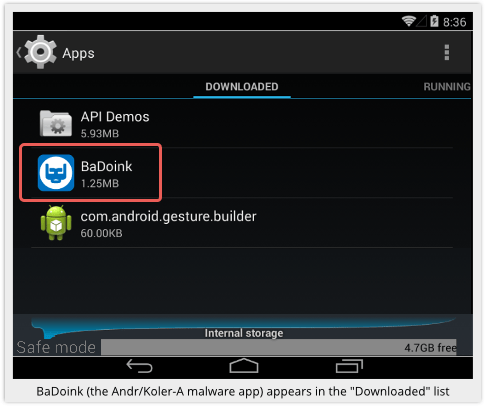
After entering your device in Safe Mode, find the name of the software that brought the Koler malware to your device. In the case of the photo from Sophos, the malware came to an Android tablet, with the BaDoink app.
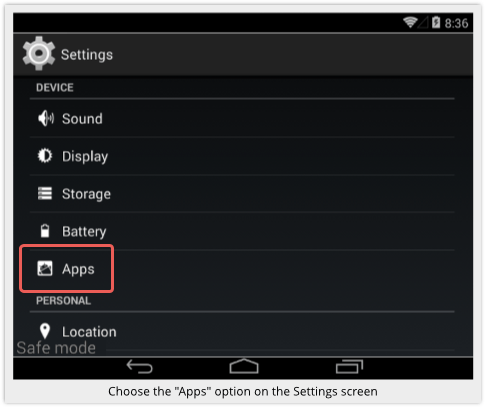
Go to the device settings and then to installed apps, find the name of the app and remove it.
Beware of ransomware
Install a reliable anti-virus program that will scan all new apps automatically before they are run for the first time.
Be wary of apps offered in ads and pop-ups.
Stick with the default Android setting that allows you to install apps only from Google Play.
Keep backups of your important data.
