

“Secure Boot is not configured correctly” or in English “Secure Boot Isn't Configured Correctly” is one of the common errors that have been detected in the installation of the new Microsoft operating system Windows 8.1. Microsoft has unofficially given some instructions on how you can fix the error. Do you know the “unofficial solutions” from Microsoft…
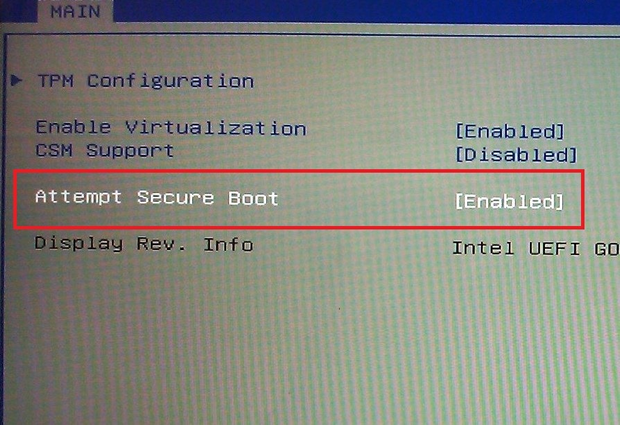
According to Microsoft, following the steps below will fix the problem and get rid of the watermark that has appeared on your desktop.
Check if Secure Boot is disabled in the BIOS and if it is disabled, enable it again.
Then try resetting the BIOS to factory settings and if that doesn't work you can try resetting your computer back to factory settings. Once it is back, enable Secure Boot again.
The company says: “To determine the problem, you can check the event logs. To view the event logs, go to Applications and Services Logs/Microsoft/Windows/VerifyHardwareSecurity/Admin, and look for the following events in the logs: 'Secure Boot is disabled. Please enable Secureboot through the system firmware. (The PC is in UEFI mode and Secure Boot is disabled.)' or 'A non-production Secure Boot Policy was detected. Remove Debug/PreRelease policy through the system firmware. (The PC has a non-production policy.)'
Another major problem is that some computers don't have a Secure Boot option in the BIOS menu, so Microsoft's instructions don't make much sense in that case.
Once again, Microsoft is trying to console its customers with unofficial solutions who, despite having paid for its new operating system, cannot install it. Professionalism at its best!
