


The University of Piraeus is a pioneer in research on IT security. See the new study by university researchers and postgraduate students on password recovery from Android mobile devices
A new study was recently presented on the possibility of recovering usernames & passwords from the RAM memory of mobile devices, using digital forensics techniques . The study is signed by Assistant Professor Christos Xenakis , Researcher Christoforos Dantoyan and Postgraduate Students of the Department of Digital Systems of the University of Piraeus : Dimitris Apostolopoulos and Yiannis Marinakis .
Smartphones and tablets, in addition to the numerous services and capabilities they provide, make us vulnerable to new types of attacks, putting our personal data at risk. The loss or theft of a mobile device can lead to a significant violation of the owner's privacy, as emails, social activities, personal photos and, in general, any information stored in digital form on the mobile device can be leaked.
Sensitive personal data can be recovered from both the internal memory (flash memory) of the device and from external SD storage cards. In addition, as presented in this article, sensitive data is contained in the temporary RAM memory of mobile devices, from where it is also possible to recover them. In this study, we focus on recovering passwords (username and password) from the RAM memory of mobile devices using the Android.

[box_success]
A total of thirteen (13) popular Android applications, in their latest version, were studied, and thirty (30) different scenarios were executed for each application, representing the full range of possible uses. All applications examined use passwords to authenticate users, in order to allow them to access the services provided by each application. [/box_success]
These applications belong to the following four (4) categories:
- Banking Applications (m-banking): These applications allow mobile device users to make banking transactions and payments.
- E-commerce applications (e-shopping): These applications allow users to make purchases online.
- Password managers: These applications aim to protect the passwords that their users use on the Internet.
- Encryption and information hiding applications: These applications encrypt sensitive messages and data on the mobile device.
It is worth noting that in all the experiments performed, open source software and tools were used . Specifically , the LiME (Linux Memory Extractor) software was used to extract the data from the mobile phone's RAM . The analysis of the memory contents was done using the Autopsy tool. The experiments and scenarios performed aim to fully understand how the Android operating system manages memory .
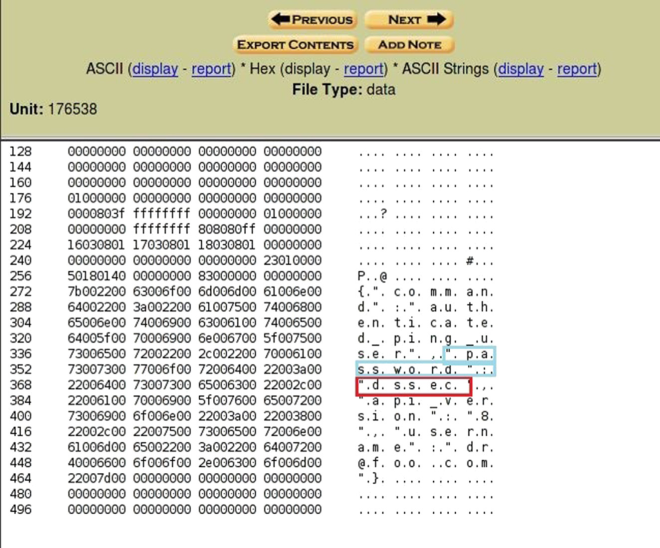
Analysis of Results
Unfortunately, almost all of the applications tested were vulnerable to password recovery from RAM. Even banking applications, which should support high levels of security, are vulnerable to this type of attack.
We also noticed that when the mobile device (phone or tablet) is not being used by its owner, but is running, then the application passwords remain intact in the RAM memory.
[quote]
Another important observation is that when an Android application remains active in the background ,the user's passwords are not deleted from the RAM. This conclusion is very important, as many users do not log out of the applications they use, but leave them running in the background. We also discovered that taskmanagers (i.e. applications that have the ability to terminate processes that are active in the background) cannot delete an application's passwords from the RAM.
[/quote]
Experiments have shown that when the mobile phone receives/makes phone calls or receives/sends SMS messages, then the contents of the RAM are preserved. On the contrary, when the mobile phone is used for browsing the Internet or when other applications (e.g., games) are activated, then it is very likely that the passwords are deleted from the device's cache.
A more general conclusion about the most reliable way to ensure that RAM does not contain passwords or other sensitive data is to restart the mobile device or remove its battery.
From the analysis of the experimental results, it is shown that all applications use strings and expressions, such as username, userid, password, login that indicate the exact location of the passwords in the RAM. Thus, a malicious person can recover sensitive data from a stolen device, simply by searching for the above strings. It is obvious that application developers should avoid similar strings and expressions.
As a conclusion to this study, we suggest that application developers use correct and secure programming techniques (e.g., deleting passwords from memory when they are not used), in order to increase the level of security provided to mobile device users.
[box_warning]Finally, it is worth noting that the above concerns are valid and real if we consider the fact that we always carry our mobile devices with us and rarely turn them off.[/box_warning]
All of the experiments and results of this study are published in the scientific article below.
Christoforos Ntantogian, Dimitris Apostolopoulos, Giannis Marinakis, ChristosXenakis, “Evaluating the privacy of Android mobile applications under forensic analysis,” Computers & Security, Elsevier Science,Vol. 42, pp:66-76, May 2014.
