


Tired of Skype banner ads that appear on the right side of your chat window? There's a simple method to disable them, which works regardless of the version of Windows you have.
There are no more than 6 simple steps you need to take……so let's get started:
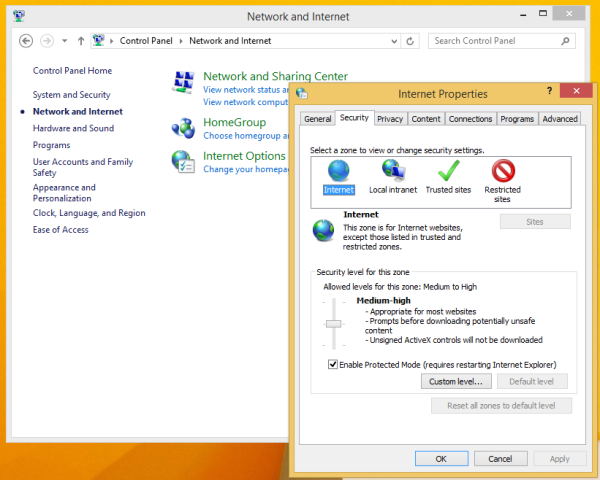
- Go to the Control Panel (if you don't know how, then press the Win key and X together and in the new window that opens, select "Control Panel")
- Locate and open the item: Control Panel -> Network and Internet -> Internet Options.

- Go to the Security tab.
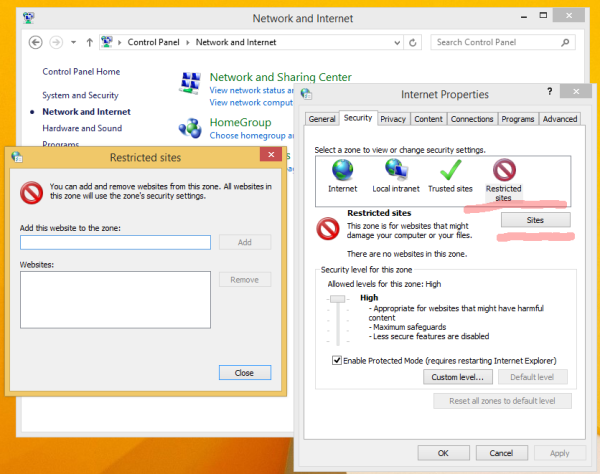
- Click the “Restricted sites” icon and click the “Sites” button: The “Restricted sites” dialog box will appear on the screen.
- Type the following in the text box, then press the Add button:
https://apps.skype.com/
- Close "Internet Options" and restart Skype.
That's it! Enjoy Skype without ads in its chat.
Source: secnews.gr
📧
Subscribe to the SecNews Newsletter
