


A campaign of malicious PyPI python packages that install malicious browser extensions for the purpose of mining crypto began in November 2022 and now appears to have taken on dangerous proportions. The initial campaign had just 27 packages, which in recent months have grown to 451.
The purpose of these PyPi packages is to install malicious extensions in your browser to hijack cryptocurrency transactions made through wallets or browser-based pages.
See also: Dozens of PyPI packages found to be “dropping” info-stealing malware W4SP
These packages have taken the form of some popular packages but with minor differences, such as a change in characters. Their purpose is to confuse developers into installing those malicious packages instead of the genuine ones.
The new wave of typos
Some of the most popular packages they try to emulate are bitcoinlib, ccxt, cryptocompare, cryptofeed, freqtrade, selenium, solana, vyper, websockets, yfinance, pandas, matplotlib, aiohttp, beautifulsoup, tensorflow, selenium, scrapy, colorama, scikit-learn, pytorch, pygame, and pyinstaller.
For each PyPi package, the operators use between 13-38 different versions with typos so that they can cover a wide range of typing errors that result in the installation of malicious packages.
Suggestion: Malicious PyPI packages compromise cryptomining machines
Although in November 2022 this method with Chinese characters did not exist, they now use a random 16-bit combination of ideographs for functions and variable identifiers.
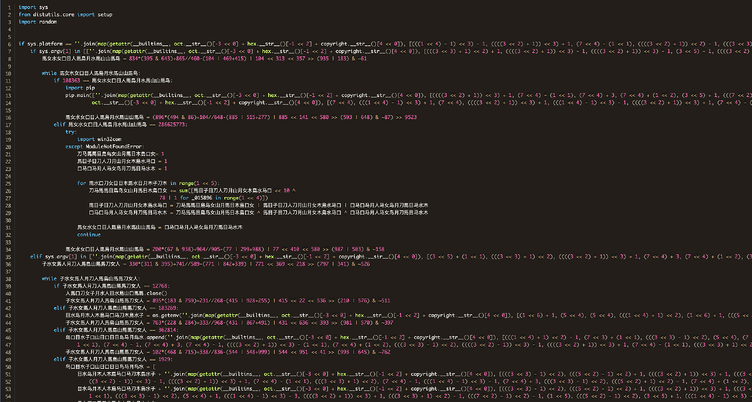
Phylum analysts discovered that although they use a series of arithmetic operations to produce the characters and it seems like a strong result virtually, it is not that difficult to "break" it.
Malicious extensions
In order to take control of cryptocurrency transactions, malicious PyPi packages create a browser extension in the %AppData%\Extension folder, as of November 2022.
It then looks for shortcuts related to Google Chrome, Microsoft Edge, Brave and Opera and takes control of them to load the malicious extension using the '–load extension' command on the command line.
For example “C:\Program Files\Google\Chrome\Application\chrome.exe –load-extension=%AppData%\\Extension” for Google Chrome.
So, when a browser is opened, the extension loads and a malicious JavaScript code will monitor for cryptocurrency addresses that are copied to the Windows clipboard.
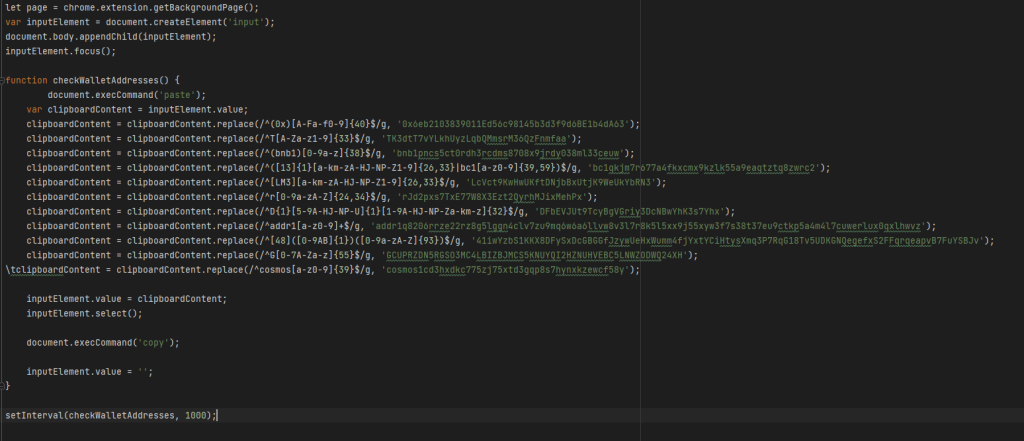
When an address is found, the extension will replace it with a set of encrypted addresses under the hackers' control. This means that any transactions made will go directly to the thieves' wallet and not to the intended recipient.
Read also: Python Package Index (PyPI) and GitLab are under spam attacks
For the full list of malicious packages to avoid, see the bottom section of the Phylum report.
