

Operators of the QBot malware use Windows Calculator to side-load the malicious payload onto infected computers .

DLL side-loading is a common attack method that exploits the way Dynamic Link Libraries (DLLs) are handled in Windows. This technique involves spoofing a legitimate DLL and placing it in a folder where the operating system loads it (instead of the folder it should be).
See also: FCC fights robocalls through 'automatic guarantee'
QBot, also known as Qakbot, is a malware that affects Windows devices. It started as a banking trojan but evolved into a malware dropper and is often used by ransomware in the early stages of an attack to install Cobalt Strike beacons on targeted devices.
Security researcher ProxyLife discovered that Qbot has been abusing the Windows 7 Calculator app for DLL side-loading attacks, at least since July 11.
Qbot malware: New attacks
ProxyLife and Cyble have provided more details about recent Qbot attacks to help users protect their devices.
The emails used in the latest campaign have an HTML attachment that downloads a password-protected ZIP file. This file contains an ISO file.
The password to open the ZIP file is displayed in the HTML file. The attackers have locked the file with a password to avoid detection by antivirus programs.
The ISO contained within the ZIP contains a .LNK file, a copy of 'calc.exe' (Windows Calculator), and two DLL files: WindowsCodecs.dll and a payload named 7533.dll.
When the user opens the ISO file, it only displays the .LNK file, which is disguised to look like a PDF containing important information or a file that opens with the Microsoft Edge browser.
See also: Chrome zero-day vulnerability used to infect journalists with spyware
However, the shortcut leads to the Calculator app in Windows, as shown below:
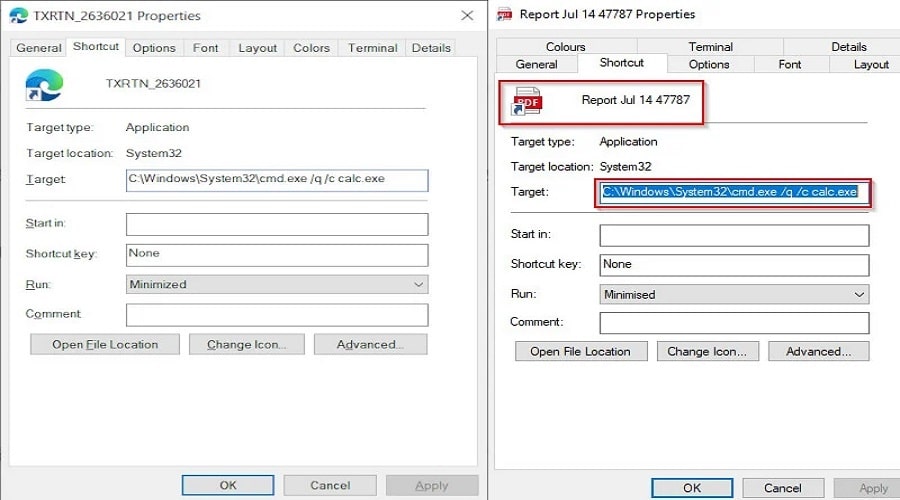
Clicking on the shortcut activates the infection by executing Calc.exe via Command Prompt.
When loaded, the Calculator app in Windows 7 automatically searches for and attempts to load the legitimate WindowsCodecs DLL file. However, it does not check for the DLL in certain hard-coded paths and will load any DLL with the same name if placed in the same folder as the Calc.exe executable.
Attackers exploit this flaw by creating their own malicious WindowsCodecs.dll file that launches the other [numbered].dll file, which is the QBot malware.
By installing QBot through a trusted program like Windows Calculator, some security software may not detect the malware when it loads.
It should be noted that this DLL sideloading flaw no longer works in Windows 10 Calc.exe and newer versions. For this reason, cybercriminals are turning to the Windows 7 version.
See also: Windows 11 blocks RDP brute-force attacks by default
Qbot malware has been around for over a decade (at least since 2009). Although its distribution campaigns are infrequent, it has been linked to ransomware (e.g. RansomExx, Maze, ProLock, and Egregor). More recently, the malware was also used for the Black Basta ransomware.

Researchers suggest the following protection methods:
- Do not open emails from unknown senders.
- Avoid downloading pirated software from untrusted sites.
- Use strong passwords and implement multi-factor authentication where possible.
- Change your passwords after specific time intervals.
- Use well-known and trusted antivirus solutions
- Avoid opening untrustworthy links and email attachments without first verifying their authenticity.
- Update your devices and apps regularly.
- Block URLs that could be used to spread malware, e.g. Torrent/Warez.
- Monitor the beacon at the network level to block data extraction by malware.
- Enable Data Loss Prevention (DLP) solutions on employee systems.
Source: www.bleepingcomputer.com
