

When you browse shopping websites, Microsoft Edge may suggest coupons or discount prices with a feature called “Shopping in Microsoft Edge,” which was turned on by default in December 2020. Here's how to turn it off.

Learn about Microsoft Edge: The ability to share tabs between your devices is coming
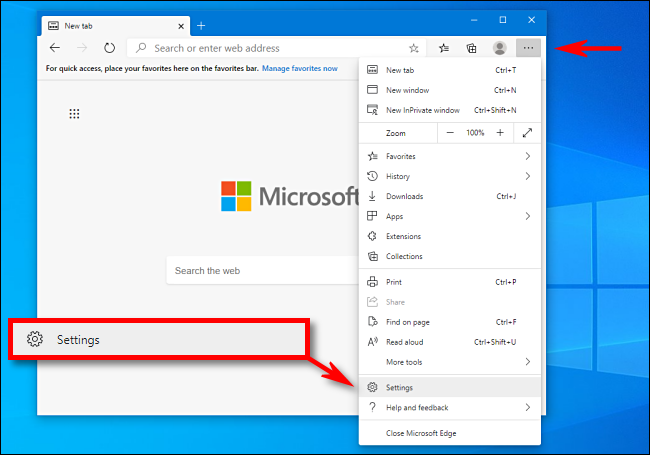
First, open Edge. In any window, click the menu button (three dots) and select “Settings.”.
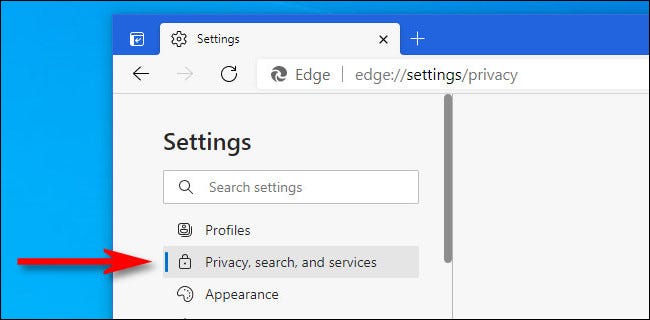
In the Settings tab, click “Privacy, search, and services” in the sidebar.
See also: Microsoft Edge: How to enable/disable the password generator
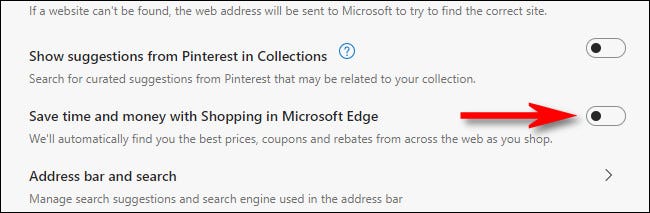
Scroll down to the “Services” section and turn the switch next to “Save time and money with Shopping in Microsoft Edge” to turn it off.
See also: Microsoft Edge: Add automatic HTTPS selection for all domains
After that, close the Settings tab. You will no longer see price suggestions, coupons, and discounts in Microsoft Edge while shopping. Happy browsing!
Information source: howtogeek.com
