

Google Drive is Google's file storage and sync service. It lets you store files in the cloud, share files, and edit documents, spreadsheets, and presentations with colleagues and friends.
Google Drive includes Google Docs, Sheets, and Slides, a full office suite that allows collaborative editing of documents, spreadsheets, presentations, drawings, forms, and more.
To use Google Drive on your computer, you'll first need to download and install the Backup and Sync .
After installing Backup and Sync for Google Drive, we'll see how you can add or remove Google Drive from each File Explorer navigation pane in your Windows 10 account.
We can do it in two ways: using a BAT file, or using a REG file
Google Drive add-on with BAT file
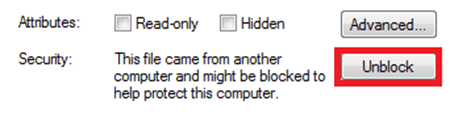
Download the BAT File. After downloading, open the .zip and run Google-Drive-topanel.bat. If you have Windows Defender enabled before running the file, you should Unblock it, from the file properties.
Right click on the file – Properties – General and Unblock.
 Type the letter for what you want to do. (see image below)
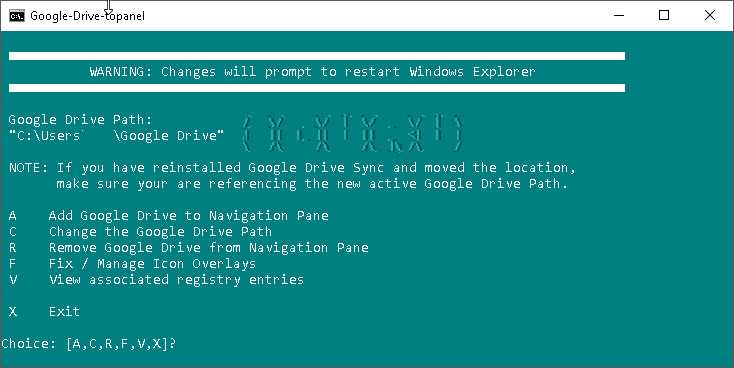
If you type the letters A or R, the File Explorer process will automatically start and File Explorer will open displaying Google Drive in the panel. If you type X, the .bat file dialog will close.
Google Drive add-on with REG file
Download the REG File. After downloading, open the .zip and run Google-Drive-topanel.reg
If you installed Google Drive in a location other than the default location used by the installation, you will need to create a custom .reg file with the new location. You can do this by right-clicking on the .reg and editing it with Notepad++.
If after installing the keys contained in the .reg file, you consider removing them from your computer because you no longer use Google Drive, download the .reg file below which will do it automatically for you.
Download Remove-GoogleDrive.zip
Extract the reg file from the zip, and run it by double-clicking it. If prompted, click OK for UAC.
If you don't see the change immediately, you should restart your computer, or the File Explorer process.
