

The Algorithmia website offers free automatic coloring of black and white photos, online, using an automated algorithm.
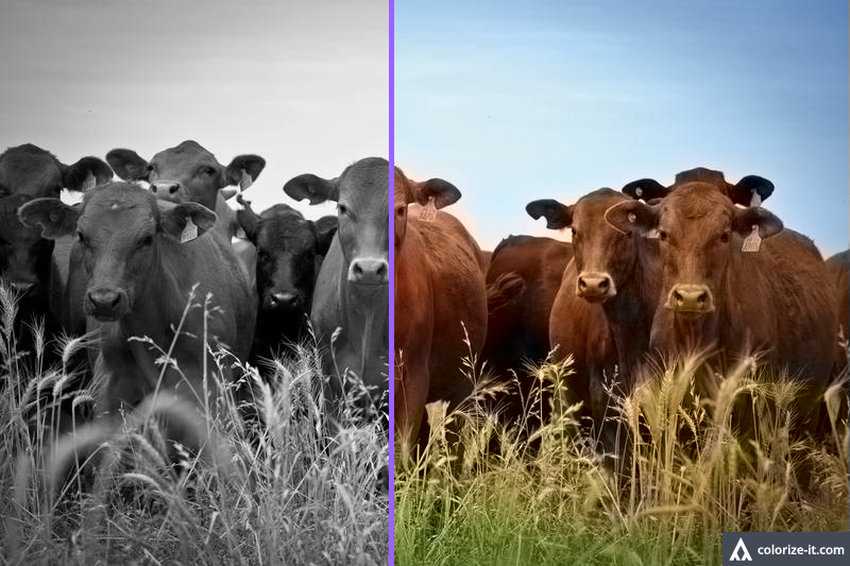
If you have old black‑and‑white photos of your grandparents, then it is worth trying the Algorithmia website. You will find a free online service that uses an algorithm capable of adding color to black‑and‑white images. The usage is very easy. Paste a URL into the box or upload an image, wait a short time for the processing to finish and you will see the colored result.
The service displays a comparative image with half being the original black‑and‑white and the other half in color. Drag the vertical purple line to display more or fewer colored sections of the image, to see how it will look before you download it.
The processed images can be downloaded either as a comparative image, or as a full color image. Both options will have a watermark in the lower right corner. Downloading the comparison image will display the image with the purple line. Move the purple line before downloading the comparative image to have the coverage percentage you want. The default is half original image and half color image.
The service is not perfect and can produce some interesting and unusual results. Sometimes a little time is required to process the images, it may even take up to 15 seconds. Although it always depends on your internet connection.
The overall results tend to lean towards sepia -yellow, especially when the algorithm doesn't recognize something. Of course, it's not a serious image colorization tool like you'd find in an advanced graphics program. There are no options to make adjustments to the colors or areas of the image, but it's a fun tool that won't tire you out, and the results often look good.
There is an interesting note from Algorithmia, which states that the service will color either one side of the image or the other, depending on the browser you are using. Browsers based on Firefox have the colored result on the left side of the image. Browsers based on Chromium show the color results of the image on the right.
You can try any of the five sample images to see how the service works before you color one of your own images.
Color the photos with Algorithmia's algorithm from here.
