

Mozilla has begun redesigning Firefox's about:config page in Firefox Nightly and it will likely come to all versions of the popular browser at some point.

The new page is built with web technologies, while the old one is based on XUL technology, which Mozilla wants to completely remove from the Firefox browser.
These changes are still in development. So the final result may change, and what we will eventually see in the stable version of Firefox may be slightly different. It is not clear in which stable version Mozilla will finally make the change. Interested users can follow the development by reporting their feedback and bugs to the Meta Bug on Bugzilla
In the new about:config page, Firefox continues to display the familiar warning that you may cause irreparable damage when you first log in, even if the browser is configured to ignore the warning. The new page is blank by default. All that appears is a search field at the top and a background image that Mozilla uses for Firefox's internal pages.
You will need to press the Esc key or the Enter key to display all preferences. The new web-based page is not as small as the old one.
One significant change, at least for now, is that it is no longer possible to interact with any preference by double-clicking on it.
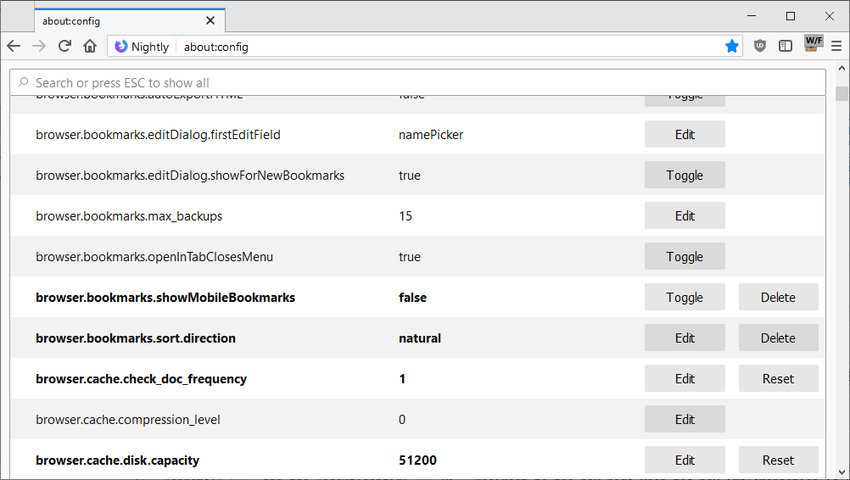
In the current stable version of Firefox, you can double-click any preference to change its value. You can also double-click any String or Integer value to immediately display the edit window.
This is no longer possible. Firefox users must click the Edit or Toggle buttons to make the desired changes. Toggle changes the value immediately, while Edit allows you to change the setting using other types of customization.
Some preferences have a Reset or Delete button attached to them. Resetting changes the preference's value to the default value, and deleting removes it from the browser. Deleting appears to be available only for preferences that were added manually by the user.
Another change is that you can no longer sort the list, at least not in this initial version. The old interface came with headings that you could click on to sort the preferences accordingly, e.g. alphabetically, by status, by genre, etc.
One final and perhaps problematic change is that Mozilla will not allow deep linking to the about:config page, stating that it “may not be a good idea” or even that it is “dangerous in some ways” and that users should simply copy and paste terms or names into the page’s search box. In the current stable release, you can send someone directly to a preference by giving them the link about:config?filter=Preference , where the word preference is replaced by the setting you want to change. This is no longer possible.
You've gotten a first look at what's coming in the near future for Firefox. We'll be back with more updates on that later.
