

Dark Patterns: Who controls your data online? You? The answer is not that easy. A recent report by the Norwegian Consumer Council reveals that tech companies are misleading you to gain rights to your data.
Using “dark patterns,” (we talked about them in an earlier post), big internet companies like Facebook, Google, and Microsoft exploit psychological biases to increase the likelihood that you will make privacy choices that are not in your best interest.

Of course, no one expects big tech companies to protect consumer privacy. Below, we'll take a look at these dark patterns and how they can affect you.
What are dark patterns?
(See the video as a good example of a dark pattern on Amazon.)
The website DarkPatterns.org defines dark patterns as “tricks used on websites and apps to get you to buy or sign up where you don’t want to.”
There are many examples: Bad UI design. Misleading wording. Hidden options. Even color choice can be part of a dark pattern.
The website lists 12 types of dark patterns:
- Bait and switch
- Confirmshaming
- Disguised ads
- Forced continuity
- Friend spam
- Hidden costs
- Misdirection
- Price comparison prevention
- Privacy policy
- Roach motel
- Sneak into basket
- Trick questions
You can read about each of these dark patterns. You’ll recognize quite a few of them (especially the tactic Mark Zuckerberg uses, privacy protection).
The big problem with these tactics is that not many people can counter them. We have psychological biases called heuristics that make us much more likely to respond in certain situations. And when companies exploit this, many of us can’t resist.
How Companies Trick You Into Your Privacy Rights
The report details various tactics used by Facebook, Google, and Microsoft to trick you into opting into features that don’t protect your privacy.
Dark Patterns Default Settings
The new GDPR regulations state that “default settings should not allow data collection or use of personal data beyond what is necessary to provide the service, and that the use of personal data for other purposes requires explicit consent.”
This is hardly worth mentioning. Of course, these companies won’t go bankrupt by stopping collecting your data. That’s how they make money.
On both Facebook and Google, users have to tinker with their settings to disable data collection and information sharing. This is one of the dark patterns. (Despite GDPR, Microsoft doesn’t offer default settings, allowing users to choose whatever they want from the start.)
Ease of changing settings
How easy is it to change your privacy settings? If you’ve ever looked at Facebook or Google’s privacy settings, you’ll find that it’s a bit of a pain to turn off data sharing. Both services have chosen images and text placement to encourage users to share more data.
Microsoft uses these visual cues too, but it takes the same number of clicks to protect or give access to your data.
Facebook is notorious for requiring a lot of clicking, a lot of reading on a lot of different screens to understand who can see your data and what they can do with it.
Twitter’s privacy settings, by contrast, are remarkably simple.
Framing
This is how the options are presented. Companies tell you the positives of giving them your data, but not the negatives. They list all the reasons why you shouldn’t increase your privacy options, but none of the concerns about your privacy.
The report from Norway gives Facebook’s facial recognition settings as an example. Facebook tells you about the benefits of automatic tagging and warns that without facial recognition, you won’t be able to know if someone else is using a photo of you as a profile picture.
The largest social network doesn’t mention anywhere that advertisers might use facial recognition technology to better target their ads or what else could be done with that data. Google and Microsoft are no better.
Reward and punishment
You’ve probably seen it, both Facebook and Google tell you that you’ll lose some functionality if you protect your data. Facebook even presents you with the option to delete your account without indicating that you can download all of your data before deleting the account.
Below is a flowchart of Facebook’s GDPR privacy update options (which, in itself, is definitely a form of punishment):
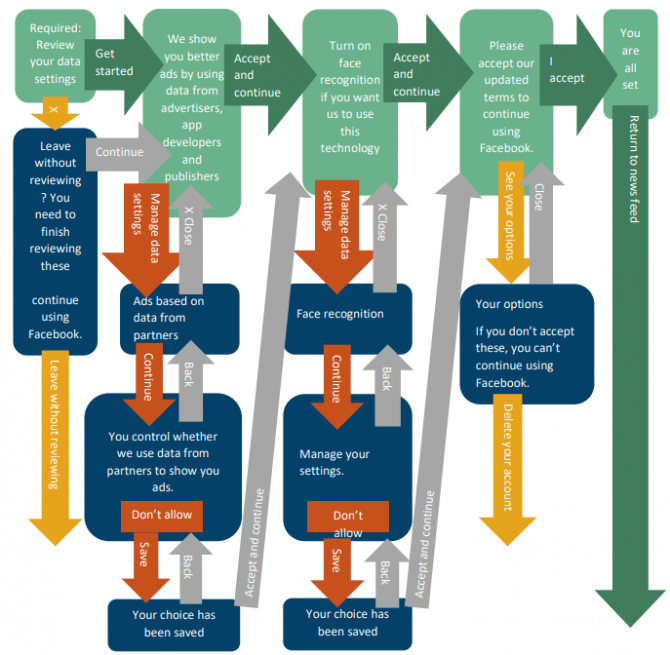
Once you’ve made all of these choices, will you hit the “Delete Account” button at the end? Probably not.
Companies keep repeating that you’ll get better service if you share your data. However, Microsoft included a statement that Windows would still work if you didn’t share it. Don’t rejoice, because the company doesn’t allow for a complete blocking of telemetry.
Forced Actions and timing
Are you making the right decisions when you’re in a hurry? Are you weighing all the options? Of course not. Companies give you options to keep your privacy within their mobile apps. When you see the options, you usually want to do something else with the app or service.
Facebook used this technique a lot until GDPR. Google and Microsoft weren’t much better.
The image above is a perfect example of time pressure. The same tactics are used by many businesses to get you to spend more money or give up more data.
How you can protect your privacy and data
Unfortunately, there’s not much you can do about all these deceptive tactics. Read your privacy options carefully and dig deep into the settings to learn what you need to do.
Knowing that companies are doing everything they can to trick you into giving up more information is a good step. Don’t assume that companies are trying for your best interest.
Below is one of the best excerpts from the Norwegian report:
Google has designed a privacy dashboard, giving users an overwhelming majority of choices in micro-businesses, which, according to our analysis, discourages users from changing, taking control of settings, or deleting their data.
Google's privacy dashboard is beautifully designed and user-friendly. But it's not designed to help you manage your privacy.
___________________________
- Wi-Fi's WPA3 security standard is ready
- Apple Data and Privacy: download all your data
- Wireshark 2.6.1: the best network protocol analyzer
- Facebook in Congress: 38 questions for Mark Zuckerberg
