

With each release of Windows 10, more and more classic Control Panel options are being converted to a modern page in theSettings. At some point, Microsoft will completely remove the classic Control Panel from its operating system. However, the classic Control Panel still has many options and tools that are not available in Settings.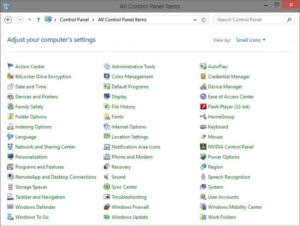
The Control Panel has a familiar look that many users prefer over the new “Settings” app.
You can easily use the administration tools, manage user accounts on your computer in a flexible way, maintain backups of your data, change hardware functionality, and do many other things.
Of course, you can pin Control Panel applets to the taskbar for quick access to the settings you use most often. Alternatively, you can use some special commands to launch Control Panel applets directly.
From Windows 95 onwards, it was possible to open various Control Panel applets by their names in the RUN dialog box (Win+R).
Tip: To open RUN, press the Win+R keys together.
For example, typing timedate.cpl in RUN will open the “Date and Time” application. The same command works even in Windows 10.
Then, starting with Windows Vista, Microsoft added the ability to open different pages of the modern Control Panel. The control.exe file, which is the main executable file of the Control Panel, supports two special options, NAME and PAGE.
The NAME option directly opens an applet or wizard. For example, the following command will open Windows Firewall directly:
control.exe /NAME Microsoft.WindowsFirewall
The PAGE option now allows you to open a subpage of the main option. For example, the command will open the “Edit Design Settings” subpage of the “Action Options” applet:
control.exe /NAME Microsoft.PowerOptions /PAGE pagePlanSettings
Names of Control Panel applets for use in Windows 10 via RUN
Below is a list of commands you can use to open anything you want from the Control Panel.
| Control Panel Applet | Commands |
|---|---|
| Administrative Tools | control.exe /NAME Microsoft.AdministrativeTools or control.exe admintools |
| AutoPlay | control.exe /NAME Microsoft.AutoPlay |
| Backup and Restore (Windows 7) | control.exe /NAME Microsoft.BackupAndRestoreCenter |
| BitLocker Drive Encryption | control.exe /NAME Microsoft.BitLockerDriveEncryption |
| Color and Appearance | explorer shell:::{ED834ED6-4B5A-4bfe-8F11-A626DCB6A921} -Microsoft.Personalization\pageColorization |
| Color Management | control.exe /NAME Microsoft.ColorManagement |
| Credential Manager | control.exe /NAME Microsoft.CredentialManager |
| Date and Time (Date and Time) | control.exe /NAME Microsoft.DateAndTime or timedate.cpl or rundll32.exe shell32.dll,Control_RunDLL timedate.cpl,,0 |
| Default Programs | control.exe /NAME Microsoft.DefaultPrograms |
| Desktop Background | explorer shell:::{ED834ED6-4B5A-4bfe-8F11-A626DCB6A921} -Microsoft.Personalization\pageWallpaper |
| Device Manager | control.exe /NAME Microsoft.DeviceManager or hdwwiz.cpl or devmgmt.msc |
| Devices and Printers | control.exe /NAME Microsoft.DevicesAndPrinters or control.exe printers |
| Ease of Access Center | control.exe /NAME Microsoft.EaseOfAccessCenter or access.cpl |
| File Explorer Options (General tab) | control.exe /NAME Microsoft.FolderOptions or folders or rundll32.exe shell32.dll,Options_RunDLL 0 |
| File History | control.exe /NAME Microsoft.FileHistory |
| Fonts | control.exe /NAME Microsoft.Fonts or control.exe fonts |
| Game Controllers | control.exe /NAME Microsoft.GameControllers or joy.cpl |
| Get Programs | control.exe /NAME Microsoft.GetPrograms or rundll32.exe shell32.dll,Control_RunDLL appwiz.cpl,,1 |
| HomeGroup | control.exe /NAME Microsoft.HomeGroup |
| Indexing Options | control.exe /NAME Microsoft.IndexingOptions or rundll32.exe shell32.dll,Control_RunDLL srchadmin.dll |
| Infrared | control.exe /NAME Microsoft.Infrared or irprops.cpl or control.exe /NAME Microsoft.InfraredOptions |
| Internet Properties (General tab) | control.exe /NAME Microsoft.InternetOptions or inetcpl.cpl or rundll32.exe shell32.dll,Control_RunDLL inetcpl.cpl,,0 |
| iSCSI Initiator | control.exe /NAME Microsoft.iSCSIInitiator |
| Keyboard | control.exe /NAME Microsoft.Keyboard or keyboard |
| Language | control.exe /NAME Microsoft.Language |
| Mouse Properties (Buttons tab 0) | control.exe /NAME Microsoft.Mouse or main.cpl or control mouse OR rundll32.exe shell32.dll,Control_RunDLL main.cpl,,0 |
| Network and Sharing Center | control.exe /NAME Microsoft.NetworkAndSharingCenter |
| Offline Files | control.exe /NAME Microsoft.OfflineFiles |
| Network Connections | ncpa.cpl or control netconnections |
| Network Setup Wizard | netsetup.cpl |
| Notification Area Icons | explorer shell:::{05d7b0f4-2121-4eff-bf6b-ed3f69b894d9} |
| ODBC Data Source Administrator | odbccp32.cpl |
| Personalization | explorer shell:::{ED834ED6-4B5A-4bfe-8F11-A626DCB6A921} |
| Phone and Modem | control.exe /NAME Microsoft.PhoneAndModem or telephone.cpl |
| Power Options | control.exe /NAME Microsoft.PowerOptions or powercfg.cpl |
| Power Options -> Advanced settings | powercfg.cpl,,1 |
| Power Options -> Create a Power Plan | control.exe /NAME Microsoft.PowerOptions /PAGE pageCreateNewPlan |
| Power Options -> Edit Plan Settings | control.exe /NAME Microsoft.PowerOptions /PAGE pagePlanSettings |
| Power Options -> System Settings | control.exe /NAME Microsoft.PowerOptions /PAGE pageGlobalSettings |
| Programs and Features | control.exe /NAME Microsoft.ProgramsAndFeatures or appwiz.cpl |
| Recovery | control.exe /NAME Microsoft.Recovery |
| Region (Formats tab) | control.exe /NAME Microsoft.RegionAndLanguage or control.exe /NAME Microsoft.RegionalAndLanguageOptions /PAGE /p:”Formats” or intl.cpl or control.exe international |
| Region (Location tab) | control.exe /NAME Microsoft.RegionalAndLanguageOptions /PAGE /p:”Location” |
| Region (Administrative tab) | control.exe /NAME Microsoft.RegionalAndLanguageOptions /PAGE /p:”Administrative” |
| RemoteApp and Desktop Connections | control.exe /NAME Microsoft.RemoteAppAndDesktopConnections |
| Scanners and Cameras | control.exe /NAME Microsoft.ScannersAndCameras or sticpl.cpl |
| Security and Maintenance | control.exe /NAME Microsoft.ActionCenter or wscui.cpl |
| Set Associations | control.exe /NAME Microsoft.DefaultPrograms /PAGE pageFileAssoc |
| Set Default Programs | control.exe /NAME Microsoft.DefaultPrograms /PAGE pageDefaultProgram |
| Sound (Playback tab) | control.exe /NAME Microsoft.Sound or mmsys.cpl or rundll32.exe shell32.dll,Control_RunDLL mmsys.cpl,,0 |
| Speech Recognition | control.exe /NAME Microsoft.SpeechRecognition |
| Storage Spaces | control.exe /NAME Microsoft.StorageSpaces |
| Sync Center | control.exe /NAME Microsoft.SyncCenter |
| System | control.exe /NAME Microsoft.System or sysdm.cpl |
| System Icons | explorer shell:::{05d7b0f4-2121-4eff-bf6b-ed3f69b894d9} \SystemIcons,,0 |
| Troubleshooting | control.exe /name Microsoft.Troubleshooting |
| Tablet PC Settings | control.exe /NAME Microsoft.TabletPCSettings |
| Text to Speech | control.exe /NAME Microsoft.TextToSpeech |
| User Accounts | control.exe /NAME Microsoft.UserAccounts or control.exe userpasswords |
| User Accounts (netplwiz) | netplwiz or control.exe userpasswords2 |
| Windows Defender Firewall | control.exe /NAME Microsoft.WindowsFirewall firewall.cpl |
| Windows Mobility Center | control.exe /NAME Microsoft.MobilityCenter |
Applets with Standalone executable files | |
| Add a Device wizard | DevicePairingWizard.exe |
| Add Hardware wizard | hdwwiz.exe |
| Windows To Go | pwcreator.exe |
| Work Folders | WorkFolders.exe |
| Performance Options (Visual Effects) | SystemPropertiesPerformance.exe |
| Performance Options (Data Execution Prevention) | SystemPropertiesDataExecutionPrevention.exe |
| Presentation Settings | PresentationSettings.exe |
| System Properties (Computer Name) | SystemPropertiesComputerName.exe |
| System Properties (Hardware) | SystemPropertiesHardware.exe |
| System Properties (Advanced) | SystemPropertiesAdvanced.exe |
| System Properties (System Protection) | SystemPropertiesProtection.exe |
| System Properties (Remote) | SystemPropertiesRemote.exe |
| Windows Features | OptionalFeatures.exe or rundll32.exe shell32.dll,Control_RunDLL appwiz.cpl,,2 |
Applets accessible only with RunDLL32 | |
| Add a Printer wizard | rundll32.exe shell32.dll,SHHelpShortcuts_RunDLL AddPrinter |
| Additional Clocks | rundll32.exe shell32.dll,Control_RunDLL timedate.cpl,,1 |
| Date and Time (Additional Clocks) | rundll32.exe shell32.dll,Control_RunDLL timedate.cpl,,1 |
| Desktop Icon Settings | rundll32.exe shell32.dll,Control_RunDLL desk.cpl,,0 |
| File Explorer Options (View tab) | rundll32.exe shell32.dll,Options_RunDLL 7 |
| File Explorer Options (Search tab) | rundll32.exe shell32.dll,Options_RunDLL 2 |
| Internet Properties (Security tab) | rundll32.exe shell32.dll,Control_RunDLL inetcpl.cpl,,1 |
| Internet Properties (Privacy tab) | rundll32.exe shell32.dll,Control_RunDLL inetcpl.cpl,,2 |
| Internet Properties (Content tab) | rundll32.exe shell32.dll,Control_RunDLL inetcpl.cpl,,3 |
| Internet Properties (Connections tab) | rundll32.exe shell32.dll,Control_RunDLL inetcpl.cpl,,4 |
| Internet Properties (Programs tab) | rundll32.exe shell32.dll,Control_RunDLL inetcpl.cpl,,5 |
| Internet Properties (Advanced tab) | rundll32.exe shell32.dll,Control_RunDLL inetcpl.cpl,,6 |
| Mouse Properties (Pointers tab 1) | rundll32.exe shell32.dll,Control_RunDLL main.cpl,,1 |
| Mouse Properties (Pointer Options tab 2) | rundll32.exe shell32.dll,Control_RunDLL main.cpl,,2 |
| Mouse Properties (Wheel tab 3) | rundll32.exe shell32.dll,Control_RunDLL main.cpl,,3 |
| Mouse Properties (Hardware tab 4) | rundll32.exe shell32.dll,Control_RunDLL main.cpl,,4 |
| Screen Saver Settings | rundll32.exe shell32.dll,Control_RunDLL desk.cpl,,1 |
| Set Program Access and Computer Defaults | rundll32.exe shell32.dll,Control_RunDLL appwiz.cpl,,3 |
| Sound (Recording tab) | rundll32.exe shell32.dll,Control_RunDLL mmsys.cpl,,1 |
| Sound (Sounds tab) | rundll32.exe shell32.dll,Control_RunDLL mmsys.cpl,,2 |
| Sound (Communications tab) | rundll32.exe shell32.dll,Control_RunDLL mmsys.cpl,,3 |
