

 Windows 10 is one of the most popular Windows operating systems right now, with millions of users worldwide. This is partly due to the fact that many users have moved away from Windows 7 after Microsoft that it would stop providing updates next year. So, many Windows 7 users have moved to the newer version.
However, many people do not update their system with the latest Windows 10 updates, resulting in various security issues.
If you are having trouble updating Windows 10, then the following procedures might help you:
- Enable all automatic updates
- Using the troubleshooter
- Using Reimage Repair
- Reinstalling Windows
Enable all automatic updates
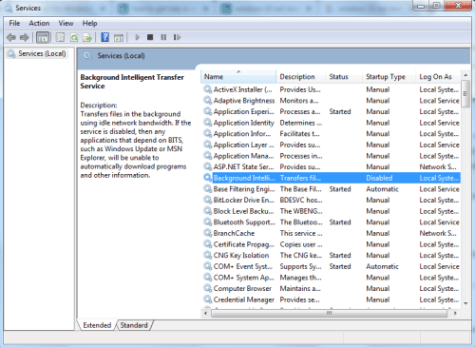
By default, some settings that automatically update are enabled. However, users may, for some reason, disable some of these settings, such as Background Intelligent Transfer Service (BITS).
So, if you have disabled some of these automatic updates, it would be a good idea to enable them again and try installing the updates again.
Use the troubleshooter
The troubleshooter is designed to help you detect and identify problems that exist on your system and that prevent updates from installing.
With this tool, the system can automatically detect and fix any problems that may exist. Then, if you restart, you will be able to install the updates.
You can find the troubleshooter by following these steps: control panel > troubleshooting > Windows update > troubleshooter.
Use Reimage Repair to fix corrupted files
Reimage Repair is a Windows repair tool that detects and attempts to fix problems that may be found in your operating system. It can also help repair corrupted files.
Among other problems, it can also resolve the problem that causes the inability to install updates, so it is a very useful tool. You can download the program here.
Reinstall Windows
It's the last resort. If you've tried everything else and it didn't work, then you might have to reinstall Windows from scratch.
Of course, if you choose this solution, you should keep in mind that all data will be deleted. Therefore, you should back up your important files before starting this process.
