

If you miss Windows 98 icons or just want to confuse your friends about your operating system, you can get and put Windows 98 icons on Windows 10.
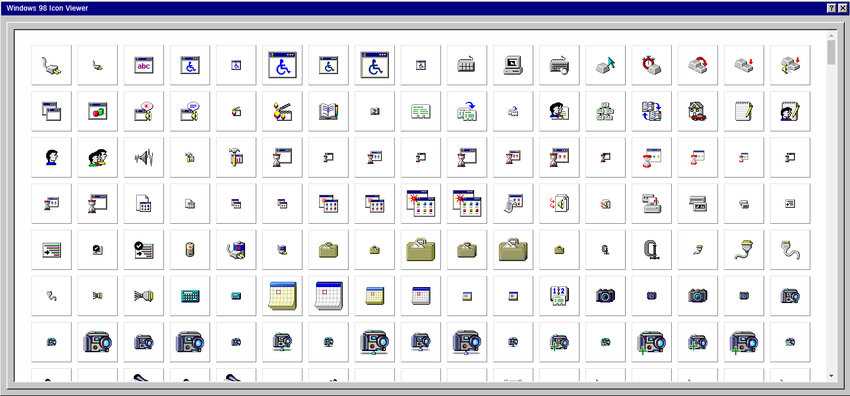
Get Windows 98 Icons
For the full set of Windows 98 icons, visit this website. Scroll with the bar in the icon viewer and click on the icon you want to use. It will be saved as a PNG image and you will need to convert it to an ICO file.
To convert a PNG file to an ICO file there are many free programs you can use. We recommend XnView or ICO Convert.
Changing Icons in Windows 10
Once you have all the icons you want to replace in ICO format, it's time to change them. This will be done in two different stages, because changing icons for folders and files is different from changing the "This PC" and "Recycle Bin" icons.
This PC, Recycle Bin, Network, User Folder
Open Settings and go to Personalization group. Select Themes tab and on the right, you will see an option called “Desktop Icon Settings”. Click on the button and you will get the window below. Select the item you want to change and then click on Change Icon.
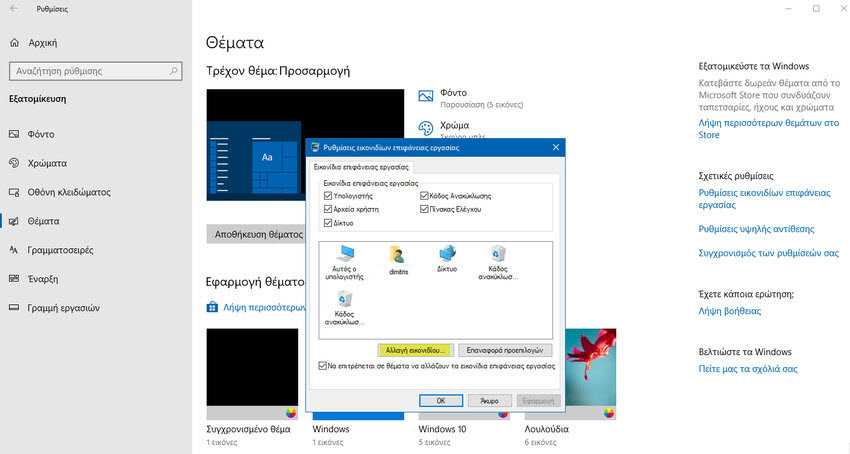
In the window that opens, select the icon you want to use. Make sure that if you use different icons for the Recycle Bin, that you put different icons for both the empty and full bins. Click “Apply” and the icon will change. Make sure that the icon files are saved somewhere on your hard drive that you will not move them.
Folders and files
To change icons for folders and files, navigate to one of them and right-click it. Select Properties from the context menu. In the Properties window, select the Personalization tab. Click the Change Icon button, and then select the Windows 98 folder icon that you want to use for it. Click Apply.
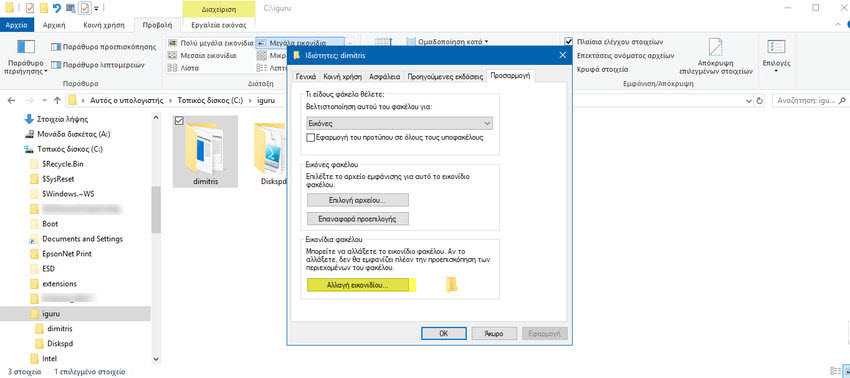
Repeat this for files and all other items for which you want to change the icon.
