

Every time you connect to websites,using a browser, a mobile application or a program that supports Internet connections, your information is automatically stored somewhere on the Internet.
Every time a device or program makes a connection with the so-called header, your information is sent to the server you connected to. As you can see in the image below, each page you connect to can “see” your IP, where you come from (referer), what browser you are using, your operating system, whether it is 32 or 64bit, and the location you are in.
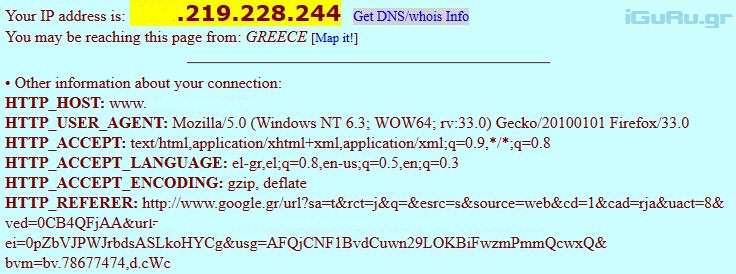
Some sites use the information to display different types of content to their visitors, or to prevent them from using some functionality of the site.
There are also other methods for retrieving additional information. Below we list known technologies that are used today. We refer to “known technologies” as there are also technologies we have never heard of, such as those leaked by Snowden, for example.
[su_divider top=”no” divider_color=”#1f9c017″ margin=”5″]][/su_divider]
IP Address Can reveal your approximate geographic location and ISP.
User Agent reveals information about your operating system and web browser.
Cookies Can be used to track users across domains they visit.
Geolocation – can identify your geographic location.
JavaScript These scripts can reveal a lot, from the language and system you are using, to the resolution of your screen, and much more.
HTML5 uses new options such as Canvas Fingerprinting
Plugins Flash, Java or Silverlight can search and store even more information about you. They can reveal your installed fonts and other details about your system environment.
You can see what is revealed by your system when you connect to the websites Panopticlick, Browser Fingerprinting , and Browserleaks.
[su_divider top=”no” divider_color=”#1f9c017″ margin=”5″]][/su_divider]
How to protect yourself
It is what we call “there is no cure” that is common to everyone. However, there are guidelines and optimization practices that will limit your exposure on the Internet.
For your IP You can use a web proxy, virtual private network or a system like Tor to hide your address.
For User Agent: The User Agent can be changed in the browser. Firefox users can use an add-on like User Agent Switcher for example, and Chrome users the User-Agent Switcher for Chrome.
Cookies: It is highly recommended to disable third-party cookies in your browser. This means that only the site you are connected to can give you “cookies” while other sites will not be able to “load” you with their own tracking data. This gets rid of tracking cookies planted in systems by advertisements or social media.
Geolocation Browsers are usually set to ask before enabling the feature. Unless the default setting has been modified.
JavaScript and HTML5 If you use NoScript or another blocker you already have JavaScript disabled. Many websites work without JavaScript, while some show problems. However, you can create a list of allowed trusted websites, and so the scripts will be able to work without causing any problems in the appearance of the website. Of course, you can disable JavaScript completely from your browser. Some HTML5 features, such as Canvas, can be disabled in some browsers either directly or by using add-ons.
Plugins Set your plugins not to open automatically or disable them permanently, so that they cannot be used by websites unless you allow them first.
Missing something? You can add it in the comments.
