

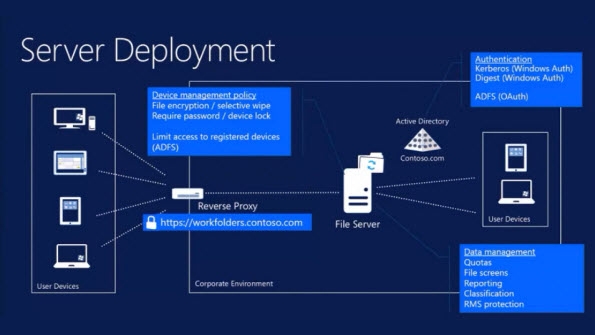
Windows 8.1 includes a new feature for corporate computers called Work Folders. Work Folders is a feature of Windows Server 2012 R2 for file servers.
In the logic of the new trend “Bring Your Own Device” (BYOD), for it to work, corporate computers and therefore their employees must have access to work files on personal computers – that is, files stored on corporate computers. The personal computer or device cannot be part of the corporate network. Work Folders allow synchronization of work files between computers on the corporate network and your personal computers.
The above may be a bit confusing for ordinary users who have only one computer at home and nothing else, but look at the logic of the whole story. You want to access folders located in your company from your home because you were "in a hurry" to work at home for another 8 hours. Little things ... Since your company's IT staff absolutely does not want to put your personal computers on their network, because you will infect it (and you probably will) and because they do not want to give you VPN or Teamviewer or DirectAccess or any other type of connection in general, Microsoft made sure to cover employers. by creating Work Folders.
Work-related files are stored on your personal computers in the “%userprofile%\Work Folders” folder. Organizations can store files in a Sync Share on a centrally managed file server and maintain control over confidential data by enforcing device policies such as storage percentage, encryption, and screen lock passwords. They can also have selective remote wipe capabilities to revoke access to certain files.
Today, Microsoft released the “Client Work Folders” feature for Windows 7 SP1. It supports Windows 7 Professional, Enterprise, and Ultimate. To install it, use the following links:
Windows 7 Client Work Folders (x86/32-bit )
Windows 7 Client Work Folders (x64/64-bit )
You may realize that the “Work Folders” feature sounds similar or even that it is a replacement for the “Offline Files” feature that has been present in Windows since Windows 2000. Although both have a similar purpose (synchronizing data on the server with the client), they work differently and each has its own advantages and disadvantages.
Work Folders works like OneDrive but for corporate users. It has a different synchronization protocol than “offline files”. It is hosted on IIS (Internet Information Services) and synchronization occurs over HTTPS and does not require a VPN, DirectAccess, or other remote access connection. “Offline files” are for computers located within the corporate network. “Work Folders” for Windows 8.1 can also synchronize files for computers that are not part of the corporate network. Data synchronization will occur immediately after the installation of the unique file server certificate is completed and after the client computer passes the device access policy and permissions set up on the file server.
