

iOS 9: It's driving us crazy with its 25 new features!! (part #1)
Apple's latest iOS isn't far off from its predecessors, and we're certainly not expecting any dramatic changes. But that's to be expected. However, sometimes the biggest impact and surprise aren't so much the radical changes, but the small details, the ones that make our everyday lives a little better. After all, the details make the champion, right? iOS 9 comes to prove this rule once again.
As iOS 9 prepares for its official release on September 16, we're going to show you some of our favorite features, big and small, that could make using your iOS device a lot easier.
We also welcome your comments, what your favorite feature is, as well as anything else you would like to observe or add.
_______________________________________
1. Brand new app switcher

iOS 9 makes browsing your apps as realistic as shuffling a deck of cards. As usual, double-click the Home button to start browsing your apps, which will appear on the left side of the screen.
_______________________________________
2. Use the Mail app for smarter caller ID

iOS 9 also relies on data from your Mail app to gather more information about your contacts. This is an optional feature in Settings, but if enabled, you'll get suggestions for autofilling your contacts' email addresses. iOS 9 will also try to guess an unknown number on the call screen.
_______________________________________
3. New ways to browse your Photos

iOS 9 makes it easier than ever to navigate and select your photos. Open a photo and you’ll see a new scroll bar at the bottom to zoom in and out of all the photos. Want to select multiple photos at once? No need to tap each one individually. Just select a photo, then drag your finger across the rest of the photos you want to select.
_______________________________________
4. Put Contact Thumbnails in Messages

Previously, only iPhone 6s Plus users could see circular thumbnails of their contacts' faces in Messages. iOS 9 brings this feature to all iPhone models, so your contacts are no longer faceless!
_______________________________________
5. View the latest notifications
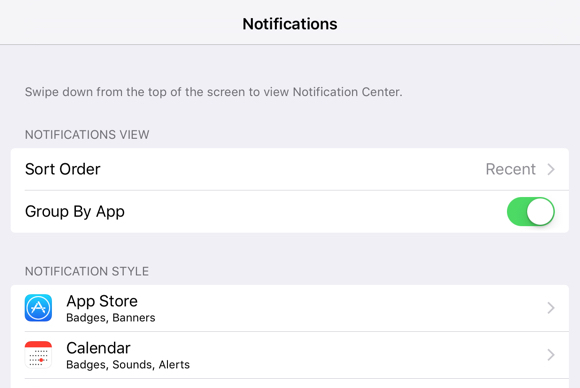
In iOS 9, the notification view will be organized chronologically, so that the most recent notification remains at the top. You have the option to change this by going to Settings, and choosing to organize notifications by app.
_______________________________________
6. Siri Suggestions in Spotlight

Siri in iOS 9 will have additional features depending on how you use your iPhone. Do you call your mom every day before dinner? Spotlight will have her as a suggested contact. Do you check and scroll through Instagram for hours before bed? Spotlight will help you enjoy your nightly ritual, too.
_______________________________________
7. Music starts automatically when you plug in your headphones

Another cool feature: Every time I plug in my headphones, the Music app automatically opens. Not only that, but it also plays the song I listened to most times during the day, so I can start my music routine without even unlocking my phone!
_______________________________________
8. Access the iCloud Drive app

Still wondering what documents you have stored in iCloud? iOS 9 gives you the ability to access your iCloud Drive through a single app. In Settings, simply toggle the iCloud Drive app to show up on your Home screen to access it. iOS 9 also lets you add an attachment to Mail directly from your iCloud Drive.
_______________________________________
9. For iPads: Two apps in one!

If you have an iPad Pro, iPad Air 2, or iPad mini 4, then you'll get an additional feature in iOS 9: Split View, or basically the ability to use two apps at once. For example, if you're looking for a restaurant listed in Maps and click on the website, the URL will open in Safari so you can see both at the same time.
_______________________________________
10. Communicate with your contacts directly from Spotlight

The Spotlight screen becomes more functional in iOS 9. For example, search for a contact and you'll now have the option to call them (if you have their number, send them an iMessage, or FaceTime them (if they also have iOS) right from the search.
_______________________________________
11. Access your Wallet with a locked screen
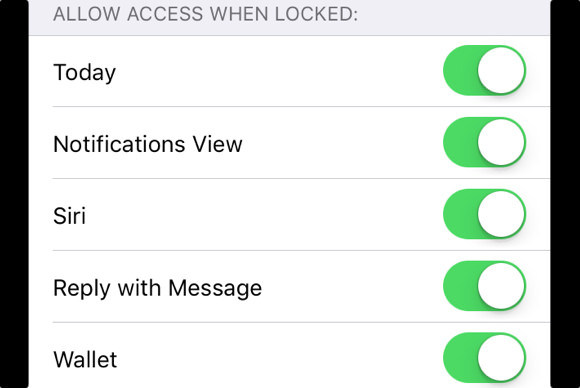
In iOS 9, you'll be able to launch the new Wallet app (and Apple Pay) right from your Home screen, even when your screen is locked. This makes it incredibly easy to use Apple Pay to pay for your everyday purchases.
_______________________________________
12. Suggestions for nearby points of interest in Maps
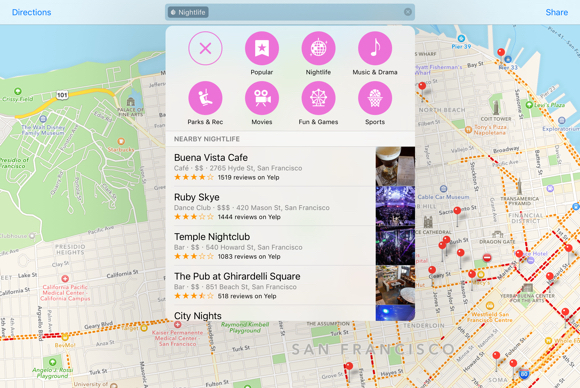
In addition to one-way directions, Maps will have Nearby suggestions for local businesses. Instead of typing “Bakeries,” you’ll now simply tap the Food icon, then Bakeries to instantly get a list of the closest places to grab a chocolate croissant (my favorite!). Plus, you’ll have ready-made lists of suggestions for shopping, travel, and other services, like pet care!
At this point, we will renew our appointment for tomorrow, Sunday, to see together the rest of the new features of iOS 9. You can send us your observations, comments, or simply tell us which feature you liked the most from what we've seen so far!
