

A new ChromeLoader campaign is underway, infecting visitors of warez and websites for pirated movies with a new variant of the search hijacker and the adware browser extension called “Shampoo”.
This discovery of the new campaign comes from HP's threat research team, Wolf Security, which reports that the operation has been ongoing since March 2023.

ChromeLoader history
ChromeLoader is a browser hijacker that forcibly installs browser extensions that redirect search results, promoting unwanted software, fake giveaways, surveys, adult games, dating sites and other unrelated results.
About a year ago, Red Canary analysts reported a sudden surge in ChromeLoader distribution that had begun in February 2022, now including macOS in the targeting scope along with Windows.
In September, VMware and Microsoft warned about another massive ChromeLoader campaign with the experimental capability to drop additional malicious software, including ransomware.
More recently, in February 2023, security researchers at ASEC discovered a campaign in which the ChromeLoader malware was distributed in VHD files named after popular video games.

The newer campaign
HP analysts report that in the campaign that started in March 2023, ChromeLoader is distributed through a network of malicious websites that promise free downloads of music, movies, or video games that are protected by copyright.

Instead of downloading legitimate media files or software installers, the victims download VBScripts that execute PowerShell scripts, which create a scheduled task with the prefix “chrome_” for persistence.
This task triggers a series of scripts that download a new PowerShell script to the host registry as “HKCU:\Software\Mirage Utilities\” and also retrieve the malicious Chrome extension, Shampoo.
Shampoo is a variant of ChromeLoader, capable of injecting ads into websites visited by the victim and performing search query redirects.
In a sample analyzed by BleepingComputer, searches from the browser address bar or Google are first redirected to a site at ythingamgladt[.]com and then to Bing's search results.
Once the malicious extension is installed, it prevents the victim from accessing Chrome's extensions page. Instead, users are redirected to Chrome's settings page when they try to do so.
It is believed that the adware's function has financial motives, aiming to generate revenue from search redirects and advertisements.
Naturally, it is not difficult for victims to notice these redirects, as they do not get what they are searching for on Google. However, removing the malicious software is complicated.
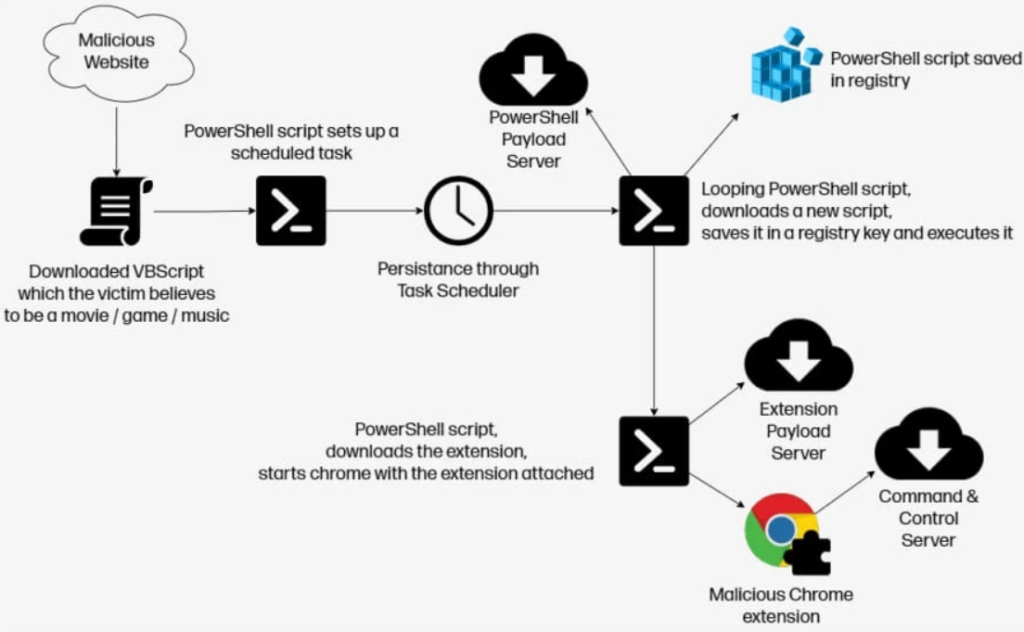
Therefore, if the victim restarts the system, the malicious Chrome software will be temporarily disabled, but it will be quickly reinstalled.
To get rid of ChromeLoader Shampoo, HP Wolf Security says users can perform the following steps:
- Remove any scheduled tasks with the prefix “chrome_”. Legitimate Chrome scheduled tasks usually have the prefix “Google”.
- Delete the registry key “HKCU\Software\Mirage Utilities\”.
- Then restart the computer.
BleepingComputer also found the PowerShell scripts that export the malicious extension to the folder ‘C:\Users\<user>\appdata\local\chrome_test’, which should be deleted if present.
HP warns that these removal steps must be completed quickly, before the recurring script reinstalls the malicious software.
A simple method to determine if a variant of ChromeLoader is running in your web browser is to check whether Chrome is running with the argument “-load-extension”. You can use tools such as Process Explorer to examine the properties of a process and see its command line arguments.
Information source: bleepingcomputer.com
