


A new standalone utility called Bloatbox was recently released that allows Windows 10 users to remove unwanted apps that come pre-installed.
Windows 10 comes with various apps, and it's not always easy to remove them using Settings or Control Panel.
For example, core apps like “Your Phone” in Windows 10 cannot be removed.
Now you can use the Bloatbox utility to remove both “Your Phone” and other pre-installed apps easily and quickly.
Introducing the Bloatbox app
This is a new third-party app called Bloatbox which was originally going to be released alongside a privacy-focused app called Spydish, but was instead released as a standalone program.
“It was intended as a small extension for Spydish, to uninstall specific applications. Since I didn't want to add components to Spydish, I made it available as a standalone application,” states Bloatbox's GitHub repository.
To run Bloatbox, download Bloatbox.zip and place it on your desktop. Once extracted, double-click Bloatbox.exe.
When launched, you will see that Bloatbox has a simple layout with the first column listing the installed applications and the second column showing the available features.
This list contains all installed apps, even those that Windows 10 doesn't allow you to uninstall under normal circumstances. These apps include: Weather, News, and Your Phone, among others.
Select the apps you want to uninstall and click the “Uninstall” button on the “Remove Apps” side.
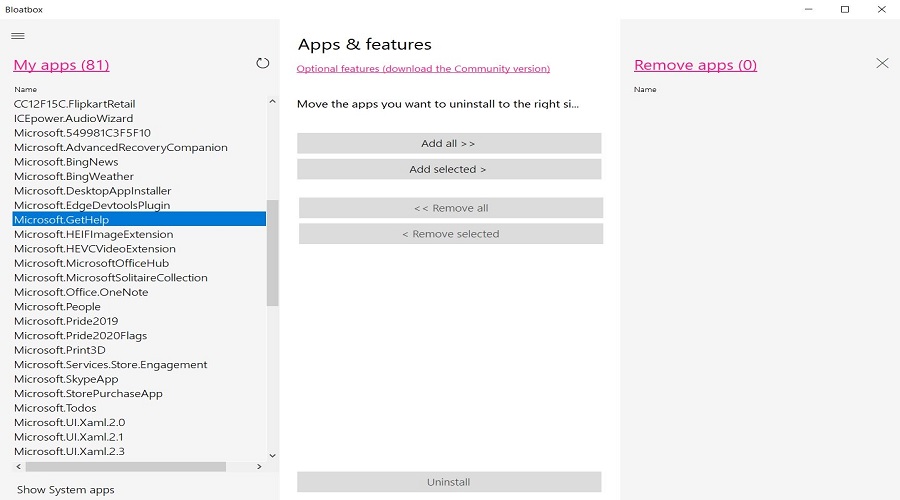
Once you click the “Uninstall” button, you will see the following message on your screen :
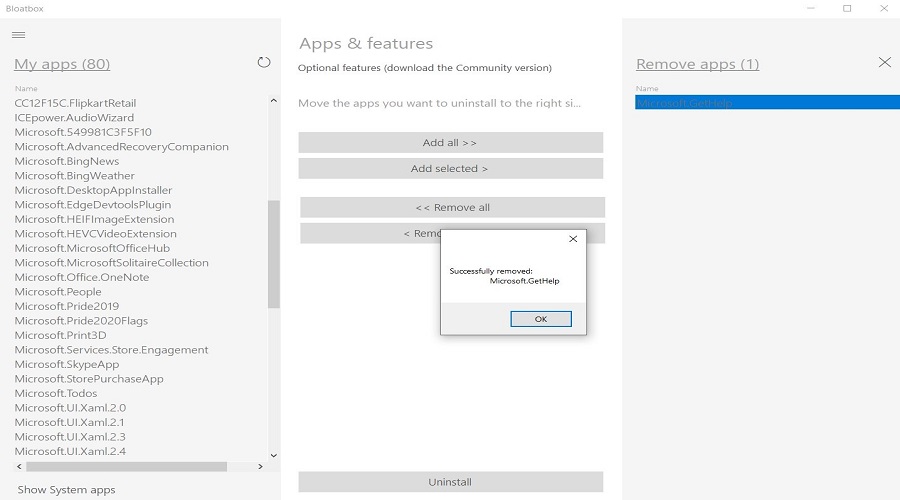
With this simple process, you have removed any application you want. A restart is not necessary.
Overall, Bloatbox is a useful and simple tool that allows you to instantly remove essential Windows 10 applications that normally cannot be removed. Even users who don't have much experience with programs and applications will find it extremely easy to use.
