

Do you have an ADSL or VDSL internet connection? Are you sure that your provider is offering you what you pay for? If you want to see what you really got when you signed your internet connection contract, read the article below.

If you're bragging about your new 50 Mbps VDSL, you'd better check first if you actually have that speed. Internet speed tests are a quick way to see how fast your internet connection is.
Internet service providers promise “up to” a certain speed, measured under optimal conditions. But if you want to know how fast or slow your connection really is, a speed test is a must.
What is an internet speed test?
An internet speed test is the best way to get an idea of how fast your connection is at a given time.
The service you use to connect to the internet often limits your download and upload speeds based on the plan you have chosen, local congestion, any settings you have imposed, and so on.

The most interesting part of a connection is the promises made by your internet service provider (ISP). These almost always include the phrase “up to.” This policy trick from your ISP gives them the right to claim that if they promised you “up to 24 Mbps” and you’re only getting 15 Mbps, then the company is keeping its promise. But if you run the meter and see 10 Mbps, then you’re not getting what you’re paying for and it’s time to call your ISP.

Of course, ADSL and VDSL connections have limitations and multiple factors that affect speed, but the self-respecting ISP makes sure to set up DSLAMs in every block and not overload them with traffic. The DSLAM is a multiplexer machine, located in your neighborhood's KAFAO, and which takes charge of gathering the signals of the entire neighborhood into a single complex signal, through a process called multiplexing. From there, the data is sent to your ISP, which is responsible for giving you access to the internet.

A speed test measures your ping, as well as your upload and download speeds. Measuring the latter two is necessary because most ISPs offer separate download and upload speeds. Usually, the download speed is the one advertised in the brochures, as it is the fastest, but if you go into your connection details you will see that the ISP usually specifies a slower upload speed for each budget package.
For example, our local ISP offers an ADSL connection package with a download speed of 24 Mbps, but an upload speed of 1 Mbps.
How a speed test works
There are three ways to do a speed test of your internet connection. The first way , and the easiest, is to go to an online service through your browser. There are several of them, such as speedtest.net, fast.com, testmy.net, broadbandspeedchecker.co.uk, speed.io and a bunch of others.

The second way is to use an ftp application and download a large file via an ftp connection, while at the same time you will see your speed via a download manager. And here there are many ftp servers that offer this feature, such as Cosmote, Nova (Forthnet), the National Technical University of Athens, Hetzner.de etc.

The third way is for your router to have such a speed meter, where by entering its settings through a browser you can run it.

When you start a speed test, a lot of things happen. First, the service that is running the test determines your location and the closest test server to you. It is important to test your internet speed with the closest test server to you, as the speed your ISP promises you is based on ideal conditions. In fact, if your ISP has a speed test server, you should test your speed on it.
Some versions, such as Speedtest.net , have the option to change the server. When you start the speed test, a simple signal (ping) is first sent to the server and it responds. The sending and response time is measured in milliseconds (ms). The lower the number, the better.
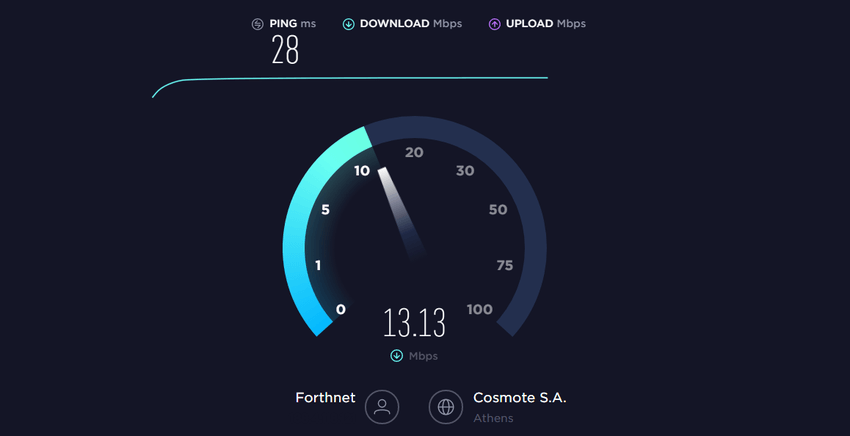
After the ping is complete, the download test begins. Your computer opens multiple connections to the server and attempts to download a small amount of data. At this point, two things are measured: how long it took to download the data packet and how much network resources were used.
If the testing program detects that your computer has more connection capabilities, it opens more connections to the server and downloads more data. The general idea is to load your internet connection to see how far it can go by doing simultaneous tasks.
Think of your internet service as a highway with a speed limit. Opening additional connections is like adding more lanes to the highway. The speed limit hasn't changed, but more cars can travel through the same space at a faster rate. So the 50th car will arrive sooner using a four-lane highway than on a two-lane highway.

Once the service determines that it has the right connections to test your internet service, it downloads additional chunks of data, measures the amount downloaded during the allotted time, and tells you the download speed, measured in Mbps, which stands for Megabytes per second. It essentially tells you in one second how many megabytes it managed to download.

Next comes the load test. It's essentially the same process as the download test, but in reverse. Instead of downloading data from the server to your computer, your computer uploads data to the server.
For more detailed technical information, read Speedtest.net's analysis of how it works.
Are speed tests accurate?
Although speed tests sound simple, it's actually much more difficult to accurately measure how fast your internet connection is.
Check out the first step in the process: choosing a test server. Often the closest server can be incredibly close, perhaps even in the same city. This proximity is an optimal situation, with data not having to travel far. Businesses know that proximity makes a difference, which is why some, like Netflix, use a wide and global network of delivery to their customers, to bring data from as close to you as possible.
But the entire internet isn't right next to you. Much of it is on distant computers, sometimes in another city or country. So while your speed test may show incredibly fast traffic, you may find that downloading a program is very slow if the server hosting the data is very far away. Based on this common scenario, your test results may show you faster performance than you actually use.

The difference in server locations is why you might see different speed results when you try different speed test services, like Ookla, Netflix , or Google. Check out the results we got from 4 different services that targeted different servers.
| Service | Ping (ms) | Download (Mbps) | Upload (Mbps) |
| Speedtest.net (to Cosmote) | 28 | 13,02 | 0,77 |
| Fast.com (Netflix) | 32 | 12,00 | 0,74 |
| Googlefiber.net (Google) | 647 | 11,60 | 0,55 |
| Broadband (to Frankfurt) | 356 | 12,18 | 0,81 |
Your ISP may also offer you a speed test, such as Cosmote, Cyta, Forthnet. Vodafone used to have an ftp link for speedtest, but their page is now defunct. Or if your provider is not listed, you can choose the ftp of the National Technical University of Athens.
However, you shouldn't really rely on speed test results produced by your ISP. These tests are optimized for ideal conditions, using nearby servers. This means you'll get a faster result than what a Netflix or Google speed test will give you.
It's a good method if you just want to brag about how great your ISP is (that's the idea), or to make sure your ISP is delivering the internet speed it promises, but it's a bad method for getting an idea of your actual speeds. See what speeds Speedtest.net showed us for different servers located both in Greece and abroad.
| Speed tests with Speedtest.net | |||
| Server – Country | Ping (ms) | Download (Mbps) | Upload (Mbps) |
| To Cosmote | 28 | 13,02 | 0,77 |
| To Vodafone Greece | 27 | 12,50 | 0,77 |
| To AT&T (New York – USA) | 160 | 12,21 | 0,75 |
| To i3D (Tokyo – Japan) | 336 | 12,26 | 0.54 |
In the second step of the test process, your computer attempts to open additional connections and maximize your network usage. If your network is already loaded, then the speed test cannot fully utilize your resources.

If you try to run a speed test while streaming a movie on Netflix or downloading a major update, for example, your results will be lower than the results of tests you would run without performing the above tasks.
How you're connected and what devices you're testing also affect the results. A computer connected to ethernet should have a faster speed result than a tablet connected to Wi-Fi, because Wi-Fi is generally slower than ethernet. You may find that results vary across devices, even if they're using the same connection.
How to Get the Most Accurate Results
Getting accurate results depends on what you're trying to measure. Do you want to see if your internet service provider is actually delivering the speeds they promised and listed in your contract?

Then go for optimal, ideal conditions. Use a device connected to ethernet (wired, not wireless), choose the test server closest to you, and stop anything that might be eating up your Internet connection.
It would be best to restart your router before running a speed test. If your router has a built-in speed test, use that instead of using an online service. This will eliminate a few steps from the process and give you better results.
However, if you want to see results that are closer to real-world performance, use a browser or app. Bypassing the test that your router has, you'll be able to choose a server that's further away. Try Google , which you'll likely visit quite often.
Ultimately, no matter the methodology or measurement method, you won't get a completely accurate result. However, you can satisfy your curiosity by checking the speeds your ISP promised you.
