

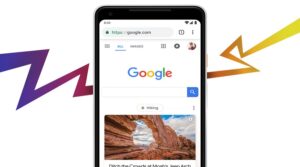
Google feed has been changed and renamed to Google Discover.
As with other feeds, the Google feed comes in the form of a series of cards, intended to inform users about the events that interest them most.
The feed, which is based on a user's browser history, interests and machine learning, marks a new phase of Google search - one that doesn't require any searching by the user. The Discover feed gives users information before they ask for it.
And with over 800 million users, the feed has proven to be a huge success.
As Google continues its efforts to make search as seamless as possible, it has launched a series of new features coming by the end of the year.
One of these was the revamped Google Feed, now called Discover.
Updates to the Discover feed include:
New look: The design has been completely revamped, with a focus on visual content. And now, each post will come with a clickable text headline and a Discover icon. When clicked, relevant content will appear.
Updated content: Previously, most of the content that appeared in Feed was news, but with the launch of Google Discover, the company announced plans to include more general content (content that isn't new, but might be new to you). Based on your search history, it will also bring up content about a specific topic.
More control: At the bottom of each card, you can indicate whether you want to see more or less of a particular type of content.
Discover on the homepage: Previously, the Google Feed was accessible through the Google mobile app, but now Google plans to display the Discover feed on all google.com mobile browsers.
Optimization for Google Discover
Google Discover represents a significant change in the way people use the search engine. Most importantly, users no longer have to search to find the topics that interest them most.
For brands, it represents a greater emphasis on SEO.
Without search queries, keyword optimization won’t be enough to rank your content in Discover. But the good news is that many of the same SEO rules still apply.
Here are some of the rules to remember.
Create quality content
As always, focusing on creating high-quality content that meets the needs of your readers is crucial to getting content featured on Discover. But in addition to quality, you should also focus on engagement. You should think about what topics you and your friends or followers find most interesting.
The key difference here, however, is this: Discover doesn't take into account what any friends or Followers like and share. It relies solely on the content that garners the most engagement, and this makes building relationships with your users more important than ever.
Think about the ways you can encourage your customers – with personalized email marketing, social media shout outs, etc.
Use images and videos
In its announcement, Google noted that users will see more images and fresh visual content in the Discover feed. This means that to appear as high as possible, content should include high-quality images and video when possible.
Create both new and general content
For the best results, you should focus on creating a mix of content. As Google says, the Discover feed will focus on both fresher content and general content.
Create trustworthy content
Another key factor is the emphasis social media places on the credibility of a source. Facebook in particular, only includes credible news in its latest algorithm update.
For Google, it likely means that the more trustworthy your content is rated, the more likely it is to appear in Discover.
To earn Google's trust, you need to take care of the quality of your content.
Multiple languages
It should also be noted that Google Discover is available in multiple languages, and Google plans to release even more.
So think of it this way: Google Discover shows content if you interact with it. All it needs to do is have someone interact with your content and you'll have the option to show it in the feed.
Brands should take into account that they should focus more on the quality of the content they produce and its promotion.
