

In a previous article, we analyzed the extremely simple logic of RAID, as well as the ways in which it can be implemented in systems (Software / Hardware RAID). RAID is essentially an array of hard drives where they cooperate with each other to achieve either better system performance, fault tolerance, or both. More detailed information can be found in the first part of the article.
Let's look at some typical RAID layouts:
RAID 0 (Disk striping):
RAID 0, one of the simplest RAID arrays, divides data across 2 or more disks, known as striping, allowing for greater data throughput. Each file is read from multiple disks, combining the speed of all the media together. However, it does not provide any kind of fault tolerance as it does not keep copies of the files or parity info (more on parity in a later article). Both or more disks appear as a single partition, so if one fails, the entire array fails, leading to data loss. This array is commonly used for live stream recording where speed comes first and reliability second.
RAID 1 (Disk mirroring):
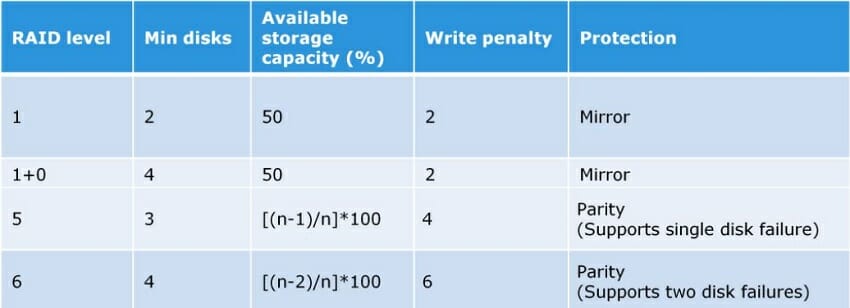
RAID 1 writes the same data to pairs of disks. This process is called data mirroring and its role is to provide extended availability. If one of the disks in an array fails, the system can access the data from the remaining disks as there are always copies. Once the failed disk is replaced, the data is copied to it from the existing disk that is already in operation, and the array is rebuilt. RAID 1 is the easiest way to create failover storage and requires at least 2 disks to run.
RAID 5 (Striping with parity):
RAID 5 strips data across multiple disks like RAID 0, but also maintains parity blocks that are used to recover data if a disk fails. A parity block is a set of bits used for error correction or data recovery. This arrangement offers increased speed as the data is split across multiple disks, but also ensures availability, as if a disk fails, its data can be recovered through the parity blocks on the remaining disks. Parity blocks take up about 1/3 of the available disk space. At least 3 disks are required to perform.
RAID 6 (Striping with double parity):
RAID 6 is similar to RAID 5, but provides greater reliability by maintaining an additional parity block. This means that even if 2 disks in the array fail at the same time, the system continues to function normally. A minimum of 4 disks are required to perform.
RAID 10 (Striping + Mirroring):
RAID 10 combines the mirroring of RAID 1 with the striping of RAID 0. In other words, it combines reliability with speed and is typically used in environments such as servers that perform a lot of writes where both speed and high reliability are necessary. A minimum of 4 disks are required to perform.
