

For several years, Microsoft has been urging Windows users to disable the vulnerable SMBv1 protocol. The recent massive global cyberattack caused by the WannaCry ransomware underscores this necessity.
[su_heading]See below how to get rid of the ancient SMBv1 (Server Message Block version 1) protocol along with the risks it poses.[/su_heading]

As is known, the infamous WannaCry ransomware managed to spread thanks to a vulnerability in the SMBv1 protocol, affecting organizations, companies, and users worldwide.
If your computer is running Windows 10, then you are protected from this particular exploit, but that doesn't mean you will be as lucky next time.
So if you want to take some steps to protect yourself, you should permanently uninstall SMBv1. The transition to SMBv3 has already happened, so there is no excuse for allowing this outdated and terribly insecure protocol to run on your system.
To disable SMBv1 from Windows 10, you can follow one of the following two methods. (The procedure mentioned initially can also be used in older versions of Windows, including Windows 7 and 8.x.)
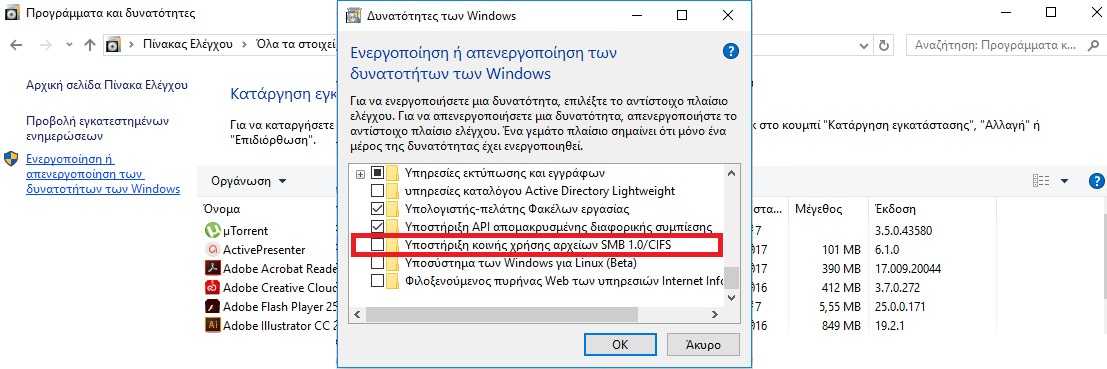
- Go to Control Panel > Programs, and select “Turn Windows features on or off” from the menu on the left. Uncheck the SMB 1.0/CIFS File Sharing Support option. That’s it, you’re protected.

- As an alternative, you can open Windows PowerShell with administrator privileges and type the following command:
Disable-WindowsOptionalFeature -Online -FeatureName smb1protocol
Press enter & you're done.
And safe.
